Clickjacking: check whether your app can be framed
Clickjacking is an attack where another site loads your page inside an invisible frame, puts its own bait on top, and tricks your user into clicking your real buttons. You can check whether your app can be framed with one HTML file and one command. This guide walks you through that check, the pages to test first, the mistakes that leave gaps, and the headers that fix it.
What clickjacking is and why framing matters
Browsers let any page embed any other page with an <iframe> unless the embedded page says no. An attacker builds a page that looks like a game, a prize, or a "Click to continue" prompt. Underneath, at zero opacity, sits your app in a frame. Your user is already signed in, so their cookies go along with the request. They think they are clicking "Play". They are really clicking "Delete account", "Confirm transfer", or "Grant access".
The OWASP Clickjacking Defense Cheat Sheet calls this a UI redress attack. The attacker never sees your page content. They do not need to. They only need your page to load, stay signed in, and accept a click in a predictable spot. That is why the defence is simple: tell the browser your pages must not be framed by other sites.
Quick test: load your app inside an iframe
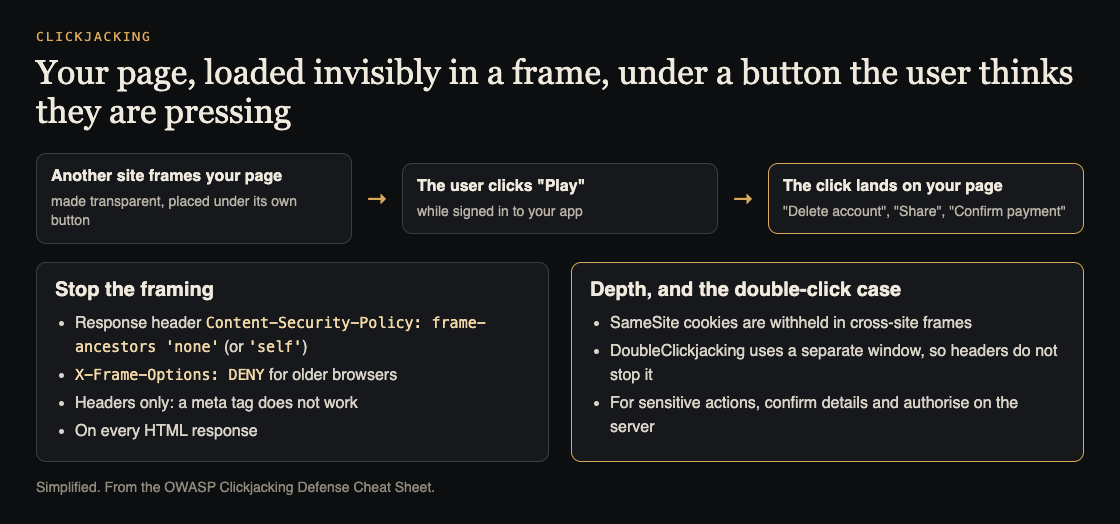
How clickjacking works and what stops it. Simplified from the OWASP Clickjacking Defense Cheat Sheet.
Start with the fastest proof. Create a file called frame-test.html on your laptop with this one line:
<iframe src="https://app.example.com/settings" width="1000" height="700"></iframe>
Replace the URL with a real page from your app. Open the file in your browser. You will see one of two things:
- Your page renders inside the frame. Your app can be framed. Treat this as a finding.
- The frame is blank or shows a "refused to connect" message. Open the developer console. You should see an error that mentions
X-Frame-Optionsorframe-ancestors. That means a header is blocking it.
For a closer copy of a real attack, serve the file from a different origin instead of opening it from disk. Run python3 -m http.server 8000 in the folder and visit http://localhost:8000/frame-test.html. Sign in to your app first in another tab, then reload the test page. If you see your signed-in view inside the frame, the attack path is open.
Check the clickjacking headers
The iframe test shows the result. The headers show the cause. Two headers control framing:
Content-Security-Policy: frame-ancestors ...is the modern control. It lists which origins may frame the page.X-Frame-Optionsis the older control. UseDENYorSAMEORIGIN.
Check them from your terminal:
curl -s -D - -o /dev/null https://app.example.com/settings | grep -i -E 'x-frame-options|content-security-policy'
This fetches the page with a normal GET and prints only the headers. Avoid relying on curl -I alone. That sends a HEAD request, and some servers and proxies return different headers for HEAD than for GET.
Read the output like this:
frame-ancestors 'none'orX-Frame-Options: DENY: no site can frame the page, including yours.frame-ancestors 'self'orX-Frame-Options: SAMEORIGIN: only your own origin can frame it.- A CSP header with no
frame-ancestorsin it: CSP is present but does nothing for framing. This is common. - No output at all: nothing protects the page.
Test the pages that matter: logins, settings, payments and one-click actions
Do not stop at the home page. Many apps set headers on the marketing site and forget the app itself, or the other way round. Run the iframe test and the curl check against each of these:
- Login and sign-up pages. Overlays on a framed login page can trick people into typing into the wrong place.
- Account settings. Email change, password change, two-factor setup and "delete account" are prime targets.
- Payment and checkout. Any "Pay", "Confirm" or "Subscribe" button that completes in one click.
- OAuth and permission screens. "Allow this app to access your account" is a single click with large consequences.
- Admin panels. An admin tricked into one click can do far more damage than a regular user.
- Any one-click action. Follow, share, invite, approve, publish. If one click changes state, it needs protection.
A quick way to cover them all is to loop over a list of URLs in your shell and run the same curl command for each. Paste the output into your notes so you can compare it after you fix things.
Common mistakes: meta tags, frame-busting scripts and missing routes
Setting the policy in a meta tag
Browsers ignore frame-ancestors when it appears in a <meta http-equiv="Content-Security-Policy"> tag. They also ignore X-Frame-Options in a meta tag. Both must be real HTTP response headers. If your only protection lives in your HTML head, you have no protection.
Trusting a frame-busting script
Older apps use JavaScript like if (top !== self) top.location = self.location. OWASP lists simple scripts like this under "do not use", with ways to defeat them such as double framing. Use headers. Keep a script only as a backup, never as the main control.
Missing routes
Headers often get set in one place and skipped in others. Look for:
- Error pages (404, 500) served by a different handler.
- Static HTML files served straight from a CDN or storage bucket.
- Subdomains such as
admin.,billing.orauth.that run separate configs. - In nginx, an
add_headerinside alocationblock. It replaces everyadd_headerfrom the parent block, so headers you set at the server level silently disappear for that route.
Using ALLOW-FROM
X-Frame-Options: ALLOW-FROM is obsolete and modern browsers ignore it. If you need to allow specific sites, use frame-ancestors.
How to fix it: set frame-ancestors and X-Frame-Options correctly
Pick the strictest policy your app can live with. For most apps, nobody else needs to frame you:
Content-Security-Policy: frame-ancestors 'none'X-Frame-Options: DENY
If your own pages frame each other, use 'self' and SAMEORIGIN instead. Send both headers. Modern browsers follow frame-ancestors when both are present, and older browsers fall back to X-Frame-Options.
Where to set them:
- nginx:
add_header Content-Security-Policy "frame-ancestors 'none'" always;plus the matchingX-Frame-Optionsline. The wordalwaysmakes sure error responses get the header too. - Node:
res.setHeader('Content-Security-Policy', "frame-ancestors 'none'")in middleware that runs on every response. - Next.js: add both headers in the
headers()function innext.config.jswith a source pattern of/:path*.
If you already send a CSP header, add frame-ancestors to it rather than sending a second CSP header, so the two policies do not combine in ways you did not plan.
Then rerun your iframe test and your curl loop. Every page on your list should refuse to load in the frame. Compare the output to the notes you took before the fix.
The case headers do not cover: DoubleClickjacking
OWASP adds a newer variant. DoubleClickjacking tricks a user into pressing a sensitive button in another window during a double-click. Your page is a normal top-level window, not a frame, so X-Frame-Options and frame-ancestors do not stop it, and SameSite does not prove the user meant the action. For consent screens, payment confirmations and account security settings, OWASP's advice is to have the user review the action's details and to enforce authorization on the server; an extra confirm button alone is not enough. The security headers guide covers the other headers worth sending alongside these.
Clickjacking is one item on a longer list. If your app fetches URLs that users supply, read our guide to SSRF testing. If user input reaches your logs, see how to stop log injection.
Frequently asked questions
Is X-Frame-Options still needed if I use CSP frame-ancestors?
Modern browsers follow frame-ancestors and ignore X-Frame-Options when both are set. Sending both costs nothing and covers older browsers, so keep both.
Can a SameSite cookie stop clickjacking on its own?
It helps, because Lax or Strict cookies are not sent inside a cross-site frame, so the framed page loads signed out. But some apps need SameSite=None, browser defaults vary, and pages that work without sign-in can still be abused. Treat SameSite as a second layer, not the fix.
How do I allow framing only from my own domains?
List them in frame-ancestors, for example frame-ancestors 'self' https://dashboard.example.com. X-Frame-Options cannot list several origins, so set it to SAMEORIGIN or leave it off on pages that a different origin must frame.
Does clickjacking affect APIs or single-page apps?
Pure JSON API responses have no buttons to click, so the risk sits with the HTML pages. In a single-page app, the header must be on the HTML document your server returns for every route, since client-side routing never sends new headers.
Get started
The quick check tells you whether one page can be framed. A full review looks at every route, subdomain and one-click action, alongside the other weak spots in your web app and API. whitehatstoic runs security tests on web apps and AI systems, with a written report, fixes, and a retest after the fixes are in. No test can promise to find every weakness, but a careful one finds a lot before someone else does. Testing is scoped after a short call. You can pick the security topic directly on the booking page for security testing.
Building something that has to be safe? Book a meeting with whitehatstoic: tell us the product, the deadline and your biggest worry, and we reply with a plan and a price.
Comments
No comments yet.
Sign in or make an account to comment.