Club committee problems: one list for the committee
Most clubs run on goodwill and a handful of people who keep turning up. The same issues return every season: the broken floodlight, the late renewals, the tournament that is short of helpers. This guide shows you how to handle club committee problems with one list for the committee, kept in one place, with what you tried and what happened written next to each problem. By the end you will know what goes on the list, how to set it up in one meeting, and how to hand it to the next committee without losing the history.
Why club committee problems keep coming back
Committee problems are not always solved once. They can get patched, forgotten and rediscovered. Someone fixes the gate lock with a cable tie. It holds for a winter. A new treasurer joins and asks why the gate is tied shut. Nobody remembers.
The problem is not effort. Committees work hard. The problem is memory. A club committee changes over time, and each change can take with it what the last group learned. The fixes that failed are easy to lose, because a failure is rarely written down on purpose.
So the next committee may try the same failed fix, and lose a season finding out what the last group already knew.
The cost of scattered notes, chats, and meeting minutes
Look at where your committee's knowledge lives today. Often it is in three places:
- The group chat. Fast, but it scrolls away. A decision from February is buried under 400 messages about the barbecue.
- Meeting minutes. Accurate, but organised by date, not by problem. To find out what happened with the floodlight, you read twelve sets of minutes.
- Someone's head. Often the secretary's. When they step down, it leaves with them.
None of these tells you, at a glance, which problems are still open and what has already been tried. That is the one question every committee meeting needs answered.
What belongs on one committee problem list
Keep the list to problems, not tasks. A task is "buy bin bags". A problem is "The clubhouse bins overflow after match days". The problem stays on the list, and every attempt hangs off it.
Good entries are one line and specific. Here is what a small tennis club's list might look like:
- Court 3 floodlight has been out since March
- Membership renewals arrive weeks after the deadline
- Not enough volunteers for the summer tournament
- Nobody is sure who holds clubhouse keys
- Junior coaching sessions clash with league fixtures
Under each problem, you add the solutions you try and the outcome of each one: worked, partly, or failed. The failed ones matter most. "Emailed members a renewal reminder: partly" tells the next treasurer to try something else, rather than send the same email again.
You can also link problems that belong together. Late renewals and a thin volunteer pool might share a cause: members who have drifted away. When you link them, that pattern becomes visible. A list never shows you that.
How to set up the list in a single meeting
You can do this in one committee meeting with a laptop on the table. Here is the workflow in Problem Graph, a problem and solution journal drawn as a map.
- Open the app before the meeting. Go to the app. You can look around without an account, but to add problems you need one, with a username and a password. One person creates it, usually the secretary.
- Go round the table. Ask each committee member for one problem they keep hearing about. Type each as a single line and press Enter. It lands on the graph straight away. Put club problems in the work lane so you can filter them later.
- Add what has already been tried. This is where the long-serving members earn their tea. "We asked the council about the floodlight in April: failed." Record it.
- Mark each committee problem as a main node. Only a main node can be shared. When it is, its solutions, their outcomes and any requirements they need go with it. A problem you only link to a main node stays private.
- Create a private network for the committee. Give the invite code to committee members only. Share your main nodes into it. Members see them. Nobody else does.
One caution: the app says anyone with the invite code can join. Treat the code like the clubhouse key. Give it to committee members, not to the whole club chat.
If you want to see how a populated map looks before you start, the app offers a Load example set button on an empty graph. There is also a List view beside the map. Some committees find the list easier to read aloud in a meeting.
Assigning owners and next steps without nagging
The Problem Graph pages describe no task assignment or reminders. That is fine. You can still make ownership clear with a simple habit: put the person's name in the solution line.
For example, under "Court 3 floodlight has been out since March":
- Ask the council about a repair grant: failed
- Priya to get two quotes from local electricians: trying
Now everyone can see who owns the next step. Nobody has to send a chasing message in the chat. When Priya reports back at the next meeting, you record the outcome on her solution. If it worked, the map shows it. If it failed or only partly worked, you add the next solution and a new name.
The map does the nagging for you, quietly. A problem with no solution marked as trying is a problem nobody owns. You spot it at a glance.
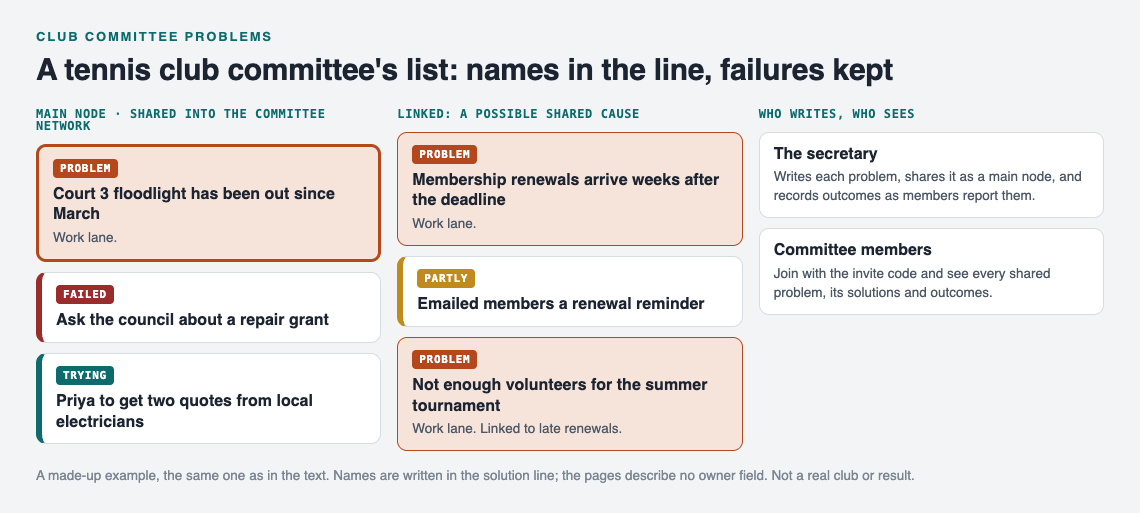
The made-up tennis club list from this post.
Running committee meetings from the list (and handing it over at AGM time)
Once the list exists, use it as your agenda. A simple running order:
- Open the committee network and filter to Network so you see only shared problems.
- For each problem with a solution marked as trying, ask the owner for the outcome. Record worked, partly or failed.
- For each problem with nothing being tried, decide one next step and one name.
- Add any new problems raised since the last meeting.
This helps keep meetings short. You talk about what changed, not about what everyone already knows.
The real payoff comes at the AGM. A new chair and treasurer arrive. Instead of a handover email and a folder of minutes, you give them the invite code. They join the network and see every open problem. They also see every fix that has been tried, including the ones that failed. As the Problem Graph home page puts it: "A solution that failed three times stays on the map as a failed solution, and that is exactly what the next person needs to know."
One thing to plan for: the problems live in the account of whoever wrote them, usually the secretary. If the secretary steps down, agree at the AGM how the record carries on, for example the outgoing secretary keeps the main nodes shared while the new one writes new problems. That way a new committee can avoid last year's dead ends.
How this differs from a volunteer group list
We have written about keeping one shared list for volunteer group problems. The idea is similar, but a committee is a different shape.
- A committee has a term. People are elected and then step down. Handover is the main risk, so the history of failed fixes matters more.
- A committee answers to members. It needs a clear record of what it tried, not just what it did.
- A committee is small and fixed. That suits a private network with a short list of invited people. A volunteer group is often larger and looser.
The same shared-list approach also works in a house. If you share a flat, see how to solve roommate problems with a shared list. If your club is a research or professional society, keeping a list of open problems in your field may also help.
Frequently asked questions
Who should own the club committee problem list?
The secretary is a natural choice, because they already keep the records. That person sets up the private network, holds the invite code and records outcomes as members report them. Other committee members join with the code and see every shared problem.
How often should the committee review open problems?
At every committee meeting, as the first item. A quick pass through anything marked as trying takes ten minutes and keeps the list honest.
What if members raise problems outside the committee?
Whoever hears it passes it to the secretary, who writes it down as one line and shares it into the committee network. Members outside the committee do not need access. The committee decides what to try and records the outcome there.
Is a spreadsheet enough, or do we need a tool?
A spreadsheet works if someone keeps it tidy and you only need a list. Problem Graph adds outcomes on every attempt and links between related problems. It also gives you a private network you can hand to the next committee with one invite code.
Get started
Pick one problem your committee has discussed at least three times. Write it down in one line. Under it, add every fix you remember trying and mark each one worked, partly or failed. Then bring it to your next meeting and ask who owns the next step.
Try Problem Graph: it is free, and you can look around the public network without an account. Write one problem down in a line and attach the first thing you will try.
Comments
No comments yet.
Sign in or make an account to comment.