Command injection: keep user input away from the shell
Command injection happens when text from a user ends up inside a shell command your server runs. The fix fits in one line: keep user input away from the shell. This guide to command injection shows how attackers break out of a command, where user input slips in without anyone noticing, and the defences the OWASP OS Command Injection Defense Cheat Sheet lists, in order. It also covers how to test your own app without breaking it.
What command injection is and why the shell is the problem
Your app often needs another program. It resizes an image, pings a host, zips a folder or runs git. The quick way is to build a string and hand it to a shell, like sh -c on Linux or cmd.exe on Windows.
The shell does not just run a program. It reads a small language. It splits words, expands variables, follows pipes and runs more than one command per line. When you paste user input into that string, the user gets to write part of a program, and your server runs it with your app's permissions.
Here is the classic case in Node:
exec('ping -c 1 ${req.query.host}')
You expect example.com. An attacker sends example.com; cat /etc/passwd. The shell sees two commands and runs both.
How attackers break out: semicolons, pipes, backticks and $()
The shell has many characters that end one command or start another. Attackers only need one that you did not block.
- Semicolon
;runs the next command no matter what. - And/or
&&and||run the next command based on whether the first one worked. - Pipe
|sends output into another program. - Backticks and
$()run a command and paste its output in place. These work even inside double quotes. - Newlines act like a semicolon. An encoded newline,
%0ain a URL, can get past filters that only look for;. - Redirects
>and<write or read files.
This is why blocklists fail. You remove ;, and the attacker uses a newline. You remove backticks, and they use $(). Windows cmd.exe has its own set, including & and ^. You are trying to out-guess a whole language.
Where user input sneaks into shell commands (filenames, hostnames, uploads)
Few teams write exec(req.query.cmd). The input usually arrives by a side road.
- Filenames from uploads. A user uploads
photo$(id).jpg. Your code later runsconvert uploads/photo$(id).jpg thumb.pngthrough a shell. - Hostnames and URLs. Network tools, webhook checks and "test connection" buttons pass a host to
ping,curlornslookup. - Branch names, repo URLs and tags in build or deploy tooling that calls
git. - Export options, such as a page size or format passed to a PDF tool.
- Stored data. A display name saved last month gets used in a nightly script. The script trusts it because "it came from our database".
A fast way to find these is to search your code for every shell entry point. In Node, look for exec, execSync and shell: true. In Python, look for os.system, os.popen and shell=True. In Ruby, look for backticks and system with one string. Then follow each argument back to where it came from.
Fix #1: call programs directly with argument arrays, not a shell string
The strongest fix removes the shell. Most languages can start a program and hand it a list of arguments. No shell reads the list, so ;, | and $() are just characters.
The Node ping example becomes:
execFile('ping', ['-c', '1', host])
If host is example.com; cat /etc/passwd, ping gets one strange hostname, fails to resolve it and exits. Nothing else runs.
In Python, change this:
subprocess.run(f"convert {name} out.png", shell=True)
to this:
subprocess.run(["convert", name, "out.png"], check=True)
Better still, follow OWASP's first defence and ask whether you need the external program at all. A built-in library function, such as mkdir() instead of system("mkdir ..."), cannot be talked into doing another task. And if a pipe is the reason you reached for the shell, start two processes and connect their streams in code instead.
Fix #2: allowlist inputs and use -- to stop option injection
Dropping the shell stops new commands. It does not stop the user from sending input the program reads as an option. OWASP calls this argument injection, and notes that every command injection is also an argument injection.
OWASP's own example uses wget with a fixed --directory-prefix option. With PHP's escapeshellcmd(), an attacker can still add a second --directory-prefix, save a file where they choose, and reach remote command execution. With escapeshellarg(), the whole value stays one argument and the attack fails.
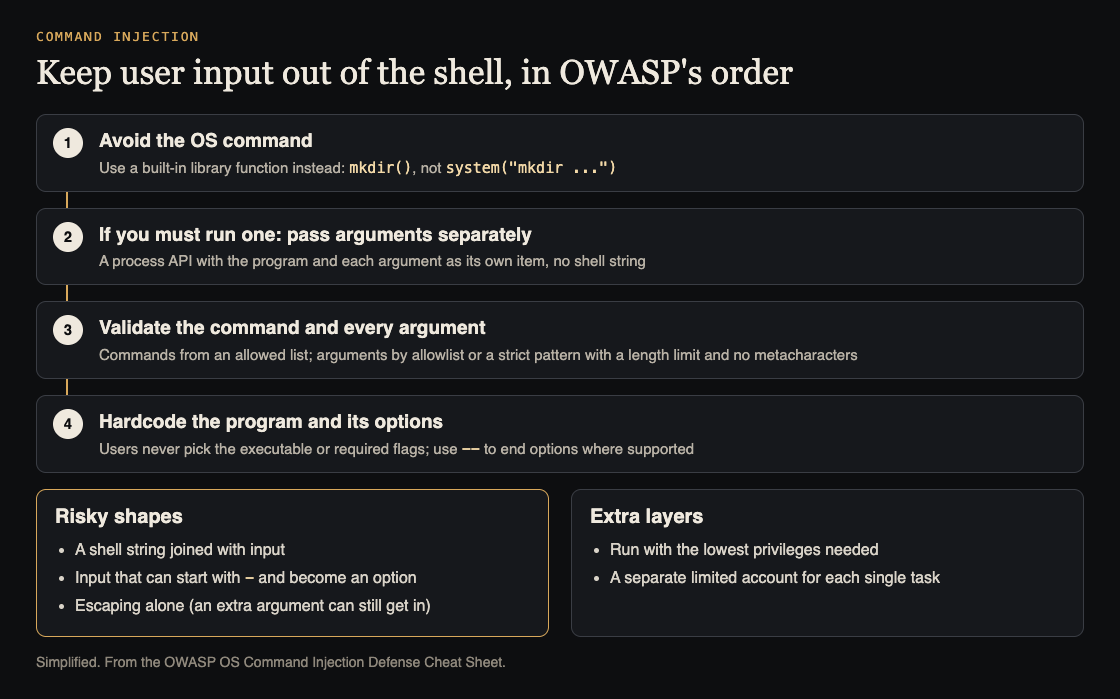
OWASP's defences, in order. Simplified from the OWASP OS Command Injection Defense Cheat Sheet.
Two fixes work together:
- Allowlist the input. Decide what a valid value looks like and reject everything else. A hostname gets letters, digits, dots and hyphens, and must not start with a hyphen. A format must be one of
png,jpgorwebp. A file reference should be an ID you map to a path on the server, not a path the user sends. We cover this pattern in more depth in input validation: check what your API accepts. - End options with
--. Many Unix tools treat--as "no more options after this point". So["tool", "--", name]keeps a value like-helpfrom being read as a flag. Check each tool's docs, because not every program honors--.
OWASP adds two rules: hardcode the program, so the user never picks the executable, and hardcode required options in your code, never in user input.
How to test your app for command injection safely
Test on a staging copy, never on production data. Use payloads that prove the bug without doing harm.
- Timing probes. Send
; sleep 5,| sleep 5,$(sleep 5)and a newline followed bysleep 5in each field that might reach a command. If the response is five seconds slower, something ran. - Harmless output. Try
$(echo test123)and look fortest123in the response, logs or the generated file name. - Callbacks. For tasks that run in the background, use a payload that makes a DNS lookup or web request to a domain you control. A hit in your logs proves execution.
- Option probes. Send values that start with
-or--and watch for changes in behavior or error messages.
Do not send rm, do not read secrets you do not need, and get written permission before testing any system you do not own.
Command injection is one of a family of bugs where input becomes code. The same "find the place where text gets run" approach applies in the browser and in templates. See XSS testing: find where user input runs as code and template injection: test pages built from user input.
The rule: keep user input away from the shell
If you remember one thing, make it the order of defenses:
- Use a library instead of an external program when you can.
- If you need a program, pass an argument array with no shell.
- Allowlist every value, and map user choices to server-side values.
- Hardcode the program and its options, and put
--before user values where the tool supports it. - Run the process with the fewest permissions it needs, ideally under its own limited account.
Frequently asked questions
Is escaping user input enough to prevent command injection?
Not on its own. OWASP lists escaping as a defence, for example PHP's escapeshellarg(), but notes an attacker can still pass an argument. Escaping also differs by operating system, so avoiding the shell is simpler, and you still need validation.
Is subprocess with shell=False always safe in Python?
No. It stops the shell from reading special characters, but the program you call can still treat input as an option or run commands itself, like find -exec. Validate values and use -- where the tool supports it.
What is the difference between command injection and code injection?
Command injection runs operating system commands through a shell or another program. Code injection runs code in your app's own language, for example through eval or a template engine. The fix is the same idea in both cases: never let input become something that gets run.
How do I detect blind command injection?
Blind injection gives no visible output, so you watch side effects. Use time delays like sleep 5 or a DNS or web callback to a domain you control, and only on systems you are allowed to test.
Get started
Today, search your codebase for exec, os.system, shell=True and backticks. List every call, trace each argument back to its source, and convert the ones touched by user data to argument arrays with allowlists.
If you want an outside review, whitehatstoic runs security tests on web apps and APIs, and on AI systems. That includes prompt injection tests, which matter when an AI agent can call tools that run commands. You get a written report with fixes and a retest after you apply them. No test finds every weakness, so the goal is to find and fix what matters before someone else finds it. Testing is scoped after a short call.

Building something that has to be safe? Book a meeting with whitehatstoic: tell us the product, the deadline and your biggest worry, and we reply with a plan and a price.
Comments
No comments yet.
Sign in or make an account to comment.