Community garden problems: one shared list
Many gardens already have a list of community garden problems. It is just spread across a group chat, a notice board by the shed, three people's memories and a notebook nobody can find. This post shows you how to keep one shared list that every plot holder can see, with what you tried and whether it worked, so the same leaky tap does not get "discovered" again every April.
Why community garden problems get lost in group chats and notice boards
A group chat is good for "anyone at the garden right now?" It is bad at memory. Someone reports slugs on plot 12, ten people react, and by Thursday the message has scrolled away under photos of courgettes. Nobody wrote down that copper tape was tried last year and did not help.
A notice board has the opposite problem. It stays put, but only people standing in front of it see it, and old notes get pinned over. Neither one records the outcome. You end up with a lot of talk about problems and almost no record of fixes.
What a garden needs is short and plain: each problem in one line, the things you tried attached to it, and an honest mark on each attempt.
Community garden problems: water, plots, tools, pests and people
Every garden is different, but these five groups are a good place to start:
- Water. Taps freeze, hoses split, the water butt runs dry in July, the bill goes up.
- Plots. Neglected plots go to seed, boundaries drift, the waiting list stalls.
- Tools. Shared tools go missing or come back broken, the shed lock jams.
- Pests. Slugs, rats near the compost, pigeons on the brassicas.
- People. Who pays dues, who comes to workdays, who parks where.
Notice how many of these are linked. Rats near the compost can be a compost problem, and the compost can be a workday problem if nobody turns it. A list hides that. A map shows it.
What one shared list looks like
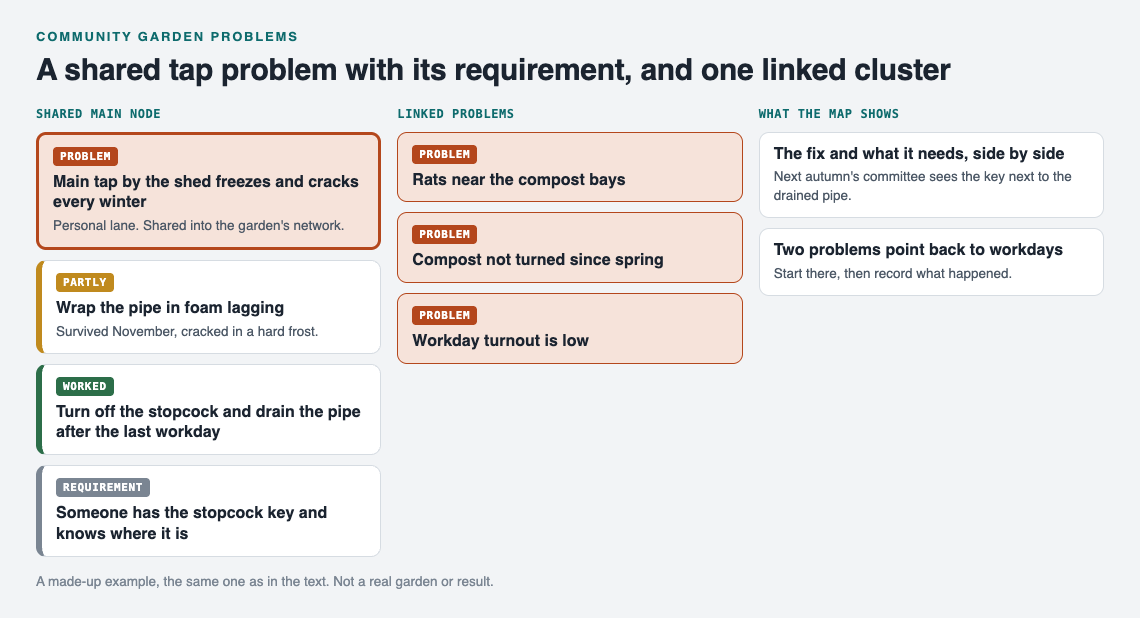
The worked example as a map: the shared tap problem with its requirement, and three linked problems that point at workdays.
Problem Graph is a problem and solution journal drawn as a graph. You write a problem in one line and it lands on the map when you press Enter. You attach solutions, mark the ones you are trying, and record the outcome as worked, partly or failed. You can also add requirements, the things a solution needs before it can happen.
Here is a small worked example for one garden problem:
- Problem: "Main tap by the shed freezes and cracks every winter."
- Solution 1: "Wrap the pipe in foam lagging." Outcome: partly. It survived November but cracked in a hard frost.
- Solution 2: "Turn off the stopcock and drain the pipe after the last workday." Outcome: worked.
- Requirement for solution 2: "Someone has the stopcock key and knows where it is."
That last line is the easy one to lose. The fix is known. What can fail is the handover. On the graph, the requirement sits right next to the fix, so next autumn's committee sees it.
Now link problems that belong together. Link "rats near the compost bays" to "compost not turned since spring" and to "workday turnout is low". Patterns show up on the map that never show up in a list. If three pest and mess problems all point back to workday attendance, you know where to start. That is the idea behind the Pareto 80/20 rule, and the post on the Pareto principle for everyday problems shows how to find the few causes behind most of the trouble.
How to set up your garden's shared list in an afternoon
You can do this on a bench by the shed. It runs in a web browser and works on your phone.
- Look around first. Open the app. You can browse the public network without an account. On an empty graph, the "Load example set" and "Load example network" buttons show you how a filled-in map looks.
- Create an account. To add problems you need a username and a password. The app asks for an email for password resets, but the site owner can turn reset off, so keep your password somewhere safe.
- Write ten problems, one line each. Do not polish them. "Shed lock sticks in rain" is enough. Put them in a lane. For a volunteer garden, most people use personal; if you run a garden as a job, work fits.
- Attach what has already been tried. Ask the longest-standing plot holder. Mark old fixes as worked, partly or failed. Failed ones stay on the map, and that is useful. As the app puts it, a solution that failed three times is exactly what the next person needs to know.
- Mark main nodes. Only a main node can be shared. When you share it, its solutions, their outcomes and their requirements go with it. A problem you only link to it stays in your private graph. So make "Main tap freezes" a main node, and keep "my own plot's leeks bolted" at home.
- Create a private network. Name it after the garden and give the invite code to plot holders. Members see what you share into it; nobody else does. Anyone with the invite code can join, so share it the way you would share the shed combination, not on a public poster.
- Share your main nodes into the network. Members see them; plot holders report new problems to you, and you add them.
Everything else stays private by default. Your problems are saved to your account and follow you to any phone or computer you log in on.
Running the list through the season: workdays, meetings, and weekly reviews
A list only helps if someone looks at it. Tie it to things the garden already does.
Before a workday
Open the List view beside the map and filter by Network. Pick the problems with a solution marked as trying. Those become the workday jobs. You are not inventing tasks; you are testing fixes.
At committee meetings
Put the map on a phone or laptop and walk the linked clusters, not the whole list.
Once a week
Spend ten minutes updating outcomes. Did the netting stop the pigeons? Mark it. Did the new padlock hold? Mark it. A short weekly review to close the problems you solved keeps the list honest and small.
One thing to know: the pages describe sharing, linking and borrowing. They do not describe chat, comments or notifications. Keep your group chat for "the gate is open, come now" and use the graph for what you want remembered.
Turning recurring garden problems into fixes that stick
Recurring problems are the ones worth the effort. A few habits help:
- Write the requirement, not just the fix. "Drain the pipe" fails if nobody has the key. Add the key as a requirement.
- Keep failed solutions. Do not delete the copper tape. Mark it failed so a new member does not buy more.
- Link across lanes. Your garden's "water bill went up" may link to a work problem about budgeting if you are the treasurer. Links work across lanes.
- Borrow before you invent. Problem Graph is built to show similar problems other people have shared, in any lane, and which of their solutions worked. You can borrow one into your graph with one tap, and it keeps a link back to where it came from.
- Ask for suggestions as a starting point. The AI proposes new solutions grounded in what worked for others on problems like yours. Treat each proposal as an idea to try and mark, not an answer.
If a fix works well enough that other gardens could use it, you can share that main node publicly. Others can then link their own problems to it and borrow what worked.
Frequently asked questions
Who should own the shared problem list in a community garden?
Pick one coordinator, such as the secretary, to create the network, hold the invite code and write the entries. Members read the list and report problems and outcomes to the coordinator, who keeps it up to date.
How do we handle conflicts between plot holders on a shared list?
Write the problem about the situation, not the person: "Boundary between plots 4 and 5 unclear", not a name. Keep personal disputes in your private graph, since only main nodes you choose to share are seen by the network.
Can members without smartphones still add problems to the list?
It runs in any web browser, so a home computer works too. For members who prefer neither, let them tell the coordinator, who adds the line on their behalf.
How is a shared problem list different from a garden task rota?
A rota says who does what and when. The problem list says what is wrong, what you tried and whether it worked, so the rota can be built from fixes worth testing.
Get started
Start small. Write the three problems that came up at the last workday, attach the fix each one is waiting on, and share them into a garden network.
Try Problem Graph: it is free, and you can look around the public network without an account. Write one problem down in a line and attach the first thing you will try.
Comments
No comments yet.
Sign in or make an account to comment.