Content Security Policy: write one your app can keep
A content security policy (CSP) tells the browser which scripts, styles, frames and connections a page may use. Writing one is easy. Writing one that survives the next release is the hard part, and a policy loosened until it blocks nothing protects nobody. This guide follows the OWASP Content Security Policy Cheat Sheet: what CSP can block, which policy to aim for, and how to roll it out in report-only mode first so nothing breaks.
What a content security policy does, and what it does not
The OWASP Content Security Policy Cheat Sheet lists what a policy can stop: inline scripts an attacker injects, scripts loaded from servers you did not approve, text run as code through functions like eval, forms that post to another site, and plugin objects. With frame-ancestors it also controls who may frame your pages, which defends against clickjacking.
OWASP is just as clear about the limit. CSP is a strong second layer, especially against cross-site scripting (XSS), but it does not remove the bug that let a script in. Fix XSS first, then add CSP on top; see XSS testing.
Pick your target: strict or basic
OWASP describes a strict policy as the goal for any team. It protects against classic stored and reflected XSS and some DOM-based XSS:
Content-Security-Policy: script-src 'nonce-{RANDOM}' 'strict-dynamic'; object-src 'none'; base-uri 'none';
- A nonce is a random value your server creates for every response and puts both in the header and on each script tag you trust. It needs HTML rendered per request.
- A hash of an inline script, such as
'sha256-...', can replace the nonce for scripts that never change. 'strict-dynamic'lets scripts created by a trusted script run without their own nonce, which keeps loaders and bundles working.
If a strict policy is not possible yet, OWASP gives a basic one. It allows resources only from your own origin, blocks inline scripts and styles, and stops cross-site framing and form posts:
Content-Security-Policy: default-src 'self'; frame-ancestors 'self'; form-action 'self';
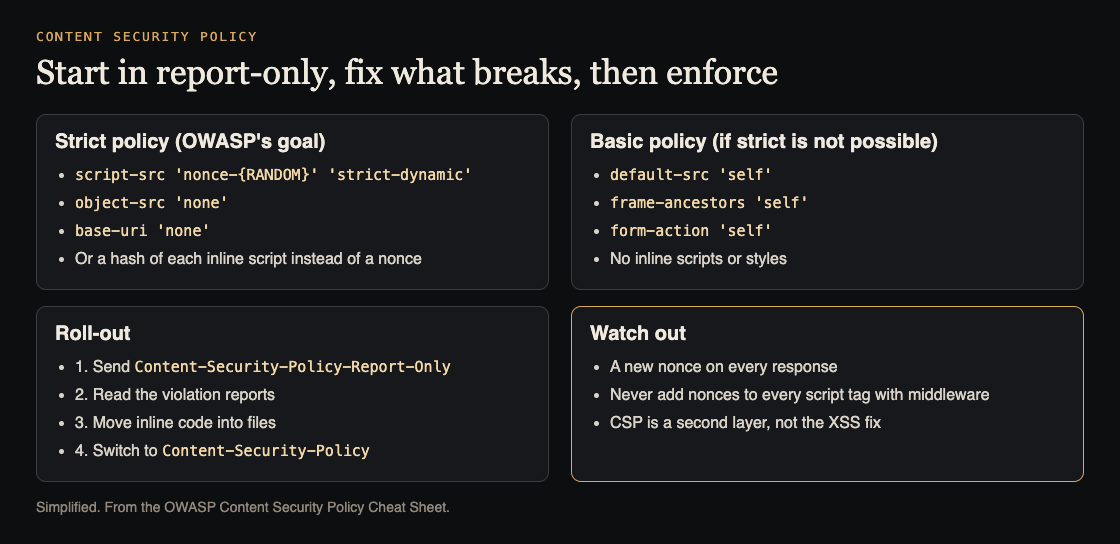
The two policies, and the roll-out. Simplified from the OWASP Content Security Policy Cheat Sheet.
Start in report-only mode
The Content-Security-Policy-Report-Only header uses the same syntax but blocks nothing. The browser prints violations to the console and sends reports to the address in report-to or report-uri. OWASP notes this is the usual step before blocking mode.
Leave it running across your real pages for a while, including sign-in, payments, admin and error pages. Each report names the directive that would have blocked something and the resource it blocked. Group them by source, then decide for each one: move it into a file, give it a nonce, allow its host, or remove it.
OWASP's tighter version of the basic policy is a useful checklist while you read: it starts from default-src 'none' and allows only scripts, connections, images and styles from your own origin, with frame-ancestors 'self' and form-action 'self'. Any report that does not fit one of those lines is a resource you have not accounted for yet.
Worked example: one app from report-only to enforced
Say your app is rendered per request by a Node server and loads its own bundle, one analytics tool and a payment form.
- Week one: report only. Send
Content-Security-Policy-Report-Onlywith OWASP's strict policy and a nonce made fresh for every response. Read the reports. - Move inline code into files. OWASP explains that with
script-srcactive, inline code is blocked, includingonclick="..."handlers. Move each inline script into a file, and replace each handler withaddEventListener. - Add nonces in your templates. Put the nonce on the script tags you write in your templates, so
'strict-dynamic'can trust what they load. - Add the controls you need.
frame-ancestors 'self'if nobody else should frame you, andform-actionwith your own origin plus the payment provider if forms post there. - Enforce. When the reports go quiet, send the same policy as
Content-Security-Policy. - Keep improving safely. OWASP notes you can send both headers at once: enforce the policy you trust, and run a stricter one in report-only next to it.
Mistakes that break a content security policy
- Nonces added by a blanket filter. OWASP warns not to write middleware that adds a nonce to every script tag: injected scripts would get the nonce too. Use your templating engine.
- A reused nonce. A nonce is one-time: a new random value for each response.
- The meta tag where a header would work. A
<meta http-equiv>policy supports most XSS defences, but not framing protection, sandboxing or reporting. Use the header where you control it, and send it on every response, not only the home page. - Old header names. OWASP says not to use
X-Content-Security-PolicyorX-WebKit-CSP. - Allowing eval to keep a library happy. Blocking text-to-code functions such as
evalis one of the protections OWASP lists; allowing it back gives that protection away. - Treating CSP as the fix. It is the second layer, after output encoding and safe templates.
Keep the policy alive as your app changes
A policy that was right at launch drifts as features ship. A few habits keep it honest:
- Any new third-party script, frame or API host needs its policy change in the same pull request.
- A test in CI requests a page and checks the header is present and carries a fresh nonce.
- Reporting stays on after enforcement, so a spike after a deploy shows what broke.
- Remove tools you no longer use; every source you drop is one less thing to trust.
Even a fully static site can use CSP. OWASP points out it can enforce Subresource Integrity, so a changed third-party script file is refused. CSP sits alongside your other security headers, and OWASP notes that frame-ancestors has made the older X-Frame-Options header obsolete.
Frequently asked questions
Does a content security policy stop all XSS?
No. OWASP calls it an effective second layer that makes XSS much harder to exploit, not a replacement for fixing it. Keep encoding output and using safe templates.
Should I use a meta tag or an HTTP header?
The header, wherever you can set it. The meta tag cannot do framing protection, sandboxing or reporting, so use it only where headers are out of your control.
Nonces or hashes?
Nonces suit pages rendered per request, because each response gets a new value. Hashes suit inline scripts that never change, such as on static pages.
What does strict-dynamic do?
It lets scripts created by a script you already trust, through a nonce or hash, run without their own nonce. That keeps bundlers and loaders working under a strict policy.
Get started
This week, send OWASP's strict policy as Content-Security-Policy-Report-Only, with a fresh nonce per response, and read the reports. Move the first inline script into a file, and repeat until the reports are quiet.
If you want a second pair of eyes, whitehatstoic's security testing covers web app and API review, with a written report, fixes and a retest after fixes. It is scoped after a short call, and no test can promise to find every weakness.

Building something that has to be safe? Book a meeting with whitehatstoic: tell us the product, the deadline and your biggest worry, and we reply with a plan and a price.
Comments
No comments yet.
Sign in or make an account to comment.