Cookie theft mitigation: detect stolen session cookies
Cookie theft mitigation is the work of noticing when someone else is using one of your users' session cookies, and shutting them out. It matters more now that logins are stronger. With multi-factor authentication and passkeys, a stolen password is hard to use. A stolen session cookie skips the login entirely. This guide follows the OWASP Cookie Theft Mitigation Cheat Sheet and turns it into a check you can build.
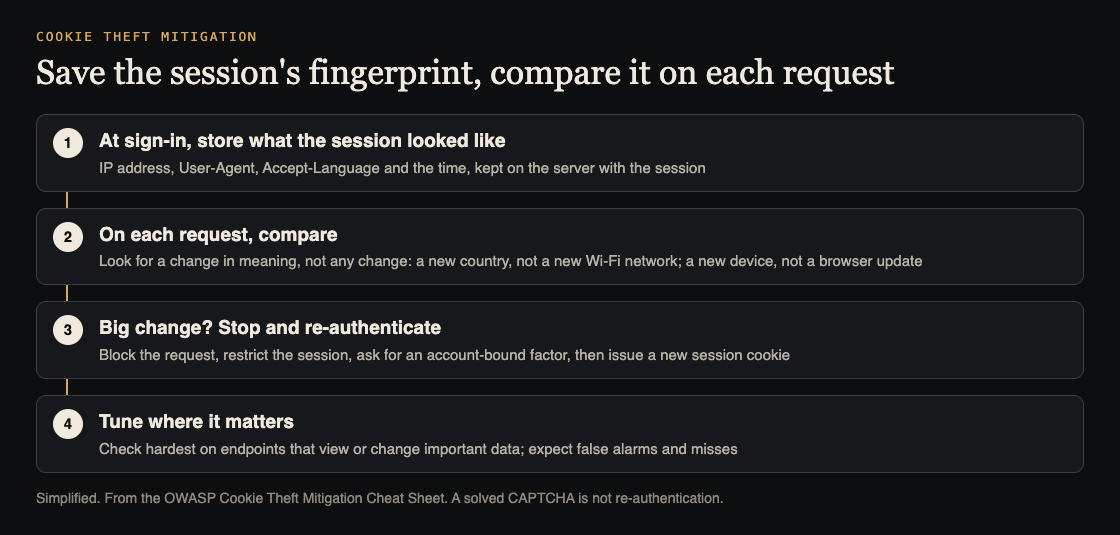
Store, compare, re-authenticate. Simplified from the OWASP Cookie Theft Mitigation Cheat Sheet.
Why a stolen cookie beats a strong login
When a user signs in, your app hands their browser a session cookie. From then on, the cookie is the proof. Whoever sends it is treated as that user.
OWASP puts it plainly: stealing a valid session cookie has the same impact as stealing the user's credentials, until the session expires. It does not matter how strong your sign-in is. The attacker never goes through it.
The cheat sheet names three ways cookies get stolen:
- Malware on the user's device that reads the browser's stored cookies.
- Phishing that tricks the user into handing over a live session.
- Flaws in your app, such as a cross-site scripting bug that can read a cookie not marked HttpOnly.
You control only the third one directly. That is why OWASP pairs prevention with detection.
Cookie theft mitigation starts with prevention
OWASP says to apply the preventive controls from its Session Management Cheat Sheet first, then watch for stolen cookies being used. Detection adds to those controls. It does not replace them.
If you have not set your cookie flags yet, start with our post on session cookie security. Then close the paths that leak cookies from inside your app. Our guide to XSS testing covers the most common one.
Malware and phishing happen outside your code. For those, detection is your only line.
The signals to save when a session starts
When an attacker uses a stolen cookie from their own device, some details of the connection change. OWASP's idea is simple: save those details when the session is created, and compare them on every request.
The core signals the cheat sheet lists:
- IP address, which hints at the region the request comes from
- User-Agent, which hints at the device and browser
- Accept-Language, the user's language setting
- Date, so you can see the time of day the session is used
Two more headers can change with the device and operating system, so OWASP says they are also worth watching: Accept and Accept-Encoding.
The cheat sheet also lists the Sec-CH-* Client Hint headers, which describe the browser, device and some user preferences. Treat them as optional. Browsers may leave them out, depending on support, what your server asks for, and the user's permissions. They are also different from the Sec-Fetch-* headers, which describe the context of a request rather than the device.
Store these values on the server, with the session record. A value kept in the browser is something the attacker can copy along with the cookie.
Compare meaning, not raw values
A plain "did anything change?" check would fire all day. OWASP gives two everyday examples:
- A user moves from home Wi-Fi to a phone network, and their IP address changes.
- A user's browser updates itself, and the User-Agent string changes.
Neither is an attack. So the cheat sheet says to check whether the meaning of a value changed a lot, not just whether the text changed. A new IP address in the same city is ordinary. The same cookie appearing from another country an hour later is not. A browser version bump is ordinary. A desktop browser turning into a different operating system on a different device is not.
Your comparison code must also cope with missing headers. OWASP's example notes that helper checks have to handle both missing values and legitimate changes.
Be honest with yourself about what this check can do. OWASP is clear that it is not certain in either direction.
- False positives: a cookie used from a new country might be an attacker, or it might be your user on holiday.
- False negatives: an attacker in the same country as the user may not change the location signal at all.
So treat a mismatch as a reason to ask for proof, not as proof of an attack. And keep your other session controls in place, because this check will miss some theft.
What to do when a session looks stolen
OWASP calls re-authentication the most reliable response. Pause the session, ask the user to sign in again, then give them a fresh session cookie. The stolen one is now useless to the attacker.
The cheat sheet's example middleware blocks the suspicious request with a 403 response. It also says that blocking one request is not enough. The app must restrict or end the suspect session and finish re-authentication before giving back access.
One warning stands out. A CAPTCHA is not re-authentication. Solving one shows a human or a capable tool is present. It does not show that the person controls a factor tied to the account, such as their password plus a second factor or a passkey. OWASP says not to treat a solved CAPTCHA as proof that a suspect session is genuine. Our post on multifactor authentication covers the factors worth asking for.
Watch the cost to users, too. If you re-authenticate too often, OWASP notes, the experience gets poor. That is the trade-off behind tuning.
Where should the check run? OWASP says these checks usually live in middleware, or in a web application firewall in front of the server. If comparing on every request costs too much, set a priority for each path. Check hardest on the endpoints that view or change important information: account settings, payments, data exports, user deletion. Lighter pages can get a lighter check.
This pairs well with a second confirmation on high-risk actions. Our guide to transaction authorization explains that step.
Device Bound Session Credentials and their limits
Ordinary session cookies are bearer credentials: anyone holding a valid one can use it until it expires or the server ends it. Device Bound Session Credentials, or DBSC, try to change that. A signing key tied to the device proves possession when the browser refreshes short-lived cookies.
OWASP lists the limits. Everyday requests still use the cookies as bearer credentials, so DBSC does not bind every request to the key. A stolen cookie can still be replayed for the rest of its short life. And if the attacker still controls the user's browser or device, they may get fresh cookies or use the key from there. Plan your session lifetimes and incident response with these gaps in mind.
Worked example: cookie theft checks for one app
Here is a plan for a web app with a settings page, a billing page and an admin area.
- Day one: prevention. Confirm the session cookie is HttpOnly and Secure, and fix any open cross-site scripting findings.
- Day two: record. When a session starts, save the IP address, User-Agent, Accept-Language and the server time with the session record on the server.
- Day three: compare on key paths. Add middleware to settings, billing, export and admin routes. Flag a change of country, or a change of device type or operating system. Ignore a browser version bump or a new IP in the same region.
- Day four: respond. On a flag, return 403, mark the session restricted, and send the user to sign in again with their second factor. Issue a new session cookie after they pass. No CAPTCHA shortcut.
- Day five: measure. Count flags per day and how many users passed re-authentication. If most flags are travellers, loosen the location rule; if almost nothing ever fires, test it with a copied cookie from another device.
Frequently asked questions
Does MFA stop cookie theft?
No. MFA protects the sign-in, and a stolen session cookie skips the sign-in. OWASP says stealing the cookie has the same impact as stealing credentials until the session expires.
Should I block every request whose IP address changes?
No. IP addresses change when users switch networks. Compare the meaning of the change, such as a new country, and ask for re-authentication rather than blocking outright.
Is a CAPTCHA enough to clear a suspicious session?
No. OWASP says a CAPTCHA does not show the person controls a factor tied to the account. Ask them to sign in again and issue a new cookie.
Get started
Pick your three most sensitive routes and start saving the IP address and User-Agent with each session today; you can add the comparison next week.
The whitehatstoic home page lists "audit sign-in and payments" among what it does, and its cybersecurity and AI safety testing includes a web app and API review, a written report with fixes, and a retest after you apply them. It is scoped after a short call. No test finds every weakness, but replaying a session cookie from a new device is a quick way to see whether your app notices.

Building something that has to be safe? Book a meeting with whitehatstoic: tell us the product, the deadline and your biggest worry, and we reply with a plan and a price.
Comments
No comments yet.
Sign in or make an account to comment.