Corporate music for a quarterly results video: a guide
Picking corporate music for a quarterly results video is mostly a job of restraint. The numbers are the content, so the track has to give the video a pulse without competing with the voice or the chart. This guide shows what Wavecrate's Corporate genre holds, how to match a track to a strong, flat or hard quarter, how to mix it, and which license each use needs.
Corporate music for a quarterly results video: what the job needs
A results video is usually a talking head over slides or a screen recording. Silence makes that feel flat, and a loud track makes the figures hard to follow. A good track does four things:
- Keeps a steady rhythm. No tempo changes or sudden drops under a revenue slide.
- Stays simple. A light melody that does not ask to be noticed.
- Holds even energy. A long build that peaks halfway through your margin chart works against you.
- Ends cleanly. You need a way out that fits the video's length.
Pick it on purpose, because the track sets the mood before anyone says a figure.
Wavecrate, the music library used as the example in this guide, has a Corporate genre with filters for mood, tempo and vocals, and every download comes with a license certificate and a code.

What the Corporate genre holds
On 16 October 2026 the Corporate genre page listed 10 tracks between 100 and 118 BPM, from 1:11 to 2:28 long. Nine are tagged uplifting and confident or happy; one, Clean Slate, is hopeful and calm. Two were marked Free that day: Bright Ideas and Electric Clarity. Counts and Free marks change, so read the page on the day you download.
Three tracks by Lumen Avenue (Forward Motion, Clean Slate and Bright Ideas) show different moods and energy levels, and they share one opening line in their descriptions: "Bright plucks and claps over a feel-good major progression." That makes them a handy set to compare, but they are not three different sounds, so listen before you choose.
The page's own filters help you narrow the list: mood (including hopeful and confident), tempo (Slow under 90, Mid 90 to 120, Fast over 120), length, energy, vocals, key and Free or Premium access.
Match the track to the quarter
A strong quarter
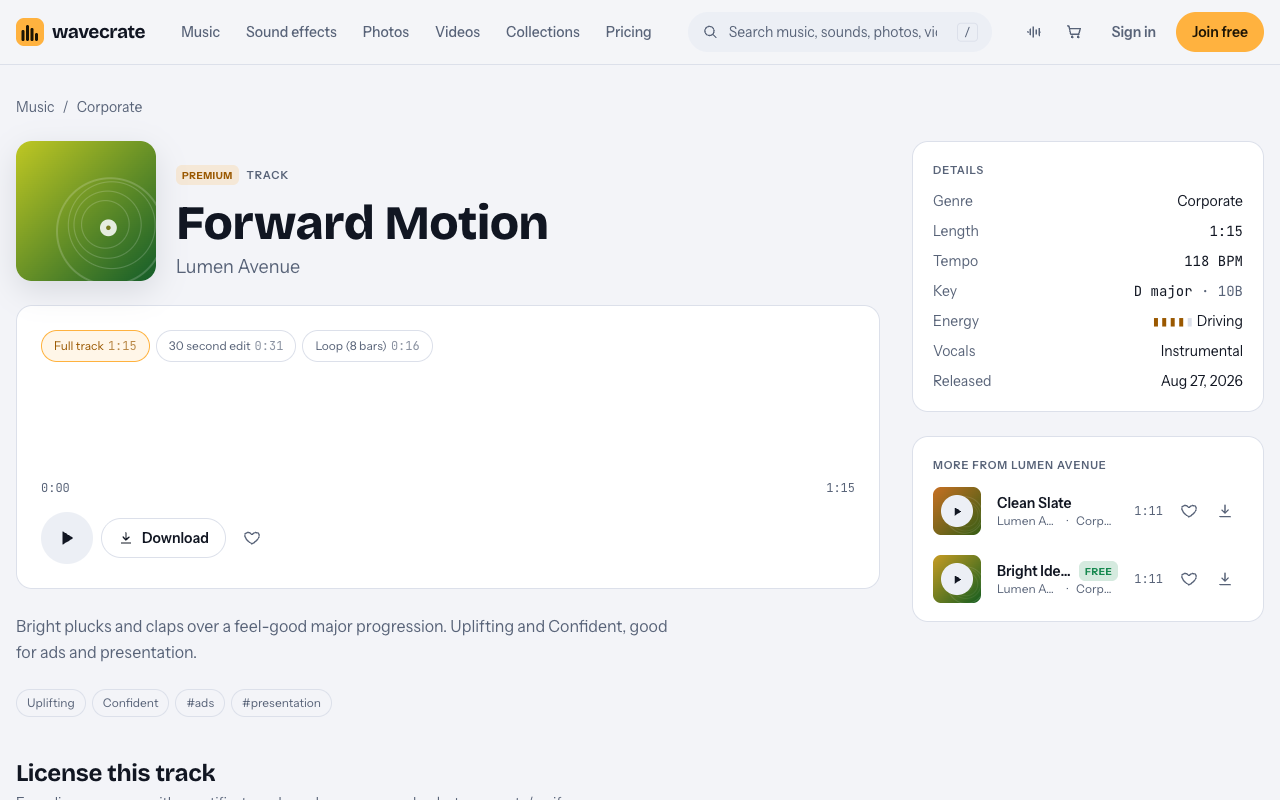
Forward Motion is Premium, 118 BPM, D major, with Driving energy. Its page says "Uplifting and Confident, good for ads and presentation." That is the brightest end of the range, so keep it low in the mix and let the numbers carry the news.
A steady quarter
Bright Ideas was marked Free on 16 October. It runs at 112 BPM in C major, with Steady energy, and its page says "Uplifting and Happy, good for ads and tech." It sets a mood without pushing it, which suits flat or on-plan results.
A difficult quarter
Cheerful music over a revenue miss sounds tone-deaf. Clean Slate is Premium at 108 BPM in G major, with Relaxed energy, and its page says "Hopeful and Calm, good for tutorial and podcast." It does not pretend the quarter was a win and leaves room for a serious message. To find similar tracks yourself, set the mood filter to hopeful or calm.
Instrumental or vocals?
Words fight words. A vocal track makes listeners sort two streams of language, and a figure like "up 12 percent" is easy to lose. The three tracks above are all marked Instrumental in their details. Every track page has a Vocals field, and the browse page has a vocals filter, so check it before you download.
Mix it so the numbers stay clear
- Set the voice first. Get the narration comfortable, then add music underneath.
- Keep the music well below the voice. If you notice the music while someone speaks, lower it.
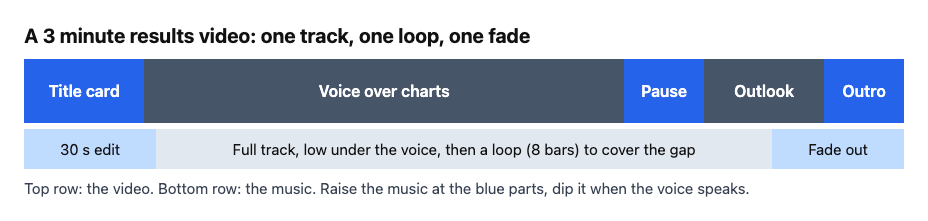
- Let it rise in the gaps. Bring it up over title cards and pauses, then dip it when the voice returns.
- Listen on laptop speakers and a phone. If the figures are clear there, they are clear on most screens.
- Fade the start and the end. A short fade avoids an abrupt cut.
Track versions help. The Forward Motion page lists a full track (1:15), a 30 second edit (0:31) and an 8-bar loop (0:16). Use the 30 second edit for a short intro and outro, and the loop to cover a stretch where the full track runs out.
One track, three uses, three licenses
Take Bright Ideas, which was marked Free on 16 October, and follow it through three videos. The license tables are on the pricing page and the track's own license cards. Paid licenses are not on sale yet: Wavecrate says purchases open soon, so the prices below are the listed prices for when sales open. Items marked Free, like Bright Ideas, can already be downloaded with a free account.
- Your own channel, with credit. A short results recap on your public channel fits the Free license: "Online videos and podcasts, with credit." The card asks for credit text in the description, and a free account gets 3 free downloads a month.
- Your own business video. A results video for your company's investors or staff is "your own business and brand content", a row the Free license does not tick. The track page's Standard card lists "Your own business and brand videos" with no credit required, so this is Standard (listed at $15 on this track), which is also included with Pro.
- A client's video, or a paid ad. The Extended card lists "Paid advertising and TV or radio broadcast" and "Client work and unlimited impressions", so a results video you make for someone else, or promote with paid ads, needs Extended (listed at $49 on this track). Pro never covers Extended.
The pages do not mention investor relations, private meetings, internal-only screenings or live webcasts. Treat anything the cards do not name as not covered, and read the license card on the day you download. Pro is listed at $99 a year or $12 month to month, is not on sale yet, and gives Standard licenses on the whole catalog.
Every download comes with a certificate and a code, and anyone can check the code on the verify page with no account. The pricing page says a reviewer can confirm the licensee, the item and the license type without contacting Wavecrate. It does not say how any platform will treat it.
Frequently asked questions
What tempo suits corporate music for a results video?
The Corporate genre on Wavecrate runs 100 to 118 BPM, which is Mid on the tempo filter. That is brisk enough to feel professional and slow enough to sit under speech.
Should I use a track with vocals?
Usually not. Vocals compete with your voice over. Choose a track marked Instrumental and check the Vocals field on its page.
Which license does a company results video need?
For your own business content with no credit line, the license cards point to Standard. Client work and paid ads need Extended. A Free item still needs credit and does not cover business content.
Can I buy a license today?
No. Wavecrate says purchases open soon, so the Standard and Extended prices on the track pages are listed prices for when sales open. Free items can already be downloaded with a free account.
Get started
Browse Wavecrate: you can join free and download items marked Free now, paid licenses are not on sale yet (purchases open soon), and every download comes with a license certificate and a code anyone can check on its verify page. Open the Corporate genre, filter by mood, and check each track's license card before you download.


Comments
No comments yet.
Sign in or make an account to comment.