Coworking Space Problems: One Shared List for Members
Coworking space problems rarely stay solved. The noisy call corner gets complained about in March, the manager nods, and by June the same complaint comes back from a new member. This post shows how to keep coworking space problems in one shared list for members, so every issue, every fix and every result stays visible to the people who use the space.
Why coworking space problems keep coming back
Most issues are not hard. A fix is tried, nobody writes down what happened, and the knowledge disappears. A member leaves. The manager changes. The next person starts from zero.
Three things cause the loop:
- The problem is told, not recorded. It lives in a hallway chat or a passing email.
- The fix is never checked. Someone buys a rug for the echo. Nobody asks if the echo dropped.
- Failed fixes are forgotten. The booking sheet for the phone booth failed once. Two years later, someone proposes it again.
A shared list breaks the loop because it keeps the history, not only the current complaint.
The most common coworking problems members report
Every space is different, but the same themes show up again and again. Here are the ones worth putting on a list first:
- Noise from calls in open areas.
- Phone booths and meeting rooms that are taken all day.
- Temperature: too cold near the windows, too warm in the middle.
- Kitchen mess and shared fridge clutter.
- Wi-Fi that drops at peak hours.
- Guests who stay too long or take desks.
- Printing, mail and parcel handling.
- Cleaning that misses certain areas.
Write each one as a single line. "Calls in the open area are hard to ignore" is better than "Noise." It says where, and it says what the member feels.
Why chat groups and suggestion boxes fail
Chat groups bury things. A complaint posted on Monday is gone by Wednesday. A suggestion box is private, so nobody knows whether their issue was already raised, and nobody sees the answer.
Both share a deeper flaw: they record the complaint but not the outcome. You can scroll a chat for an hour and still not know whether the foam panels helped.
A list that works needs three things a chat does not have. Each problem has its own place. Each fix attached to it has a status. And related problems can be linked, so the pattern is visible. The phone booth shortage and the open-area noise are probably the same problem seen from two sides.
What one shared list for members looks like
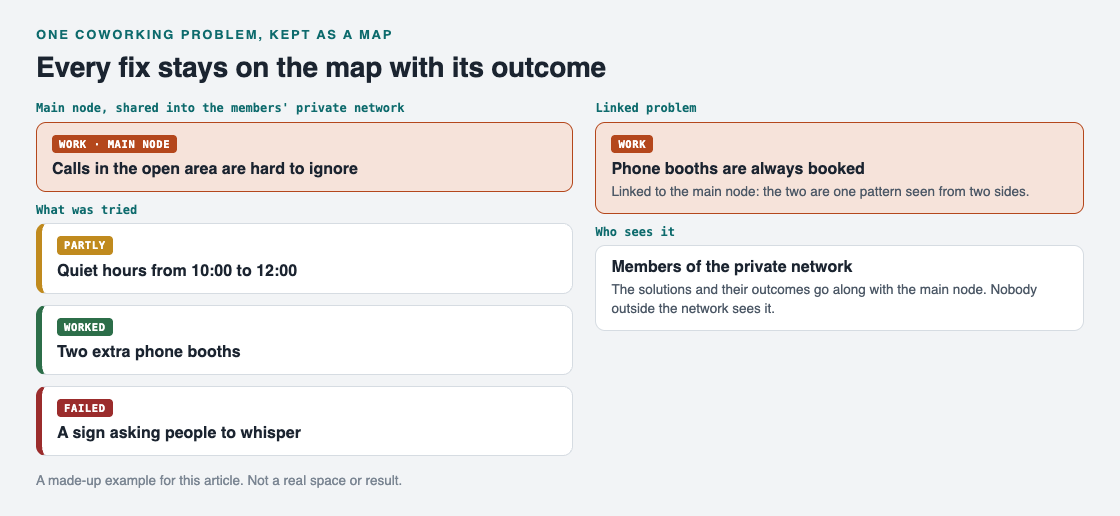
A made-up example: one problem, three fixes and their outcomes.
Think of a map rather than a spreadsheet. Each problem is a node. Under it sit the solutions people have tried, marked as worked, partly or failed. Problems that belong together are linked.
Problem Graph is built this way. You write a problem down in one line, attach the solutions you try and what happened, and link problems that belong together. The graph keeps the record. It is a journal that draws itself, so you do not have to organise anything by hand.
A small example for a coworking space (made up, to show the shape; not a real space or result):
- Problem: Calls in the open area are hard to ignore.
- Solution tried: Quiet hours from 10:00 to 12:00. Outcome: partly.
- Solution tried: Two extra phone booths. Outcome: worked.
- Solution tried: A sign asking people to whisper. Outcome: failed.
- Linked problem: Phone booths are always booked.
Anyone reading this sees the whole story at a glance. The failed sign stays on the map, and that matters. As the product itself puts it, a solution that failed stays visible, which is what the next person needs to know.
How to set up a shared problem list step by step

The three ways to keep a problem: only you, people you choose, or everyone.
You can do this in an afternoon. One person does the setup, and the rest of the space reads the result.
- Create an account. You can look around without one, but you need a username and a password to add problems.
- Write the first problem. One line. Put it in the Work lane, since coworking issues are about how people work. It lands on the graph when you press Enter.
- Mark it as a main node. Only a main node can be shared. When you share it, its solutions, their outcomes and the requirements they need go along. Problems you only link to it stay on your own graph.
- Create a private network. Name it after your space. Give the invite code to the members you want. The app says anyone with the invite code can join, so pass the code on carefully.
- Share the main node into the network. Members see it. Nobody outside the network does.
- Keep the record current. As you try fixes, add them under the problem and record what happened. Because solutions and outcomes travel with the main node, members see the results, not only the complaint. Link related problems on your own graph, such as the booth shortage and the noise, so the pattern shows on the map.
The filters help later. You can view Mine, Network or All shared, and a List view sits beside the map for people who prefer rows to nodes.
If you want to try this before inviting anyone, the empty graph offers a "Load example set" and a "Load example network" button. They show how a filled graph looks.
Turning complaints into countermeasures and checking the result
A complaint is a problem. A countermeasure is the specific thing you do about it. Our post on what a countermeasure is and how to pick one goes deeper, but the short version is this: pick a fix small enough to try this week.
For the booth problem, you could try three different ones, one at a time:
- A 30 minute limit posted on the door.
- A sign-up sheet at the desk.
- Moving calls to a set window.
Add each as a solution under the problem. Mark the one you are trying. After two weeks, record the outcome: worked, partly or failed. Do not skip this step. A fix without an outcome is just an opinion.
Problem Graph can also suggest new solutions. The AI proposes ideas grounded in what worked for others on similar problems. Treat these as proposals to test, not answers. You still decide what is worth a trial.
The same habit works in other places. A sleep log and a houseplant journal both rest on the same idea: change one thing, write down what happened.
Rules that keep the list fair and useful
A shared list can go wrong if it becomes a place to settle scores. A few rules keep it useful:
- Write about the situation, not the person. "Calls in the open area" not "Dana is loud."
- One line per problem. If it needs a paragraph, it is probably two problems.
- Every solution gets an outcome. No open trials that last for months.
- Failed solutions stay. Never delete them to make the list look better.
- Link before you duplicate. Check whether the issue is already on your graph, then link the related problem to it instead of writing it twice.
- Weigh the effect on everyone. A fix that helps the loudest group and hurts the quiet one is not a fix. A simple test: would you accept the rule if you did not know which member you would be?
If two people share one list, the same logic scales down. See one shared list for two for a smaller version of this setup.
Frequently asked questions
What are the most common problems in a coworking space?
Noise, booked-out phone booths and meeting rooms, temperature, kitchen mess and unreliable Wi-Fi come up most. Start with those, written as one line each.
How do members raise issues without confrontation?
Write the issue down as a situation, not a person, and share it as a main node in the private network. Members read it on the map, so nobody has to be called out in person.
Who should own the shared list?
Pick one person to run it. Any user can create a network and mark a main node, so that person can set up the network, share the problems and keep the outcomes current.
How often should the list be reviewed?
Every two to four weeks is a workable rhythm. At each review, record outcomes for fixes you tried and pick one new fix to test.
Get started with Problem Graph
Try Problem Graph: it is free, and you can look around the public network without an account. Write one problem down in a line and attach the first thing you will try. Then open your graph in the app and set up a private network for your space.
Comments
No comments yet.
Sign in or make an account to comment.