Credential stuffing: stop attackers reusing leaked passwords
Credential stuffing is the attack where someone takes username and password pairs leaked from another site and tries them on yours. It works because people reuse passwords. Your own app was never breached, yet accounts get taken over. This guide follows the OWASP Credential Stuffing Prevention Cheat Sheet and turns it into a plan you can roll out in layers.
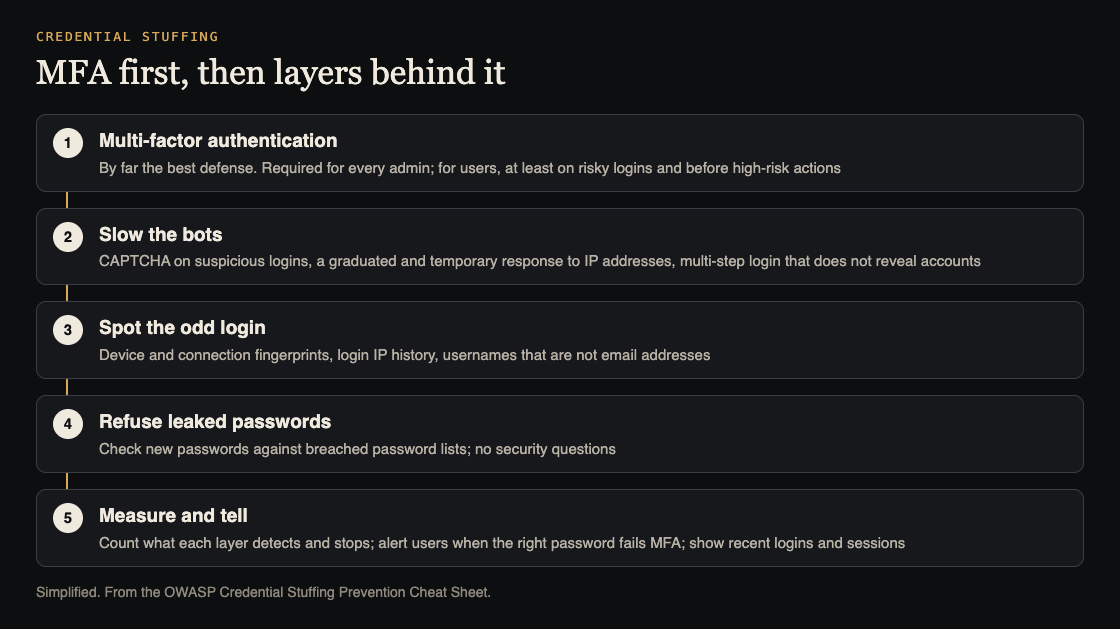
MFA first, then layers. Simplified from the OWASP Credential Stuffing Prevention Cheat Sheet.
Credential stuffing, spraying and brute force
OWASP separates three password attacks:
- Brute force: many passwords tried against one account.
- Credential stuffing: username and password pairs from another site's breach, tried against your login.
- Password spraying: one weak password tried against many accounts.
They look different in your logs, but the cheat sheet notes that the same defenses mostly cover all three. Plain per-account lockouts catch brute force well and spraying and stuffing poorly, because each account sees only a try or two. That is why login rate limiting is a start, not the whole answer.
Multi-factor authentication comes first
OWASP calls multi-factor authentication by far the best defense against most password attacks, and says to add it wherever you can. A stolen password alone no longer opens the account. With passkeys and other modern options, the cheat sheet says MFA is now practical for most apps.
If you cannot ask for a second factor on every login, ask for it when a login looks risky. OWASP's list of triggers:
- A new browser, device or IP address
- An unusual country or location, or one your users do not come from
- An IP address on a denylist, or one tied to proxies or VPN services
- An IP address that has tried to sign in to many accounts
- A login that looks scripted rather than human
You can also ask again in the middle of a session, before a high-risk action such as a large payment or an admin settings change. Our guide to transaction authorization covers that second check. Whatever you decide for everyone else, OWASP says you should be able to require MFA for all administrators.
Layered defenses when MFA is not enough
Where MFA is not possible, OWASP lists alternatives. None works as well alone, but several together give reasonable protection.
- CAPTCHA on suspicious logins. It slows automated tries, though tools and services exist that break CAPTCHAs. Watch solve rates: a sudden high rate can mean automated solving.
- A graduated response to IP addresses. Blocking an IP alone is easy to get around, since attack tools spread requests across proxy networks. Look at short bursts and long, low, steady volumes, and at whether an address belongs to a home connection or a hosting provider. OWASP gives an example: require every login from a hosting provider to solve a CAPTCHA. Make blocks temporary.
- Device and connection fingerprints. Browser, system and language from headers, plus more from JavaScript, form a device fingerprint. If it does not match the account's known devices, ask for more proof. How a connection is made can expose a script that claims to be a phone. Fingerprints can be faked, so treat them as a signal.
- Usernames that are not email addresses. Most leaked lists hold emails. Asking users to pick a username makes leaked pairs less useful. A generated username must not be predictable.
- Multi-step login. Asking for the username and password on separate steps doubles the attacker's work, as long as the first step does not reveal which accounts exist.
- A JavaScript check. Many tools post straight to your login without running scripts. OWASP warns that blocking visitors without JavaScript hurts accessibility, including for screen reader users.
- Checking for breached passwords. When a user sets a new password, check it against known breached password lists. Free and paid services exist.
Do not add security questions. OWASP says not to use them, and notes that a second knowledge factor, such as a PIN, is not MFA.
Measure every defense
OWASP asks for one more thing that teams often skip: each defense should report how many attacks it detected and how many it stopped, with a filter by IP address. Those numbers show when a defense quietly fails, when a new attack starts, and whether a change helped.
Plan for defenses failing, too. Client-side checks such as fingerprints and JavaScript challenges can be bypassed, so a server-side layer must sit behind them. If different teams run different defenses, they should agree before changing one. Keep these counts away from anything an attacker can write into, as our guide to log injection explains.
Tell users when something is wrong
The cheat sheet is specific about notifications. Do not alert someone for every wrong password. Do alert them when the correct password was entered but the MFA check then failed: their password is known, and they should change it. Keep in mind their email may be compromised too, since passwords are reused.
Show the date, time and location of the previous login when someone signs in. If your app allows several sessions at once, let users see them all and end the ones they do not recognise. Our post on password storage covers the other side: keeping your own users' passwords safe if your database leaks.
Worked example: a layered plan for one login form
Here is a plan for an app with ordinary users and a handful of admins.
- Week one: admins. Require MFA for every admin account, with no exceptions.
- Week one: counts. Log failed and successful logins per IP and per account, and chart the totals daily.
- Week two: risky logins. Offer MFA to every user. Ask for it, or a CAPTCHA, when a login matches OWASP's triggers: a new device, an IP that tried many accounts, a hosting provider address.
- Week two: breached passwords. Check new and changed passwords against a breached password list.
- Week three: notices. Alert users when the right password fails MFA, and show recent logins and active sessions on the account page.
- Every month: review. Read the counts. Which layer stopped most attempts? Did any layer stop nothing? Adjust thresholds, and remove temporary blocks that are no longer needed.
Have someone test it
The whitehatstoic home page lists "audit sign-in and payments" among what it does, and its cybersecurity and AI safety testing includes a web app and API review, a written report with fixes, and a retest after you apply them. It is scoped after a short call. No test finds every weakness, but a focused one shows which of these layers actually hold.

Frequently asked questions
Does rate limiting stop credential stuffing?
Not on its own. Attack tools spread requests over many IP addresses, so each address stays under a simple limit. OWASP recommends MFA first, then several layers together.
Is a CAPTCHA enough?
No. It slows automated logins, but tools and services exist that solve CAPTCHAs. Use it on suspicious logins as one layer among several.
Should I alert users about failed logins?
Not for every wrong password. Alert them when the right password was used but the MFA check failed, since that means their password is known.
Get started
Turn on MFA for your admins today, and start counting failed logins per IP and per account so you can see the next attack.
Building something that has to be safe? Book a meeting with whitehatstoic: tell us the product, the deadline and your biggest worry, and we reply with a plan and a price.
Comments
No comments yet.
Sign in or make an account to comment.