Cross-site leaks: stop other sites reading your app's state
Cross-site leaks let another website learn private things about your users without ever reading one of your pages. Is this visitor signed in to your app? Are they an admin? Is a given email address in their contacts? This guide explains how cross-site leaks work, which settings close them, and how to test your own app in an afternoon.
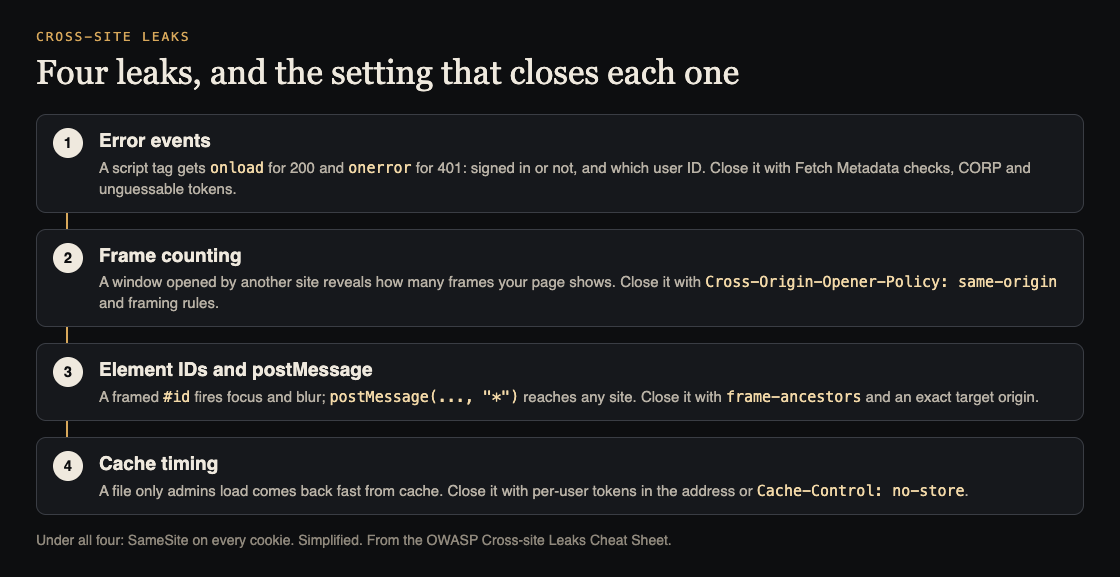
Four common leaks and their fixes. Simplified from the OWASP Cross-site Leaks Cheat Sheet.
What cross-site leaks are
Browsers keep sites apart with the same-origin policy. Two addresses share an origin only when the protocol, host and port all match. Any site can send a request to your app, but it cannot read the reply.
Many teams stop there. The OWASP Cross-site Leaks Cheat Sheet explains why that is not enough. An attacker's page cannot see your response, but it can see small side effects of it: whether it loaded or failed, how many frames it holds, how fast it arrived. Each side effect answers one yes or no question about the user. OWASP also calls this a browser side-channel attack.
The whole attack runs in the victim's own browser, the same as cross-site scripting. Sometimes the victim has to stay on the attacker's page for a while for it to work.
MDN's page on XS-Leaks lists what can leak: whether the user has visited your site, whether they are signed in, their user ID, and what they searched for recently. It also says why that matters. Someone may have an account they do not want known, for example on a site about a medical procedure. And knowing a person has an account, with their user ID, makes a later phishing email far more convincing.
How an attack runs
The pattern is always the same:
- The attacker builds a page and gets your user to open it, for example through an email or a shared post.
- That page makes the user's browser send requests to your app. The browser may attach the user's cookies.
- The page watches a side effect it is allowed to see and compares two outcomes, such as signed in versus signed out.
MDN stresses that cross-site leaks are not one trick. They are a family of attacks that use the ways browsers let sites frame each other, load each other's files and open each other in new windows. That is good news for defenders: a few settings close many of them at once.
Four leak techniques to know
Error events
OWASP's example: /api/user/1234 answers 200 for the signed-in user and 401 for anyone else. The attacker's page loads each ID in a <script> tag. A 200 fires onload, an error fires onerror. A simple loop finds the user's ID without reading any response.
Frame counting
Picture a search page that shows a frame only when there are results. The attacker opens it with window.open() and reads how many frames the window has. One frame means the searched email is in the user's data. MDN adds that the same count can come from an <iframe> the attacker embeds.
Element IDs and postMessage
If your page has <button id="pro">, adding #pro to the address makes the browser focus it. An attacker who frames that address can listen for the matching blur event and learn the user has a pro account. Separately, a postMessage call with * as its target origin hands the message to whatever site sits in that window.
Cache timing
A file loaded from the browser cache arrives much faster than one from the server. If an image only admins ever load comes back fast, the user is probably an admin. OWASP notes that a short time alone does not prove a cache hit, so the attacker has to measure with care.
MDN also describes a redirect leak: the attacker's page sets its own Content Security Policy to allow only one address on your site, then watches whether your server redirects away from it.
Close the leaks with cookies, headers and framing rules
OWASP's quick recommendations come down to five moves.
- Set SameSite on every cookie.
Strictnever sends the cookie from another site.Laxsends it only on top-level GET navigation. Chromium browsers treat a cookie with no SameSite asLax. OWASP calls SameSite strong defense in depth, but it does not stop window-based leaks such as frame counting. Our guide to session cookie security covers the other cookie settings. - Decide if anyone may frame you. If not, send
Content-Security-Policy: frame-ancestors, orX-Frame-Optionsfor old browsers. That blocks the element ID trick and protects against clickjacking too. Our Content Security Policy guide shows how to write one you can keep. - Use Fetch Metadata. The browser adds
Sec-Fetch-Site(cross-site, same-origin, same-site or none) andSec-Fetch-Destto requests. Your server can answer 403 when a sensitive endpoint is called cross-site or asked to load in an iframe. OWASP warns to check your users' browsers send these headers and to plan a fallback when one is missing. MDN's Sec-Fetch-Site reference lists the values. - Send CORP on private files.
Cross-Origin-Resource-Policy: same-originorsame-sitestops the browser loading them inside another site's page, even images. - Send COOP on your pages.
Cross-Origin-Opener-Policy: same-originkeeps another site's window from reaching yours. In OWASP's example, the frame count read then fails because the opener gets nothing back.
Two more fixes target single techniques. For postMessage, always name the exact target origin, never *. For cache timing, either add a long, unpredictable token per user to the file's address, or send Cache-Control: no-store on files you want to protect and accept the slower loads.
Tokens also help against error-event leaks: a sensitive endpoint that requires a long, unique token, checked by the server, cannot be guessed in a loop. OWASP is honest that this takes real work to build well.
These headers sit beside the ones in our list of security headers for web apps, and Fetch Metadata pairs well with CSRF protection, since both ask where a request came from.
Worked example: test one endpoint in two states
Here is a test you can run on your own app. Take one endpoint whose answer depends on the user, say /api/me or an admin page.
- List state-dependent addresses. Account pages, admin routes, search pages, and any API that answers differently for different users.
- Read the headers. In your browser's developer tools, check each one for SameSite on the session cookie,
frame-ancestors, CORP and COOP. A missing header is your first finding. - Build a small test page on another origin. A local HTML file served on a different port is enough, since a different port is a different origin. Load the endpoint in a
<script>tag and logonloadoronerror. Open a page withwindow.open()and log its frame count. - Run it in two states. Once signed in and once signed out. Then with a search that matches and one that does not.
- Compare. Any steady difference between the two runs is a leak.
- Fix and run it again. Add the defense from the section above, repeat the same two runs, and confirm the difference is gone.
Write each result down where the team can see it, with the endpoint, the side effect and the fix. Next release, run the same page again.
When to ask for a second pair of eyes
Cross-site leaks hide in pages you rarely think about: a search result count, an image only admins load, a popup that talks back with postMessage. whitehatstoic runs cybersecurity and AI safety testing on web apps and AI systems: a web app and API review, a written report with fixes, and a retest after you apply them. The work is scoped after a short call. No test finds every weakness, but a focused one checks the pages that matter most.

Frequently asked questions
Is a cross-site leak the same as CSRF or XSS?
No. CSRF makes the user's browser perform an action, and XSS runs the attacker's script inside your site. A cross-site leak only learns facts about the user from side effects, without changing anything or running code in your site.
Do SameSite cookies stop every cross-site leak?
No. OWASP calls them strong defense in depth, but window-based leaks such as frame counting can still work. Pair SameSite with COOP, framing rules and Fetch Metadata checks.
What if a request arrives with no Sec-Fetch-Site header?
Plan for it. OWASP advises checking that your users' browsers support Fetch Metadata and adding a fallback in code for requests that do not carry the headers.
Does blocking cross-site requests break links from other sites?
It can if you block everything. Apply the check to sensitive endpoints, as in OWASP's examples, and test the flows people reach from outside, such as sign-in and shared links.
Get started
Start with three changes this week: SameSite on the session cookie, frame-ancestors on your pages, and COOP on your HTML. Then run the two-state test on your most private endpoint.
Building something that has to be safe? Book a meeting with whitehatstoic: tell us the product, the deadline and your biggest worry, and we reply with a plan and a price.
Comments
No comments yet.
Sign in or make an account to comment.