Cryptographic storage: encrypt sensitive data at rest
Cryptographic storage is how your app protects sensitive data while it sits in a database, a file or a backup. Turning on "encryption at rest" is often where teams stop, but it answers only one of the questions that matter. This guide follows the OWASP Cryptographic Storage Cheat Sheet: what to store, where to encrypt, which algorithms to use, and where the keys should live.
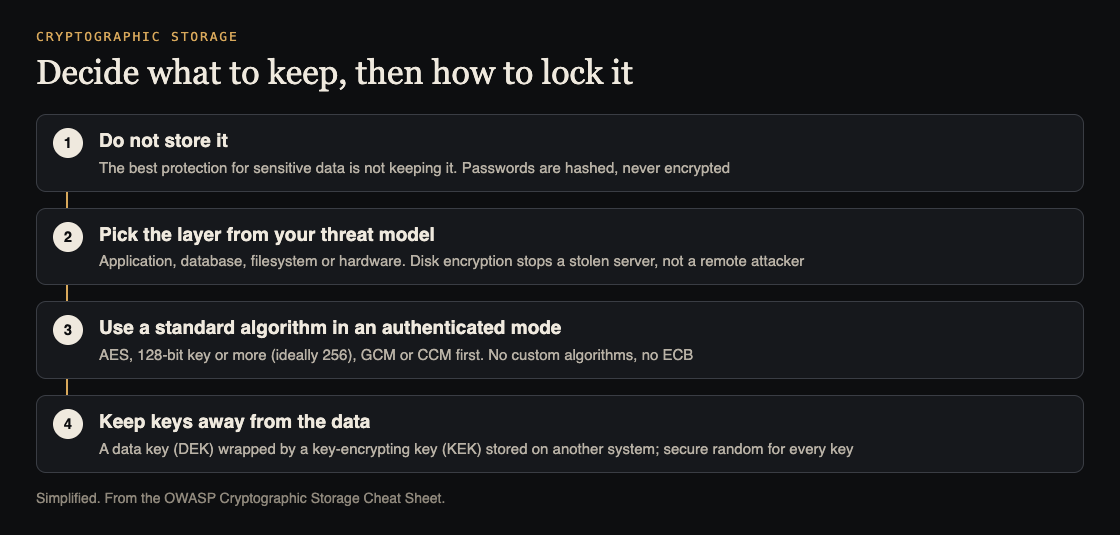
Four decisions, in order. Simplified from the OWASP Cryptographic Storage Cheat Sheet.
Start with who you are protecting the data from
OWASP begins with architecture, not algorithms. Before you encrypt anything, write down who you are trying to keep the data away from. A thief who walks off with a disk? An attacker who gets into the server over the network? Someone who finds a SQL injection bug? A copy of a backup left somewhere it should not be?
Each answer leads to a different design. If you have not done this yet, our post on threat modeling for a small team takes an afternoon.
One rule comes before all the others: passwords are not encrypted at all. OWASP says to store them with a secure password hashing algorithm, never reversible encryption. Our guide to password storage covers that.
The best encryption is not storing it
OWASP is blunt: the best way to protect sensitive information is not to store it in the first place. The cheat sheet says this applies most often to payment card details, which attackers prize and which come with strict storage rules.
Go through your tables and ask of each sensitive field: do we need to keep this? Could a payment provider hold it instead? Could we keep only the last few digits, or delete it after a set time? Every field you drop is one you never have to encrypt, rotate keys for, or explain after a breach.
Cryptographic storage happens at different layers
OWASP lists four places encryption can happen:
- The application, which encrypts a field before it ever reaches the database.
- The database, through its own transparent encryption feature.
- The filesystem, through disk or volume encryption.
- The hardware, such as self-encrypting drives.
The right layer depends on your threat model. OWASP's example: hardware encryption protects well against someone stealing the server, but gives no protection if an attacker compromises it remotely. If your worry is a remote attacker or a SQL injection bug, only encryption in the application, with keys the database cannot reach, keeps the data unreadable.
Algorithms and modes
The cheat sheet's choices are short and specific:
- Symmetric encryption: AES with a key of at least 128 bits, ideally 256.
- Modes: use an authenticated mode where available, which also detects tampering. GCM and CCM are the first choice. If neither is available, CTR or CBC with separate authentication, such as Encrypt-then-MAC. Do not use ECB outside very specific cases.
- Public-key encryption: use a maintained library with an established hybrid scheme, such as Hybrid Public Key Encryption (HPKE). If RSA must be used, the key should be at least 2048 bits, with OAEP padding.
- Custom algorithms: OWASP's whole section reads "Don't do this."
Let the library generate initialization vectors and other details. OWASP notes these should be handled automatically.
For data that must stay secret for many years, OWASP adds a note: RSA and elliptic curve schemes are not post-quantum secure. Where post-quantum protection is required, use a standardized mechanism such as ML-KEM, usually alongside a classical algorithm during the move. It protects how the key is shared; it does not replace AES for the data itself.
Random numbers that cannot be guessed
Encryption keys, initialization vectors, session IDs, CSRF tokens and password reset tokens all need randomness an attacker cannot predict. OWASP separates two kinds:
- Ordinary pseudo-random generators are fast and fine for shuffling a list, but must never be used for anything security related.
- Cryptographically secure generators are slower and safe for keys and tokens.
In Node.js, OWASP lists Math.random() as unsafe and crypto.randomBytes(), crypto.randomInt() and crypto.randomUUID() as secure. In Python, use the secrets module, not random. The cheat sheet has the list for other languages.
Be careful with UUIDs as tokens. Version 1 UUIDs are built from a timestamp and the machine's network address, so they are not random. Version 4 UUIDs are random, but whether that randomness is secure depends on the implementation.
Keep keys away from the data
Encrypted data is only as safe as its key. OWASP calls key storage one of the hardest problems, because the app always needs some access to the keys.
- Use a proper key store where you can: a hardware security module, a virtual one, or your cloud provider's key vault or secrets service.
- If you cannot, follow the basics: no keys in source code, no keys in version control, restrictive permissions on configuration files, and avoid environment variables, which can leak through debug pages or process files. Our post on secrets management goes further.
- Separate keys from data. If the data is in the database, keep the key elsewhere, so one flaw such as SQL injection does not hand over both.
- Wrap the data key. Encrypt the data with a data encryption key (DEK), and encrypt the DEK with a key encryption key (KEK) stored on another system. The KEK should be at least as strong as the DEK.
- Plan rotation now. OWASP says to rotate on a suspected compromise, after a set period, before the mode's usage limits, or when a new attack appears, and to have the rotation code ready before you need it.
Last, OWASP asks for defense in depth: design the app to stay secure even if the cryptography fails. Keep strong access control on encrypted data, and do not rely on encrypted values in URLs.
Worked example: one table of sensitive fields
Say your app has a customers table with names, addresses, a tax ID and a stored card number.
- Drop. Hand card storage to your payment provider and keep only its reference. Delete the stored card numbers.
- Decide the threat. Your worry is a SQL injection bug or a leaked backup. Disk encryption alone does not cover that, so encrypt the tax ID in the application.
- Encrypt. Use your language's standard library or a maintained crypto library: AES-256 in GCM mode, with the library generating the IV.
- Keys. Generate the DEK with a secure random function. Wrap it with a KEK held in your cloud key vault, not in the database or the code.
- Rotation. Store a key ID beside each encrypted value, and write and test the script that re-encrypts rows under a new key.
- Check. Search the code for
Math.randomand any home-made encryption, and replace each.
Frequently asked questions
Is database encryption at rest enough?
It depends on your threat model. OWASP notes that lower-level encryption protects against physical theft, not an attacker inside the running system; for that, encrypt in the application with keys kept elsewhere.
Should I encrypt passwords?
No. OWASP says passwords should be hashed with a secure password hashing algorithm, never stored with reversible encryption.
Which AES mode should I use?
An authenticated mode, with GCM or CCM as the first choice. Avoid ECB.
Get started
List every sensitive column in your database today, and mark each one "drop", "encrypt in the app" or "fine as is". The list is the plan.
whitehatstoic's cybersecurity and AI safety testing includes a web app and API review, a written report with fixes, and a retest after you apply them, scoped after a short call. No test finds every weakness, but a review shows where keys and data actually sit.

Building something that has to be safe? Book a meeting with whitehatstoic: tell us the product, the deadline and your biggest worry, and we reply with a plan and a price.
Comments
No comments yet.
Sign in or make an account to comment.