CSRF protection: test forms and APIs for forged requests
Your user is signed in to your app in one tab. In another tab, they open a page that quietly submits a form to your app. Their browser sends the session cookie along, and your app changes their email address. That is cross-site request forgery (CSRF). CSRF protection is the set of checks that tells a real request from a forged one, and this guide shows you how to test your own forms and APIs for it and which fixes to apply, using the OWASP prevention advice.
How CSRF works
The OWASP Cross-Site Request Forgery Prevention Cheat Sheet puts it simply: a malicious site, email, blog or message tricks a signed-in user's browser into an unwanted action on a site that trusts it. Browsers add cookies to requests automatically, so an unprotected app cannot tell a request the user meant from one another page sent.
The attacker never sees the response. They do not need to. CSRF is about actions: OWASP lists changing a password, making a purchase, moving money, or anything else the user is allowed to do.
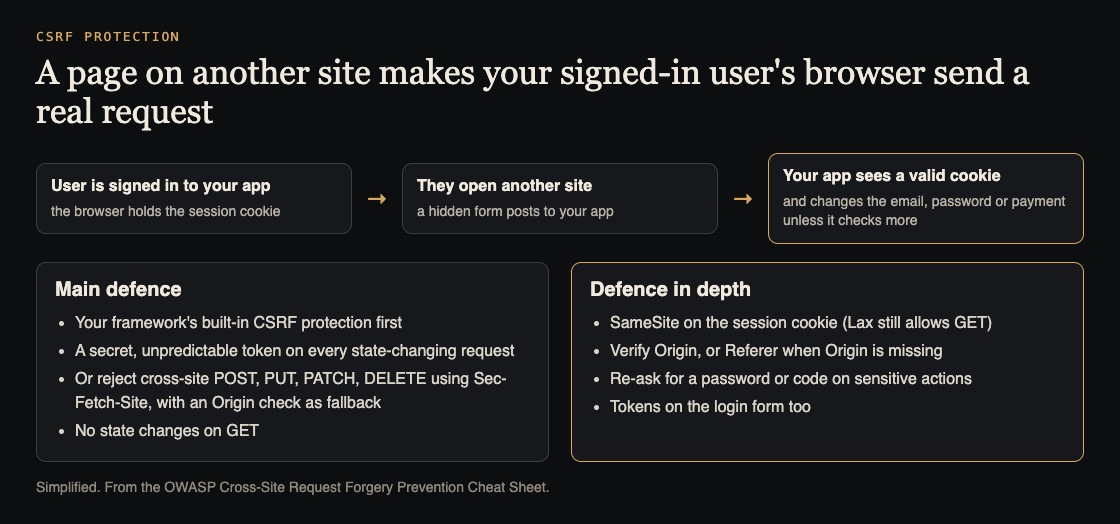
How a forged request arrives, and the defences in order. Simplified from the OWASP CSRF Prevention Cheat Sheet.
Where to look: every request that changes something
List every endpoint that changes state: profile and email changes, password changes, payments, invites, deletes, settings, and API calls your front end makes. Note how each is authenticated. CSRF matters most where the browser sends credentials on its own, which usually means cookies.
Then note the method. OWASP's rule is plain: do not use GET for state-changing operations. A GET that deletes, subscribes or confirms is the easiest CSRF target there is, because a link or an image tag can trigger it.
A worked CSRF test: the email-change form
Run this on staging, with a test account. Sign in as the test user. Then, in the same browser, open a small HTML file saved on your own machine or a test host you control:
<form action="https://staging.example.com/account/email" method="POST"><input name="email" value="tester+csrf@example.com"></form><script>document.forms[0].submit()</script>
Now check the account. If the email changed, the form has no working CSRF protection. If it was refused, note how: a missing token, a failed origin check, or the browser not sending the cookie. That last one is SameSite doing its job, and it is not enough on its own, as the next sections show.
Repeat the test with small changes:
- No token. Remove the token field from a real request and send it. It must be refused.
- Wrong token. Send another session's token, or a random value. It must be refused.
- GET instead of POST. Send the same fields as a GET. If it works, the endpoint is open to a link.
- Origin. Send the request with an
Originheader from another site, then from a look-alike such ashttps://example.com.attacker.test. Both must be refused. - The login form. Try signing the browser in to an account you control from another page. OWASP warns that login forms can be attacked too: a victim then types their card details into the attacker's account.
Write each result down with the endpoint and the method, so the retest after fixes is a quick rerun.
CSRF protection, in OWASP's order
1. Use your framework's built-in protection. OWASP says to check for it first and use it. Built-in defences are maintained by the framework's authors and avoid subtle mistakes. Then check it is switched on for every state-changing route, including the API routes.
2. If there is none, add tokens. Put a CSRF token on every state-changing request and check it on the server. Tokens must be unique per user session, secret and unpredictable. Apps that keep sessions on the server use the synchronizer token pattern; stateless apps use a signed double-submit cookie. For front ends that call an API without forms, OWASP describes sending the token in a custom request header.
3. Or use Fetch Metadata, with a fallback. Modern browsers send Sec-Fetch-Site. OWASP's policy is to reject POST, PUT, PATCH and DELETE when it says cross-site. Because some older browsers do not send it, a fallback origin check is required.
4. Never change state on GET. If you must, protect those routes as well.
Defence in depth: SameSite and origin checks
OWASP asks for at least one defence-in-depth layer on top of the main one.
- SameSite cookies. Setting
SameSite=LaxorStricton the session cookie stops most cross-site sends. OWASP lists its gaps: Lax still sends the cookie on top-level GET navigations, so a state change on GET stays open; SameSite works on the whole registrable domain, so other subdomains count as the same site; and it does nothing against client-side CSRF. Cookie settings are covered in more depth in session cookie security. - Origin checks. If the
Originheader is present, it must match your own origin exactly; if not, check the host inReferer. A missing header orOrigin: nullis not proof of a same-origin request. - Ask the user again. For password changes and money transfers, OWASP suggests re-entering the password or a one-time code. It warns against CAPTCHA for this.
One more warning from OWASP: cross-site scripting can defeat every CSRF defence, so CSRF work and XSS work go together. If your API is called from other sites, read CORS misconfiguration too, since loose CORS settings change what other sites can do.
Keep it fixed
Turn the five tests above into automated tests for each state-changing route: no token, wrong token, GET, foreign origin and look-alike origin must all be refused. Put them beside your other security tests in CI, so a new route that forgets the protection fails the build.
Frequently asked questions
Is SameSite enough CSRF protection on its own?
Usually not. OWASP treats it as defence in depth: Lax still allows GET navigations, it covers the whole registrable domain, and it does not stop client-side CSRF.
Do APIs that use tokens in headers need CSRF protection?
CSRF depends on the browser sending credentials by itself, which is what cookies do. If your API reads a token your own code adds to each request, a forged cross-site request does not carry it; if it relies on cookies, it needs CSRF protection.
Can a login form be attacked with CSRF?
Yes. OWASP describes login CSRF, where the victim is signed in to the attacker's account, and recommends tokens on the login form through a pre-session.
Get started
Pick the one form that would hurt most if forged, usually the email or password change. Run the worked test on staging today. If the email changed, turn on your framework's protection for that route and run the test again.
If you want a second pair of eyes, whitehatstoic runs security tests on web apps and AI systems, including web app and API review, with a written report, fixes and a retest after fixes. Testing finds weak spots; it cannot promise to find every one. Testing is scoped after a short call: book a meeting about security testing.
Building something that has to be safe? Book a meeting with whitehatstoic: tell us the product, the deadline and your biggest worry, and we reply with a plan and a price.
Comments
No comments yet.
Sign in or make an account to comment.