Cube rotations x, y and z: turning the whole puzzle
Cube rotations are the letters x, y and z in cube notation, and they turn the whole puzzle instead of one layer. This guide shows which way each one goes, which face ends up where, and how to read primes and doubles. Then it tests the same idea in 3D 2048, a 2048 game on a cube, where a whole-cube turn is free.
Cube rotations vs layer turns
A layer turn moves one slice. R turns the right face, U the top face, F the front face, and the rest of the cube stays still, so the colours mix.
A rotation moves all three layers at once, the same way. Nothing mixes. You are holding the same cube in a new grip, and only your view changes. Wikipedia's article on the cube defines them in one line each: x rotates the entire cube on R, y on U, and z on F.
Do not mix them up with the lowercase letters r, u and f. Those mean a face turned together with the middle layer next to it, two layers at once, and today they are usually written Rw, Uw and Fw, with w for wide. Only x, y and z move the whole cube.
Where each face goes after x, y and z
Each rotation follows its face turn, so picture a rod through the cube and spin it the way that face turns.
- x follows R. The rod runs from left to right. The front goes to the top, the top to the back, the back to the bottom, and the bottom comes to the front. Left and right stay where they are.
- y follows U. The rod runs from top to bottom, and the cube spins clockwise as you look down on it. The right face comes to the front, the front goes to the left, the left to the back, the back to the right. Top and bottom stay.
- z follows F. The rod runs from front to back. The top goes to the right, the right to the bottom, the bottom to the left, the left to the top. The front still faces you, turned a quarter.
A quick check you can do with a real cube: make an R turn and watch which way the right face moves, then move the whole cube the same way. That is x.
Primes and doubles: x', y2 and friends
Rotations take the same marks as face turns. A plain letter is a quarter turn in its face's direction. A prime, as in x', is a quarter turn the other way. A 2, as in y2, is a half turn, which ends in the same place whichever way you go.
Here is a worked example. Read y2 R U R':
- Spin the whole cube half a turn on its top-to-bottom rod, so the back face now faces you.
- Turn R: the face that is on your right now, not the one that was there before.
- Turn U, then R' (the right face the other way).
The rule in step 2 is the one beginners miss: every letter after a rotation means the face in its new position.
Rotations also explain one fact about slices. An x moves all three layers between left and right: the right face the R way, the left face the L' way, and the middle layer between them, M, which turns the same way as L, so M'. In other words, x is R, M' and L' done at once.
How many ways can you hold a cube?
Rotations only change how you hold the cube, so it is worth counting the grips. Pick one colour: it can face you from any of 6 sides. Then a neighbouring colour can sit in any of 4 places around it, and that fixes the rest. That is 6 times 4, or 24 ways to hold the same cube, and x, y and z between them reach every one.
The same turn in 3D 2048, tested
3D 2048 puts the 2048 puzzle on a cube like a Rubik's cube, with six faces of nine squares. It has the same split between layers and the whole cube. A twist, dragging a row on the right face or a column on the top face, is a layer turn: it carries tiles to the next face. A turn, dragging the space around the cube or pressing Shift and an arrow key, is a rotation. The game's own tip says "Turning is free": a turn adds no points, counts no move and adds no tile.
To see which rotation each key makes, a script put a different tile on the centre of each face (2 in front, 4 on the right, 8 at the back, 16 on the left, 32 on top, 64 underneath) and pressed Shift with each arrow, starting fresh each time.
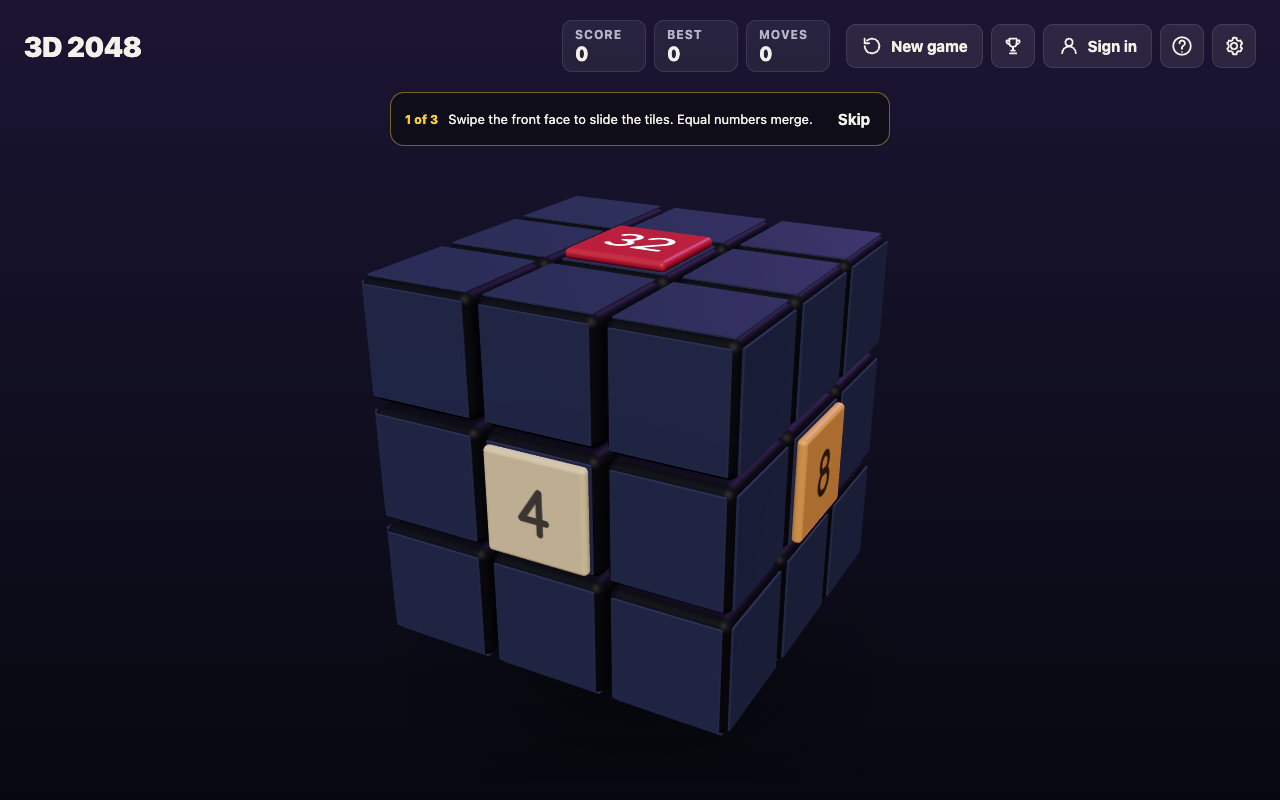
After Shift and Left: the 4 that sat on the right face is now in front, and Moves still reads 0.
- Shift and Left brought the right face to the front, the front to the left, the left to the back and the back to the right. Top and bottom stayed. That is a y.
- Shift and Right did the opposite: a y'.
- Shift and Up brought the bottom face to the front, the front to the top, the top to the back and the back to the bottom. That is an x.
- Shift and Down did the opposite: an x'.
Every time, Moves and Score stayed at 0, and four Shift and Left turns brought the cube back to where it started, just as four y turns do. A z turn was not tested.
Why a free rotation matters in the game
In 3D 2048 you slide only the front face, and new tiles land on the front while it has room. So a rotation changes where your next slide works and where the next tile goes, without costing anything. Use it to look before you spend a move: what is just over an edge, ready for an edge merge, or which side face holds the match for a front tile.
A rotation cannot make tiles, though. In a slides-only test, the front filled at move 46 while the other five faces sat empty, and turning to an empty face and sliding moved nothing. A twist is what carries tiles onto other faces; the guide to when to twist a row covers that choice, and cube notation for beginners covers the face letters.
Frequently asked questions
Is an x rotation the same as R and L' together?
Not quite. R and L' move the two outer layers the x way, but the middle layer stays behind. Add M' and you have a full x.
Why are some cube letters lowercase?
Lowercase r, u or f means a face and the middle layer next to it, turned together; today they are usually written Rw, Uw and Fw. Only x, y and z turn the whole cube.
How do I remember which way x, y and z turn?
Tie each to a face: x follows R, y follows U, z follows F. Make the face turn, then move the whole cube the same way.
Does turning the cube in 3D 2048 count as a move?
No. In the test, Moves and Score stayed at 0 after every Shift and arrow turn. Slides and twists each count one move.
Get started
Open the game, make a few slides, then press Shift and Left and watch the right face swing round to the front while Moves stays put. Then drag a row on the right face and see a tile ride round to a new face. That is the difference between y and a layer turn, in one minute.
Play 3D 2048 in your browser on a computer or a phone.
Comments
No comments yet.
Sign in or make an account to comment.