Customer complaints log for a small shop
A customer complaints log for a small shop is a single place where you write down every complaint, what you did about it, and whether the fix held. It does not need software or a manager. It needs a few fixed fields, one habit, and a weekly look back. This guide gives you a setup you can start today, with a template you can copy and a way to spot the problems that keep coming back.
Why a small shop needs a customer complaints log
In a small shop, complaints arrive in pieces. A customer mentions a sticky door to whoever is at the till. Someone else emails about a late order. A third person tells a friend instead of you. Each one feels small. Together they often point to one cause you could fix once.
Without a log, you depend on memory, and the loud complaint is easier to remember than the frequent one. A log gives you three things:
- A count. You can see that "wrong size in the bag" happened six times this month, not "a couple of times".
- A record of what you tried. You stop repeating fixes that already failed.
- A handover. A part-time staff member can read what happened on a shift they were not there for.
What to record for every complaint: the essential fields
Keep the fields few. If logging takes more than a minute, people skip it. These are enough:
- Date. The day the complaint came in.
- Channel. Counter, phone, email, review, social message.
- What happened, in one line. Write it from the customer's side: "Bread sold as fresh was stale by the afternoon."
- Category. Product, service, delivery, price, premises, staff. Pick a short list and stick to it.
- What you did right away. Refund, replacement, apology, nothing yet.
- Owner. The one person responsible for the follow up.
- Outcome. Did the fix work, partly work, or fail?
- Customer contact, only if needed. Leave it out unless you have to get back to them.
The outcome field is the one most logs miss. Without it you have a list of complaints. With it you have a list of fixes and how they went.
A simple customer complaints log template you can copy
Copy this block into a notebook page, a document, or a note on your phone. Fill one block per complaint.
- Date: 14 Oct
- Channel: Counter
- Complaint: Customer bought a gift card and it would not scan at checkout a week later.
- Category: Product
- Immediate action: Honoured the value in cash.
- Owner: Sam
- Next step: Check whether the card was activated at sale.
- Outcome: Partly. Activation was missed. Added a step to the till checklist. Watch for two weeks.
- Linked to: Earlier gift card complaint on 2 Oct.
Notice the last line. "Linked to" is how a log turns into a pattern finder. When a new complaint looks like an old one, write the old one's date next to it.
How to log complaints at the counter, by phone and online
At the counter
Deal with the customer first. Log it the moment they leave, before the next sale pushes it out of your head. One line is enough. You can fill in category and owner at the end of the day.
By phone
Repeat the problem back to the caller in one sentence. That sentence is your log entry. If you promise a call back, write the owner's name and the day you said you would call.
Online: email, reviews and messages
Online complaints already come in writing, so it is tempting to leave them in the inbox. Copy a one line summary into the log anyway. An inbox sorts by date. Your log should sort by problem.
Spotting repeat problems: grouping complaints by root cause
Categories tell you where complaints land. Root causes tell you why. "Delivery" is a category. "Orders packed after the courier's last pickup" is a root cause.
Once a week, read the past seven days of entries and ask one question of each: what would have to change so this never happens again? It is the idea behind the 5 whys, which the Lean Enterprise Institute describes as asking why again and again to get beyond the obvious symptoms to the root cause. Our 5 whys example shows it step by step. Then group entries that share an answer. You will often find that three complaints in different categories share one cause. A late delivery, a wrong item and a rude phone call might all trace back to one person covering the till and the packing bench at once.
A list makes this hard, because related entries sit far apart. This is where drawing it helps. In Problem Graph, each complaint is a problem node you write in one line and put in a lane, such as work. You link problems that belong together, and the map shows the cluster. The home page puts it this way: patterns show up on the map that never show up in a list.
A worked example. You write three problems:
- "Customer got the wrong colour mug"
- "Online order shipped two days late"
- "Phone rang out during the lunch rush"
You add a fourth problem, "One person covers till and packing 12 to 2", and link the first three to it. Now the root cause sits in the middle of the map with three complaints hanging off it. That is the problem worth fixing first.
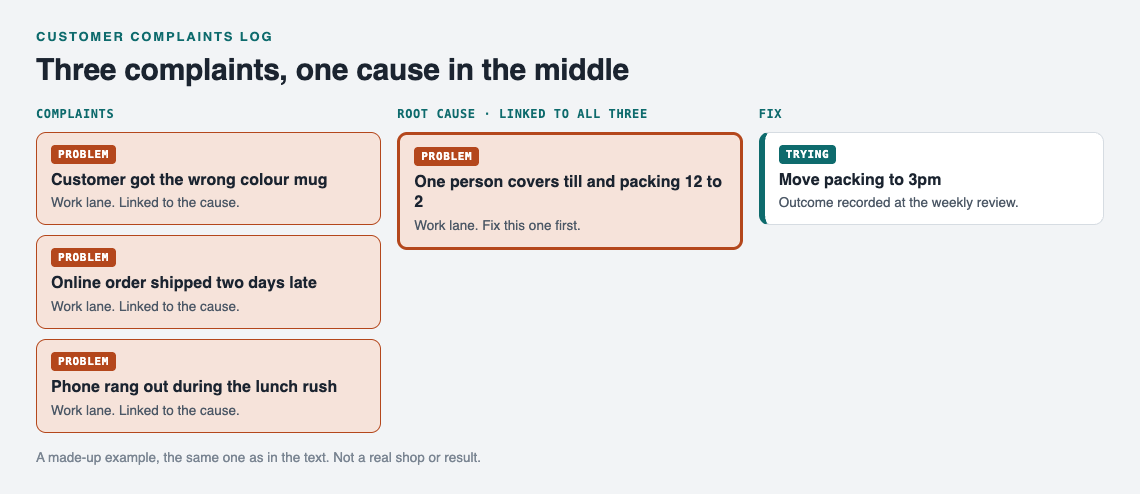
The made-up shop example as a map.
From complaint to fix: assigning owners and closing the loop
A complaint is closed when the cause is fixed and you have checked the fix, not when the customer stops talking. Closing the loop has four steps:
- Name one owner. "The team" is not an owner. Write a person's name in the log.
- Write the fix as something you will try. "Move packing to 3pm" is testable. "Be more careful" is not.
- Record the outcome. After a set period, mark it worked, partly or failed.
- Keep failed fixes. Do not delete them. They stop the next person from trying the same thing.
Problem Graph is built around steps two to four. You attach solutions to a problem as ideas, mark the ones you are trying, and record the outcome as worked, partly or failed. The page's line on this is worth repeating: "A solution that failed three times stays on the map as a failed solution, and that is exactly what the next person needs to know."
If you have staff, the person who keeps the log can create a private network, give them the invite code, and share a main node into it, such as "Lunch rush staffing". Members see that node with its solutions, their outcomes and the requirements they need. Problems you only linked to it stay private. Keep the invite code to your staff, because the app says anyone with the code can join. For a wider view of keeping fixes findable across a team, see a small team knowledge base for problems and fixes.
When you are stuck on a fix, the app can also propose suggestions grounded in what worked for others on similar problems. Treat these as ideas to test, not answers.
Common mistakes that make a complaints log useless
- Logging only the big ones. The small, frequent complaints are the ones a log is best at catching.
- Too many fields. If an entry takes five minutes, it gets skipped on a busy day.
- No outcome. A log with no outcomes cannot tell you which fixes worked.
- Blaming people in the entry. Write what happened, not who was careless. An entry should describe the problem, not judge a person.
- Never reading it. Put the weekly review in your calendar. Fifteen minutes is enough.
- Storing more customer data than you need. A name and phone number for a call back is usually plenty. Skip addresses and card details.
Frequently asked questions
How long should I keep customer complaint records?
Keep the problem and the fix for as long as they are useful, since that is your shop's learning. Customer contact details are only needed while a complaint is open; for what the rules say where you trade, ask your local consumer protection or trading standards body.
Should I use paper, a spreadsheet or an app?
Use whatever your staff will actually fill in. Paper is fastest at the counter, a spreadsheet is easy to sort, and a graph app like Problem Graph is better for linking related complaints and tracking which fixes worked.
How do I handle personal data in a complaints log?
Record the least you can. Write the problem without the customer's name where possible, keep contact details only for open complaints, and limit who can see the log. Problem Graph keeps problems private by default, and only a main node you choose to share goes to a network.
Get started
Open the app in your phone's browser. If the graph is empty, press "Load example set" to see how problems, solutions and outcomes look on the map. Then write today's first complaint as one line in the work lane, attach the fix you plan to try, and link it to any older complaint it resembles. Use the List view when you want the weekly review as a plain list, and the map when you want to see clusters.
To save your own problems, create an account with a username and a password. Your private problems follow you to any phone or computer you log in on, and nobody else sees them.
Try Problem Graph: it is free, and you can look around the public network without an account. Write one problem down in a line and attach the first thing you will try.
Comments
No comments yet.
Sign in or make an account to comment.