Database security: harden the database behind your app
Database security is about the layers around the database your app talks to: who can reach it, how the traffic travels, which account logs in and what that account may do. Most app teams think hard about SQL injection and much less about these. Yet a database that answers on the open internet, or an app that logs in as the all-powerful built-in account, turns one small bug into a full breach. This guide works through the OWASP Database Security Cheat Sheet, which covers SQL databases such as PostgreSQL, MySQL, MariaDB and Microsoft SQL Server.
Database security beyond SQL injection
Injection is about what your app sends to the database. The cheat sheet hands that to its own page, which we cover in SQL injection testing. Database security, in OWASP's sense, is everything else: the network, the connection, the accounts, the stored credentials and the server itself.
The two work together. If an injection bug slips through, the account your app uses decides what the attacker can do next. An account that can only read and change a few tables limits the damage. An account that owns the database, or is the instance's administrator, does not.
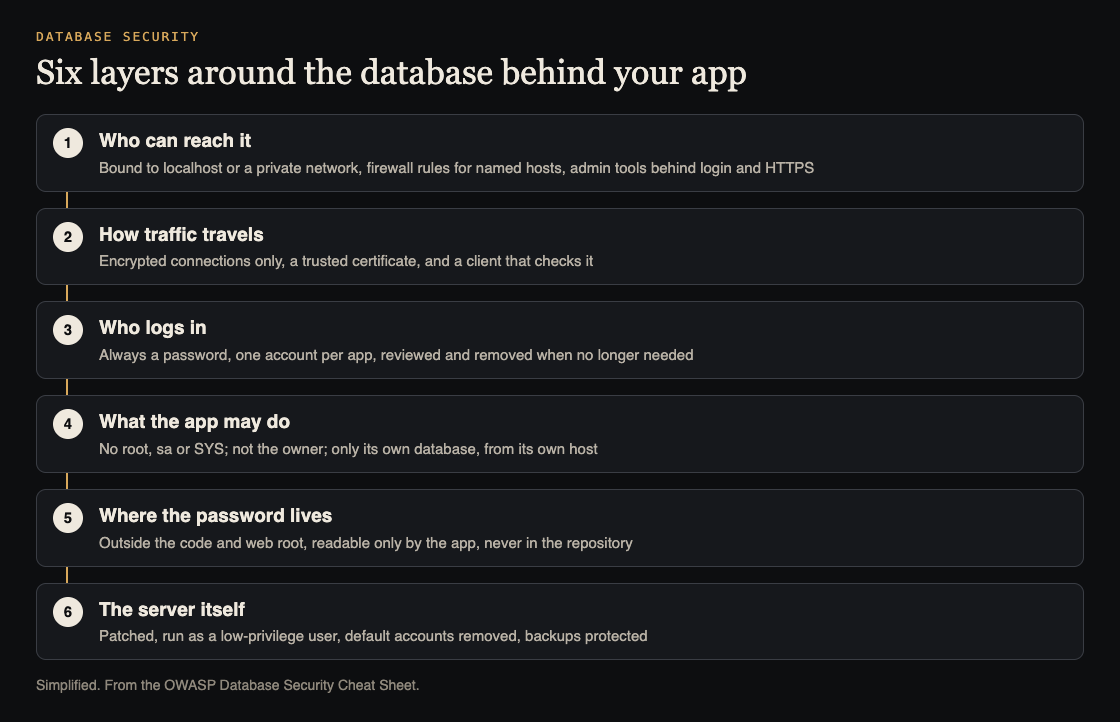
Six layers to check. Simplified from the OWASP Database Security Cheat Sheet.
Keep the database hard to reach
OWASP says the backend database should be isolated and should talk to as few hosts as possible. Depending on your setup, that means one or more of:
- turning off network access entirely and using a local socket file or named pipe;
- binding the database to localhost only;
- firewall rules that allow the database port only from specific hosts;
- putting the database on its own internal network segment, separate from the app server.
Web admin tools such as phpMyAdmin or pgAdmin need authentication, HTTPS and network limits of their own. And if your app runs on a machine you do not control, such as a desktop client, it must go through an API that enforces access control. OWASP says a thick client should never connect straight to the database.
Encrypt connections to the database
The cheat sheet warns that most databases start with unencrypted network connections. Some encrypt the login step, but the queries and results after it still travel in clear text. The fix has four parts: configure the database to accept only encrypted connections, install a trusted certificate on the server, connect from the app with TLS 1.2 or later and modern ciphers such as AES-GCM or ChaCha20, and make the app check the certificate rather than accept any. The same protocol and cipher rules as your website apply; see TLS settings.
One account per app, with the least it needs
The database should always require a login, even for connections from the same server. Each account gets a strong, unique password and belongs to a single application or service. Review accounts and permissions regularly, remove accounts when an app is retired, and change passwords when staff leave or a leak is suspected.
Then cut the account down. OWASP's rules that apply in every environment:
- Do not use the built-in
root,saorSYSaccounts. - Do not give the account admin rights over the database instance.
- Let it connect only from allowed hosts, usually localhost or the app server.
- Let it reach only the databases it needs, with separate databases and accounts for development, test and production.
- Grant only the permissions it needs. The account should not own the database, because that can lead to privilege escalation.
- Avoid database links; where you need one, give it the narrowest access.
Apps that hold sensitive data can go further, with table, column and row permissions, or by allowing access only through restricted views. If you use PostgreSQL row-level security to keep customers apart, remember that superusers and roles with BYPASSRLS skip it entirely; multi-tenant security covers that in detail.
Store the credentials outside the code
Database credentials should never be in the source code. OWASP says to keep them in a configuration file outside the web root, readable only by the users that need it, and never checked into a repository. Where your platform can encrypt or protect that file, use it. The wider habits, from vaults to rotation, are in secrets management.
Harden the server and protect the backups
The database server's operating system should start from a secure baseline such as the CIS Benchmarks. On the database itself, OWASP lists:
- install the security updates and patches;
- run the database service as a low-privilege user;
- remove default accounts and sample databases;
- keep transaction logs on a separate disk from the main data files;
- back up on a schedule, with the backups' permissions locked down and, ideally, encrypted.
Some engines have their own extras. For MySQL and MariaDB, run mysql_secure_installation to remove the default databases and accounts, and remove the FILE privilege so users cannot read or write files on the server. For Microsoft SQL Server, disable xp_cmdshell and other stored procedures you do not use.
Worked example: reviewing one app's database account
Say your app uses PostgreSQL and connects with a URL from its environment. Here is a review you can do in an hour, layer by layer.
- Reach. From a machine outside your network, try to connect to the database's host and port. It should not answer. From the app server, it should.
- Connection. Read the app's connection settings. Encryption should be required and the server certificate checked, not merely allowed. On the server, confirm unencrypted connections are refused.
- Account. Find the user name in the connection settings. If it is the built-in superuser, or the account that owns the database, that is the first fix: create a new account for the app with only the table permissions it uses.
- Scope. Check that development and production use different databases and different accounts, and that the production password is not used anywhere else.
- Credentials. Search the repository and its history for the connection string. If it is there, change the password and move it into protected configuration.
- Server and backups. Note the database version against the latest patch release, check that sample databases and unused accounts are gone, and confirm who can read the backups.
Write each finding down with its fix, change one layer at a time, and run the app's tests after each change, since a narrower account can break a feature that relied on too much access.
Frequently asked questions
Is it safe for my app to use the database owner account?
No. OWASP says the app's account should not own the database, since that can lead to privilege escalation; give it only the permissions it needs.
Do I need encrypted connections inside my own network?
Yes. The cheat sheet says to configure the database to allow only encrypted connections and to have the client check the certificate, because most defaults send queries and results in clear text.
Should development and production share a database account?
No. OWASP says development, test and production should each use separate databases and accounts.
Get started
Start with the account review above; it often finds the biggest risk first. If you want an outside look, whitehatstoic's cybersecurity and AI safety testing covers web app and API review, with a written report, fixes and a retest after fixes. whitehatstoic also builds apps on Next.js, Node and Postgres through its full-stack development service. No test can promise to find every weakness; the work is scoped after a short call.

Building something that has to be safe? Book a meeting with whitehatstoic: tell us the product, the deadline and your biggest worry, and we reply with a plan and a price.
Comments
No comments yet.
Sign in or make an account to comment.