Delta Time in Games: How a Tank Game Keeps Time
Delta time in games is the number of seconds that passed between the previous frame and the current one. You multiply your movement and timers by it, so the game runs at the same speed on a fast computer, a slow phone, or a machine that stutters for a moment.
This guide explains why you need it, how to measure it, where to use it, and what goes wrong when you use it badly. Near the end, we look at how two small browser tank games handle it, using their own code.
What delta time is
A game runs in a loop. Each pass through the loop reads input, updates the world, and draws a frame. Delta time, often written dt, is the real time that one pass took.
At 60 frames per second, dt is about 0.0167 seconds. At 30 frames per second, it is about 0.0333 seconds. If a frame hitches, it might be 0.1 seconds or more.
The idea is simple. Instead of saying "move 1 unit per frame", you say "move 60 units per second". Then each frame you move by speed * dt. The speed is now tied to the clock, not to how fast the computer happens to draw.
Delta time in games: the frame rate problem
Say a tank moves 1 unit every frame. On a machine that draws 60 frames per second, it covers 60 units in a second. On a machine that draws 30 frames per second, it covers 30 units. The same game is twice as slow for the second player.
Today, your game may run on a desktop with a high refresh monitor, a laptop on battery, and a phone, all in the same afternoon. You cannot assume the frame rate.
Now use delta time. The tank has a speed of 60 units per second.
- At 60 frames per second,
dtis 0.0167, so it moves 1 unit per frame. - At 30 frames per second,
dtis 0.0333, so it moves 2 units per frame.
The player on the slower machine sees choppier motion, but the tank still covers 60 units in a second. The rules of the game stay the same.
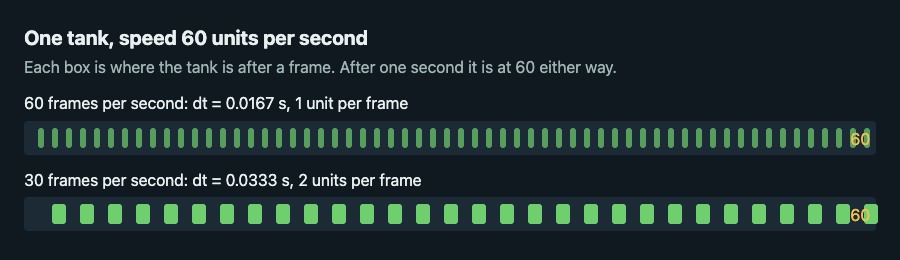
Same speed, different frame rates: a smaller step each frame at 60 frames per second, a bigger step at 30.
How to calculate delta time in a game loop
You read a clock at the start of each frame and subtract the last reading. In plain pseudocode:
- Store
last = now()before the loop starts. - At the top of each frame, set
current = now(). - Set
dt = current - last, thenlast = current. - Pass
dtinto every update function.
Most engines do this for you and hand you the value. If your clock gives milliseconds, divide by 1000 once, at the edge, so the rest of your code only deals with seconds.
Using delta time for movement, timers and animation
Movement
Multiply any speed by dt. If a position is x and the speed is in units per second, then x += speed * dt. Do the same for rotation, using degrees per second.
Timers and cooldowns
A timer counts down by dt each frame. A weapon cooldown looks like this: cooldown -= dt. When cooldown <= 0 and the player holds fire, shoot and set cooldown = 0.3.
Tank City Zero Day, the second game on Tank City Reboot, works this way. The wait between shots starts at 0.3 seconds, and each level of the Cache upgrade multiplies it by 0.75. That gives waits of 0.3, 0.225, about 0.17 and about 0.13 seconds. The timer counts down by the frame's dt, so a fast computer does not shoot faster than a slow one.
Animation
Keep an animTime that grows by dt, and pick the sprite from it. For example, flip the tread frame every 0.1 seconds instead of every 6 frames.
Fixed timestep vs variable timestep
What we have described so far is a variable timestep. Each update uses whatever dt the last frame took. It is easy, and it works for many games.
It has two weaknesses.
- Big steps break collisions. If a frame takes too long, a fast shot can jump past a thin wall in one update. This is called tunneling.
- Results vary. Physics and randomness can behave a little differently at different frame rates, which makes bugs hard to repeat.
A fixed timestep fixes both. You pick a step, say 1/60 of a second. Each frame, you add the real dt to an accumulator. While the accumulator holds at least one step, you run one update of exactly that size and subtract it. Then you draw. The simulation always advances in identical slices, so it plays out the same way every time.
Fixed steps have their own risk. If updates take longer than the step, the accumulator keeps growing, and the game falls further behind. The usual cure is to limit how much time you accept per frame, which leads to the next section.
Common delta time mistakes and how to fix them
Not clamping a huge dt
When a browser tab is hidden for a while or the machine freezes for a second, the next dt can be enormous. Everything leaps ahead at once. Enemies cross the map, shots fly through walls, timers expire together.
Clamp it: dt = min(dt, 1/30). The game will slow down during the hitch instead of breaking.
Using delta time twice
If a function already scales by dt and you scale its result again, movement becomes much too slow. Decide where the scaling happens, and keep to it. A good rule is that update functions take dt in seconds, and everything inside uses seconds.
Scaling things that should not scale
Frame sized steps are sometimes correct. A grid game that moves one tile per key press should not use dt for the move itself. Use it only for what should depend on real time.
Never testing the slow case
Force a low frame rate on purpose and check that the game still plays right. If you want a repeatable check, write a unit test that feeds your update function a fixed list of dt values, such as 100 steps of 1/60 and 50 steps of 1/30, and asserts the final position is the same.
Delta time in a tank game: Tank City Reboot
A tank game is a good place to see these ideas, because it has movement, shots, timers and walls that all need to agree. Both Tank City Reboot and Tank City Zero Day read the game's code like this.
- A capped step. Each frame, both games take the engine's frame time and cap it:
dt = Mathf.Min(Time.deltaTime, 1f / 30f). That is the clamp from the mistakes section, at 1/30 of a second. After a stall, the game slows for a moment instead of lurching forward. - Small checks for shots. A shot moves by
speed * dt, but the code walks it in steps of at most 2 pixels and tests each step. In the first game a shot is hit-tested as a box 2 pixels each side of its centre, so the steps are no larger than the thing it can hit. That is how you avoid tunneling. - Timers in seconds. In the first game a new tank gets a shield of 3.9 seconds, and in Zero Day 2.5. The kill chain gives you a 2.5 second window to land the next kill. The dash lasts 0.2 seconds and recharges in 1.5 seconds with no Overclock upgrade. Each counts down by
dt. - A pause for impact. Zero Day has a short hit stop: 0.035 seconds per enemy kill and 0.3 seconds for the boss. While it runs, the game skips the play update and the effects update. Its own countdown uses
Time.unscaledDeltaTime, the real frame time, which is a different clock from the cappeddt. - Timed rebuilds. Zero Day builds enemy route maps with Dijkstra's algorithm. The map that enemies hunting your tank follow is rebuilt when its 0.3 second timer has run out, also counted down by
dt. That keeps the cost steady no matter how high the frame rate is.
If you like seeing path finding next to timing, the breadth first search guide covers the simpler cousin of that route code.
To feel the difference yourself, play a wave of Zero Day and use the dash. One of the game's own tips says to dash through shots, because they cannot touch you mid-dash. That 0.2 second window is short, which is why steady timing matters so much to how fair the game feels.
Frequently asked questions
What does delta time mean in simple terms?
It is the time in seconds since the last frame. You multiply speeds and timers by it so the game moves at the same real speed on any device.
Do I always need delta time?
No. A turn based or tile by tile game can step on input instead. Anything that moves smoothly or counts down in real time should use it.
Should I use a fixed or variable timestep?
Start with a variable one and clamp dt. Move to a fixed timestep when you need repeatable physics or reliable collisions at high speeds.
Why does my game speed up or break after a lag spike?
One very large dt makes everything jump in a single update. Clamp it to a small maximum, such as 1/30 of a second, so the game slows down instead.
Get started
The best way to learn this is to read a small loop and then play it. Try the two games, watch how the timers feel, and then add a clamped dt to a project of your own.
Play Tank City Reboot: it is free, plays in your browser on a computer or a phone, and needs no account.
Comments
No comments yet.
Sign in or make an account to comment.