Denial of service: limit what one client can use
An app does not need a flood of traffic to go down. One client that makes your server parse a huge upload, hold a slow connection open, or run an expensive search on every request can be enough. Denial of service protection starts with limiting what one client can make your app spend. This guide follows the OWASP Denial of Service Cheat Sheet, with a focus on what a product team controls in its own app.
What denial of service attacks target
The OWASP Denial of Service Cheat Sheet reminds teams that availability is one of the three basic goals of security, and that there is no one-step fix. It uses a classification from CERT-EU with three attack surfaces:
- Application attacks exhaust the app's resources or make it unusable, without needing much bandwidth.
- Session or protocol attacks use up the resources of servers, firewalls or load balancers.
- Network attacks saturate the bandwidth itself.
One application example OWASP describes is the slow HTTP attack: requests arrive very slowly, in fragments, and the server holds each connection open waiting for the rest until its connection pool is full.
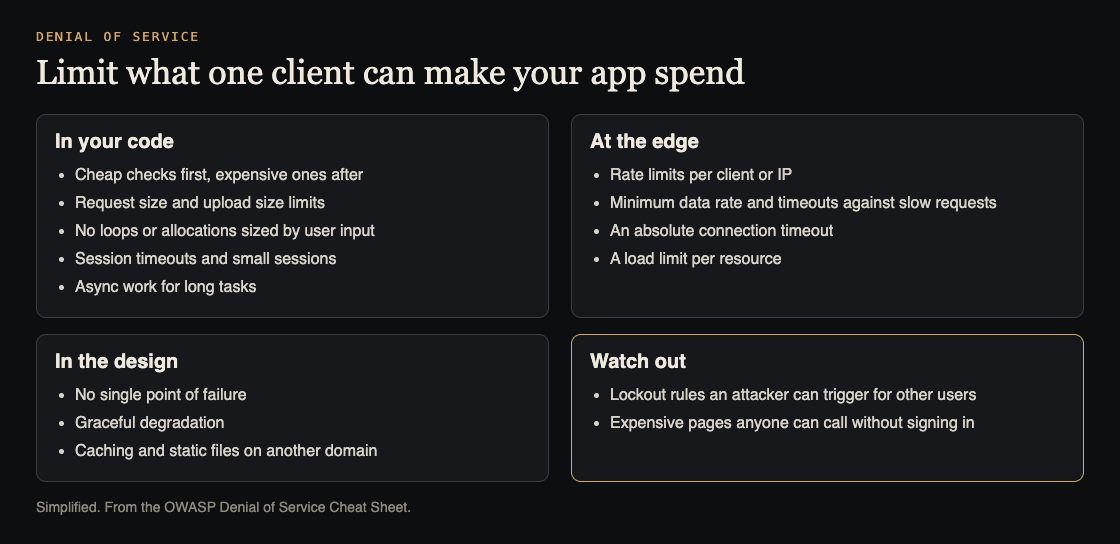
Where to put limits. Simplified from the OWASP Denial of Service Cheat Sheet.
Start with an inventory of weak points
OWASP's first step is an inventory of your components by function, architecture and performance. It should show single points of failure, bottlenecks and the pages or endpoints that cost the most to serve. For each one, note:
- What it costs per request: CPU, memory, database queries, calls to paid services.
- Whether anyone can call it without signing in.
- What else fails if it fails.
Search, exports, file conversion, image resizing and sign-up forms that send email are common entries.
OWASP adds three things to weigh against that list: your scaling options (bigger machines or more of them), the techniques you already have, such as redundancy and bulkheads, and a cost analysis for your own situation.
Limits in your code
OWASP's software design list gives you the code-level checklist:
- Cheap checks first. Run validation that costs little before anything that uses a lot of CPU, memory or bandwidth.
- Size limits. Limit total request size, and limit upload size and file types, since uploads often feed costly work such as image resizing or PDF creation.
- No work sized by input. Do not let user input decide how much memory you allocate, how many times a function runs or how many threads start.
- Long tasks in the background. Avoid making requests wait for large tasks; use asynchronous work instead.
- Sessions with limits. End sessions after inactivity and after a final timeout, and keep little data in each one.
- Handle exceptions. An app under load will throw errors; it has to keep going when it does. See error handling.
OWASP also suggests puzzles such as a captcha on forms that trigger work, for example a form that sends an email, so a bot cannot flood the mailbox.
Rate limits and timeouts at the edge
OWASP describes rate limiting as controlling the traffic to a server or component, at the infrastructure or application level, based on things like the client's IP address. Its list:
- A minimum data rate with request-read timeouts, against slow requests. OWASP warns that a minimum set too high rejects real users on slow connections.
- An absolute connection timeout.
- A maximum data rate, above which connections are dropped.
- A load limit: how many users may use a given resource at once.
For APIs, answering 429 Too Many Requests when a client goes too fast is the usual signal; see the REST API security checklist.
Worked example: protect a search and export feature
Say your app has a search page anyone can use and an export that builds a CSV of results. On a staging copy:
- Measure. Time one normal search and one export, and note database load.
- Find input-sized work. Can a client ask for 100,000 results per page, or an export with no date range? Cap both on the server.
- Move the export to the background. The request queues a job and returns at once; the file arrives when ready.
- Add limits. A rate limit per client on search, a smaller one on export, and a request size limit.
- Repeat the test with a burst of requests from one client, and check that other users still get fast answers. Then try a slow request that sends its body a few bytes at a time, and confirm the server drops it after the timeout.
Design so one failure does not take everything down
OWASP's design ideas are about staying partly up:
- Graceful degradation. Keep core features working when one part breaks, for example turn off recommendations but keep checkout.
- No single point of failure. Prefer stateless components, redundancy and bulkheads, which keep one overloaded part from sinking the rest.
- Caching and separate static hosting. The more you serve from cache, and the more images and scripts come from another domain, the fewer requests reach the app.
One trap from OWASP's access control section: account lockout can itself be a denial of service, if an attacker can lock real users out by failing their sign-in on purpose. See login rate limiting for safer patterns.
Frequently asked questions
Is a rate limit enough?
No. It helps, but OWASP's list also covers request size, input-sized work, timeouts against slow requests and design choices like graceful degradation.
Can a slow attack really take an app down?
Yes. OWASP describes slow HTTP attacks that keep connections open until the server runs out of them, which is why minimum data rates and timeouts matter.
Do we need a DDoS filtering service?
For large network attacks, OWASP suggests considering one and checking its capacity against your availability needs. App-level limits are still needed either way.
Which endpoints should we fix first?
The expensive ones anyone can call without signing in, such as search, exports and forms that send email.
Does requiring sign-in help?
Often. OWASP notes that using authentication to expose functionality, following least privilege, keeps attackers away from functions they could abuse, as long as sign-in itself is protected.
Get started
List your five most expensive endpoints today, mark which need no sign-in, and add a size limit, a rate limit and a timeout to each.
If you want a second pair of eyes, whitehatstoic's security testing covers web app and API review, with a written report, fixes and a retest after fixes. It is scoped after a short call, and no test can promise to find every weakness.

Building something that has to be safe? Book a meeting with whitehatstoic: tell us the product, the deadline and your biggest worry, and we reply with a plan and a price.
Comments
No comments yet.
Sign in or make an account to comment.