Denial of wallet: stop runaway AI agent bills
An AI agent that loops all night can cost more than the feature earns in a month, and nobody has to break in for that to happen. That is denial of wallet: an attack, or a bug, that drains your budget instead of taking your service down. This guide shows how agents run up bills, the signs to watch in your usage data, and the limits that end a runaway job in minutes instead of on next month's invoice.
What denial of wallet means for AI agents
Your service stays online. It just costs far more to run than it should. With agents, every model call, tool call and retrieval step is billed, so anything that multiplies those calls multiplies your spend.
OWASP names the risk twice. The OWASP AI Agent Security Cheat Sheet lists Denial of Wallet as a key risk: excessive API or compute costs through unbounded agent loops. The OWASP Top 10 for LLM Applications 2025 puts it under LLM10:2025 Unbounded Consumption, where a high volume of operations exploits the cost-per-use model of AI services.
Agents make this worse than a plain chatbot for three reasons. They decide how many steps to take. They call other tools and other agents. And they often run in the background, where nobody watches the meter.
Four ways agents run up a bill
- Loops. The agent calls a tool, dislikes the answer, and calls it again. A search returns nothing, so it searches again with nearly the same query.
- Stacked retries. A tool times out and your code retries. The agent framework retries too, and so does the HTTP client. Three layers that each make three attempts can turn one failed call into 27.
- Fan-out. A planner agent starts sub-agents, and each can start more. If one branch fails and the planner starts over, the whole tree runs again. The post on cascading failures in AI agents shows how one error spreads like this.
- Growing context. The agent reads a huge document into context, or resends the full history on every step. Each step costs more than the last, so cost grows faster than the step count.
They rarely come alone. An agent pulls a huge web page, the context gets too long, the call fails, the retry resends the same huge context, and the planner starts over. Each layer is reasonable on its own. Together they burn money.
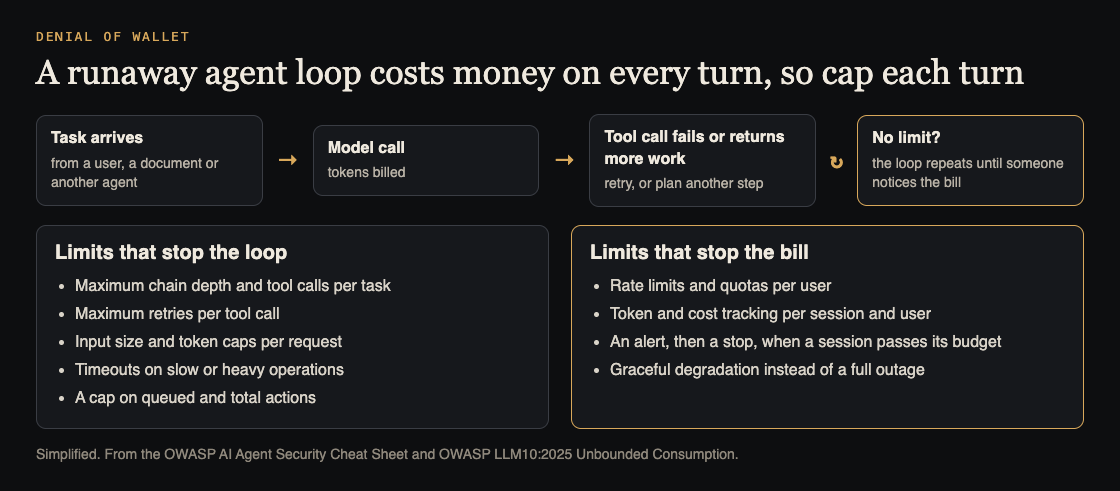
Every turn of the loop is billed, so cap each turn. Simplified from the OWASP AI Agent Security Cheat Sheet and LLM10:2025.
Warning signs in your usage data
OWASP's cheat sheet says to track token usage and costs per session and per user, not just per day. For each agent run, record a task ID, the user, the steps, input and output tokens, tool calls, retries and elapsed time. The guide to AI agent audit logs covers how to record each action so you can trace a spike to its cause.
Then watch for:
- One task with far more steps than its peers.
- Input tokens per step rising inside a single task, a sign that context is growing untrimmed.
- The same tool called with near identical arguments again and again.
- Retry counts climbing while success stays flat.
- Spend concentrated on one user, one key or one document source.
If odd tool choices come with the cost spike, the agent may have drifted from its job; see detecting rogue AI agents.
Denial of wallet limits at three levels
Monitoring tells you something went wrong. Limits stop it going far. OWASP's rule is short: enforce token, cost, retry and tool-chain limits, and never permit unlimited recursion, retries or tool chaining. Set them at three levels.
- Task. Every agent run carries a budget, checked in your code before each model call.
- User. Rate limits and quotas per user or key, as LLM10:2025 recommends, so one account or one buggy client cannot start endless tasks. The post on LLM rate limiting covers this level in detail.
- Account. If your model provider offers a spending limit, set it. It is your last line, not your first.
A worked example: a budget for a support agent
Say your support agent reads a ticket, searches your docs and drafts a reply. Give each task a budget object that travels with it:
budget = { max_steps: 12, max_input_tokens: 60000, max_tool_calls: 10, max_retries_per_tool: 2, deadline_seconds: 90 }
Pick the numbers from your own logs: look at successful runs and set each limit a little above the high end of normal. Before each model call, your wrapper checks the counters. If the next call would pass 60,000 input tokens, it stops and returns stopped: token_budget instead of a reply. The ticket goes to a human queue, and the user hears that a person will follow up.
Two details make it work. Estimate the prompt size before you send it, so the budget blocks the expensive call rather than noticing it afterwards. And make the stop a normal outcome your app handles, not an error that sets off another retry, or the budget just restarts the spend.
Cap what goes into context too: truncate tool results to a fixed size, summarise long history instead of resending it, and limit how many documents retrieval returns. LLM10:2025 also lists input size limits, timeouts, and limits on queued and total actions.
Loop breakers, alerts and a kill switch
- Repeat detection. Hash each tool call's name and arguments; if the same hash appears three times in one task, stop the task.
- One retry layer. Allow retries in one place, with backoff, and never retry an error that will fail the same way again.
- Shared budgets. When agents start sub-agents, cap the depth and pass the parent's remaining budget down, so children share it rather than each getting a fresh one.
- Alerts from your own logs. OWASP's monitoring example flags too many tool calls per minute and a cost per session above a threshold. Page someone when spend in a short window passes a ceiling.
- A kill switch. One flag your agent runner checks before every step, scoped to one user, one agent type or everything. Test it in staging so you know it stops work and does not set off retries.
LLM10:2025 adds graceful degradation: when limits bite, keep part of the service working rather than failing completely.
Frequently asked questions
Is denial of wallet the same as a DDoS attack?
No. A DDoS tries to take your service offline. Denial of wallet keeps it running but makes it too expensive to operate, and one crafted request or one bug can cause it.
Is a provider spending limit enough?
No. It acts on your whole account and stops every feature at once when reached, so you still need per-task budgets, per-user limits and your own alerts.
Can prompt injection cause denial of wallet?
Yes. Text hidden in a page, email or file can tell an agent to repeat a task or fetch more data. The posts on agent goal hijack and agent tool misuse cover that defence.
Get started
Start small: add a budget to every agent task, enforce a step limit, collapse retries into one layer, and wire a kill switch you have actually tested. Then add a security test that tries to make the agent loop, so the limits keep working after every change.
If you want a second set of eyes, whitehatstoic runs security tests on web apps and AI systems, including prompt injection tests, with a written report, fixes and a retest after fixes. Testing cannot promise to find every weakness, but it can show where an agent keeps spending when it should stop. Testing is scoped after a short call: book a meeting about security testing.
Building something that has to be safe? Book a meeting with whitehatstoic: tell us the product, the deadline and your biggest worry, and we reply with a plan and a price.
Comments
No comments yet.
Sign in or make an account to comment.