Dependency updates: find and patch vulnerable packages
Most of the code your app runs was written by someone else. When one of those packages turns out to have a known flaw, the scanner alert is the easy part. The hard part is deciding what to do when the fix is not a simple version bump. This guide to dependency updates follows the OWASP Vulnerable Dependency Management Cheat Sheet, which sorts every situation into five cases, each with its own steps.
Why dependency updates are security work
The OWASP Vulnerable Dependency Management Cheat Sheet puts the trade plainly. Using packages for document generation, HTTP calls or data parsing lets your team focus on the features your business needs. The cost is that your app's security now rests on those packages too.
OWASP's first advice is about timing: run automated dependency analysis from the very start of a project. Added in the middle or at the end, it can surface a pile of issues large enough to block the project.
Find vulnerable packages with more than one source
Detection tools compare your packages against published advisories. OWASP explains why one source is not enough. A flaw found through responsible disclosure usually gets a CVE (a public vulnerability ID) that tools pick up. A flaw released through full disclosure, posted publicly with its exploit, may never get a CVE, so a tool that reads only the CVE database can miss it.
So when you pick a scanner, OWASP suggests checking that it:
- Uses several reliable sources of vulnerability data.
- Lets you mark a finding as a false positive.
- Supports the languages and package managers you actually use.
Run it in your build so a new finding shows up on the next change, not at the next audit.
Act on the direct dependency
Most alerts are about a package you never chose: a dependency of a dependency. OWASP's advice is to act on the direct dependency that brings it in, not on the deep package itself. Changing a transitive package directly often affects stability, and doing it safely means understanding every link in the chain, which takes a long time.
One more rule before the cases: keeping a known flaw is a real decision. OWASP says accepting the risk belongs to the company's Chief Risk Officer, or failing that its Chief Information Security Officer, based on the team's technical analysis, not to whoever happens to see the alert.
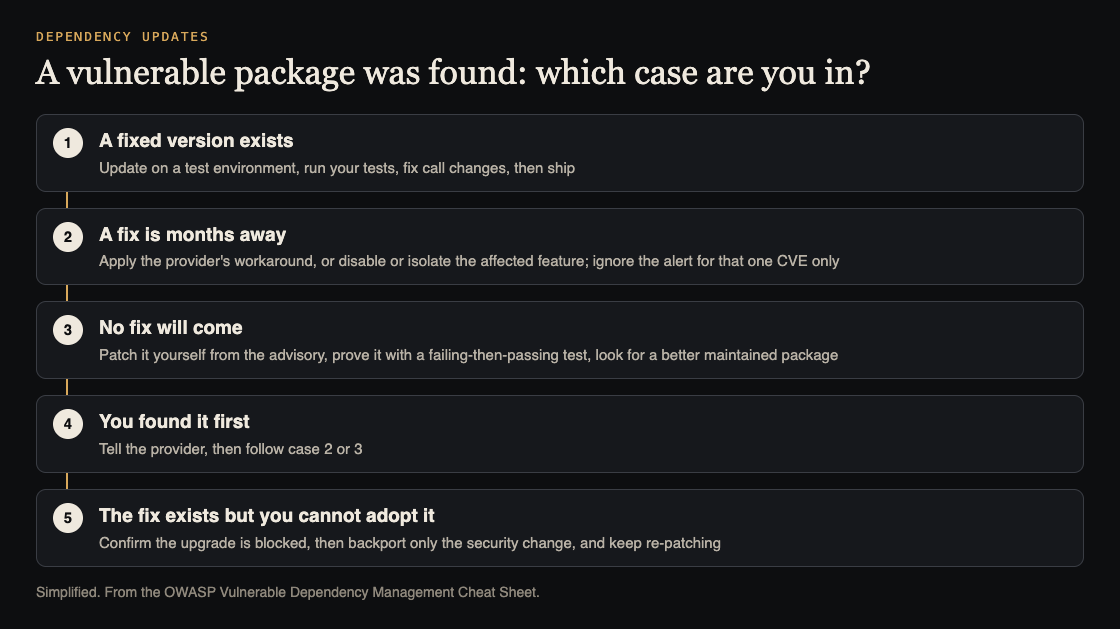
OWASP's five cases, and what to do in each. Simplified from the OWASP Vulnerable Dependency Management Cheat Sheet.
The five cases OWASP describes
- A patched version exists. Update it on a test environment and run your tests. If a test fails because a function changed, update your code and run them again. If the fix only ships in a major version that breaks your app, or a transitive pin blocks it, go to case 5 and use case 2 meanwhile.
- The fix is months away. Apply the provider's workaround if there is one. Otherwise find every call to the affected functions and block the conditions the exploit needs on every path, or disable or isolate the feature. If the provider shares an exploit, use it as a regression test, but blocking one payload does not prove the library is safe.
- No fix will come. OWASP calls this the last resort. Patch it yourself from the CVE and the upstream advisory, offer the patch upstream if the package is open source, and start looking for a better maintained package.
- You found it first, in a public disclosure post or a penetration test, before the provider knows. Tell the provider, then follow case 2 if they help or case 3 if they do not.
- A fix exists but you cannot adopt it. Confirm the upgrade is really blocked, then backport only the security change onto your version. OWASP warns this is cheaper now and costlier over time: every new release has to be re-patched.
Worked example: a fix that is months away
Say your scanner flags a parsing library your report feature uses, and the provider says a patched release is months off. Following case 2:
- Find the reachable calls. Search your code for every call to the affected functions, and note which ones take outside input.
- Apply the workaround the provider gave, on a test environment first, then in production.
- If there is no workaround, turn off or isolate the report feature until the fix ships, unless a wrapper can block the exploit conditions on every path.
- Test it. Run the provider's exploit as a regression test, try other inputs, and run your full test suite.
- Write it down. Add a note to the README naming the CVE and how it is handled. If you silence the scanner, ignore that one CVE only: the same package can have other flaws with other IDs.
Prove a patch, do not just silence the alert
When you write a patch yourself, in case 3 or case 5, OWASP sets a clear bar before you call it handled:
- A test that reproduces the flaw fails on the unpatched package and passes on the patched one. A test that passes on both proves nothing.
- The package's own tests still pass, as well as yours.
- Only then is the scanner alert suppressed, for that one CVE.
OWASP is blunt about the shortcut: suppressing the alert, or changing a version string so the tool stops matching, records a fix but does not make one. A patched package can still be flagged, because a version number cannot show the fix is present. Handle that with a narrow suppression, not by hiding the package.
Dependency flaws often look like the bugs you test for in your own code; a flaw in a parser can be an XXE problem or an insecure deserialization one.
Frequently asked questions
Should I update the vulnerable transitive package directly?
OWASP's advice is to act on the direct dependency that pulls it in, because changing the deep package often affects stability. Override it only after you understand the full chain.
Can I just ignore a finding I cannot fix?
Only as a recorded decision by whoever owns risk in your company, and with an ignore rule scoped to that one CVE, so other flaws in the same package still alert.
When should we start scanning dependencies?
At the start of the project. OWASP warns that starting late can produce a backlog big enough to block the work.
Is one scanner enough?
Check its sources. Flaws published without a CVE can be missed by a tool that reads only the CVE database, so OWASP suggests tools that use several sources.
Get started
Pick one repository today. Run a dependency scanner, sort each finding into one of the five cases, and write down the plan for the top three. Add the scan to your build so the list stays current.
If you want a second pair of eyes, whitehatstoic's security testing covers web app and API review, with a written report, fixes and a retest after fixes, and its independent reviews include a codebase review. Work is scoped after a short call, and no test can promise to find every weakness.

Building something that has to be safe? Book a meeting with whitehatstoic: tell us the product, the deadline and your biggest worry, and we reply with a plan and a price.
Comments
No comments yet.
Sign in or make an account to comment.