Docker security: check your container settings
Docker security depends less on the image than on how the container is started. The same image can run as a locked-down process or as something close to root on your server, and the difference is a handful of flags in your docker run line or Compose file. This guide turns the OWASP Docker Security Cheat Sheet into settings you can check on your own containers, then rewrites one risky command step by step.
Docker security starts with the settings, not the image
A container is a process on your host with some walls around it. The most important wall is thin: OWASP points out that containers share the host's kernel, so a kernel flaw is a flaw in every container on that host. That is why the cheat sheet starts with updates, before any flag.
Most real trouble comes from settings that quietly remove walls: a container running as root, a mounted Docker socket, every Linux capability granted, or a database port open to the internet. None of these shows up in an image scan. You find them by reading how each container is started.
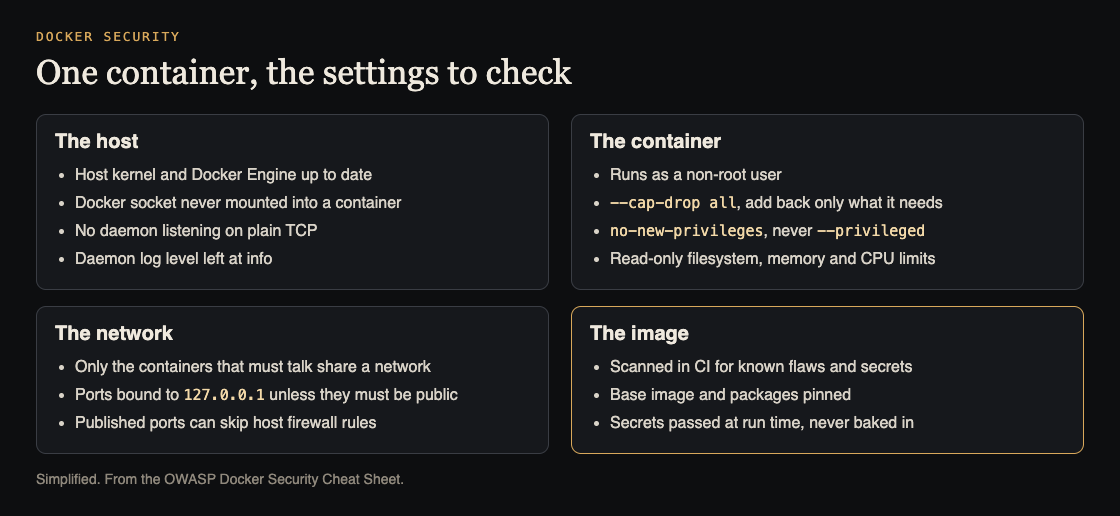
Four places to check. Simplified from the OWASP Docker Security Cheat Sheet.
Keep the host patched and the Docker socket closed
Start with the host:
- Update the host kernel and Docker Engine. OWASP names container escape bugs such as Leaky Vessels, which can give an attacker root on the host, and Dirty COW, a kernel bug that still reaches the host from a well-isolated container.
- Never mount the socket.
/var/run/docker.sockis the Docker API. OWASP says access to it is the same as unrestricted root on the host. A line like-v /var/run/docker.sock:/var/run/docker.sock, or the same thing undervolumes:in Compose, should go. Mounting it read-only does not help, because the API still accepts commands that change containers and the host. - No daemon on plain TCP. Starting the daemon with
-H tcp://0.0.0.0:...exposes it unencrypted and without login to anyone who can reach that port. - Leave the daemon log level at info. That is the default, and it records the events you may want to review later; debug is for debugging only.
Run as a non-root user with fewer powers
OWASP calls a non-root user the best way to prevent privilege escalation. You can set it three ways: docker run -u 4000 at run time, a USER line in the Dockerfile after the steps that need root, or user namespace remapping in the daemon. For more, rootless mode runs the daemon itself without host root, though the shared kernel is still part of the boundary.
Then cut what that user can do:
- Capabilities. Linux splits root's powers into capabilities. Docker already runs with a subset, but the safest setup is to drop all and add back only what the app needs, for example
--cap-drop all --cap-add CHOWN. - Never
--privileged. It adds every capability. OWASP repeats this rule twice for a reason. - No new privileges.
--security-opt=no-new-privilegesstops a process from gaining rights through setuid or setgid programs. - Keep the default security profile. Docker's seccomp profile, or your host's AppArmor or SELinux profile, is the baseline. Do not turn it off; tighten it per workload if you can.
Lock the filesystem and cap resources
Most app containers only write temporary files. Run them with --read-only, and give them a scratch space with --tmpfs /tmp. Volumes the app only reads get :ro at the end of the -v option. In Compose the same setting is read_only: true.
OWASP calls resource limits the best way to avoid denial of service from inside a container. Limit memory and CPU, the number of restarts with --restart=on-failure:5, open files with --ulimit nofile=... and processes with --ulimit nproc=.... A leak or an attack in one container then stays in that container. The same thinking applies one level up, in limiting what one client can use in your app.
Control the network and published ports
Two network defaults surprise teams:
- Containers can talk to each other. Inter-container communication is on by default over the
docker0bridge. OWASP suggests custom Docker networks, so you choose which containers share one. - Published ports can skip your firewall.
-p 8000:8000opens the port on every interface. Docker writes its own iptables and nftables rules, and the cheat sheet warns these bypass UFW entirely, so a host firewall that seems to block the port may not. Bind to localhost when only the host needs it:-p 127.0.0.1:8000:8000.
To see what is published, run docker ps --format '{{.Names}} {{.Ports}}' and read every line. A port on 0.0.0.0 should be one you meant to make public, such as your reverse proxy. If that proxy serves HTTPS, check its TLS settings too.
Scan images in CI and keep secrets out of them
The image still matters. OWASP suggests a Dockerfile linter and an image scanner in your build pipeline. The linter checks that a USER line is set, that the base image and OS packages are pinned, that COPY is used instead of ADD, and that no step pipes curl into a shell. The scanner finds known vulnerabilities, secrets and misconfigurations in the built image.
For secrets, Docker secrets keep passwords, tokens and keys out of the image and out of run commands. One catch from the cheat sheet: in local Docker Compose, file-backed secrets are plain bind mounts, so the file on the host still needs tight permissions. Further out, OWASP lists supply chain steps: record where each image came from, produce a software bill of materials for it, sign it and keep it in a registry with strict access. For keys in code and logs, see secrets management.
Worked example: rewriting one risky docker run line
Say a service was started months ago with this command:
docker run -d -p 8000:8000 --privileged -v /var/run/docker.sock:/var/run/docker.sock myapp
Check it in four passes:
- Who is it? Run
docker inspect --format '{{.Config.User}}' myapp. An empty answer means the image never set a user, so it runs as root. Add aUSERline to the Dockerfile or pass-u 4000. - What can it do?
--privilegedgives every capability, so remove it. Start from--cap-drop all, add--security-opt=no-new-privileges, and add back a single capability only when the app fails without it. - What can it touch? The socket mount gives root on the host; remove it. If a tool truly needs the Docker API, treat that tool as part of the host, not as an app. Add
--read-only --tmpfs /tmp. - Who can reach it? If only a proxy on the same host calls it, bind to
127.0.0.1. Add a memory limit and--restart=on-failure:5.
The result:
docker run -d -u 4000 --cap-drop all --security-opt=no-new-privileges --read-only --tmpfs /tmp --memory 512m --restart=on-failure:5 -p 127.0.0.1:8000:8000 myapp
Start it in a test environment first. If it fails, the error usually names the path it wanted to write or the action it was refused; fix that one thing rather than putting a broad flag back.
Frequently asked questions
Is Docker secure by default?
Partly. Docker runs containers with a subset of capabilities and a default security profile, but containers share the host kernel, can talk to each other on the default bridge, and run as root unless you set a user.
Is mounting the Docker socket read-only safe?
No. OWASP says a read-only mount does not make the Docker API read-only; a process that can connect can still change containers and the host.
Why is my published port reachable when my firewall blocks it?
Docker writes its own iptables and nftables rules, which the OWASP cheat sheet says bypass UFW. Bind the port to 127.0.0.1, or use a tool that makes the firewall apply to Docker networks.
Does rootless mode remove the need for these settings?
No. Rootless mode lowers the damage if the daemon or runtime is compromised, but the shared kernel is still part of the boundary, so a non-root user, dropped capabilities and limits still apply.
Get started
Locking down containers limits the damage when something goes wrong, but the app inside is usually where an attacker gets in first. whitehatstoic's cybersecurity and AI safety testing covers web app and API review, with a written report, fixes and a retest after fixes. If you are still building, whitehatstoic also offers full-stack development from database to deploy. No test can promise to find every weakness; the work is scoped after a short call.

Building something that has to be safe? Book a meeting with whitehatstoic: tell us the product, the deadline and your biggest worry, and we reply with a plan and a price.
Comments
No comments yet.
Sign in or make an account to comment.