Does Color Coding Your Notes Help You Remember? What Research Says
Does color coding your notes help you remember? The research on color itself is thin and mixed: students say it helps, but in a small controlled study, colored materials did no better than black and white. What the research is clear about is what to do next. Testing yourself and spacing your review are rated far above highlighting. This post sets out both sides, then gives you a color system built around testing yourself.
Does color coding your notes help you remember? The short answer
Color is a tool for attention and organization. It is not a memory method on its own.
One key term in red on a page of black text stands out. When you mark half the page, nothing does, and you get the feeling of studying without much of the result.
So the practical answer is this: use color to make decisions about the material and to plan what you will test yourself on. If it only makes the page look finished, there is little evidence it helps.
What the research says about color and memory
Three sources are worth knowing, and they do not point the same way.
Students rate color coding highly
A 2022 study by Diachenko and colleagues looked at color methods in a history course for medical students, using questionnaires, observation and statistics. Color coding important text ranked first among seven techniques, and the authors concluded it helped students remember. Much of this rests on how students rated the methods, which is not the same as a test of what they remembered.
A controlled comparison found no difference
In a 2002 study by Dwyer and Moore, 56 male students studied either black-and-white or color-coded materials. Color made no significant difference to their test scores overall. In one group, students who saw black-and-white materials actually scored higher.
Highlighting is rated low; testing is rated high
A 2013 review of ten learning techniques by Dunlosky, Rawson, Marsh, Nathan and Willingham rated highlighting and underlining as low utility, along with rereading and summarization. It rated practice testing and distributed practice, spreading study over time, as high utility. That contrast is the most useful finding for this topic: the marking matters less than what you do with the marked page afterward. Our post on whether highlighting is a good way to study goes deeper.
If you have read about other visual note methods, the pattern will be familiar. Our posts on whether doodling helps you remember and what research shows about mind mapping reach a similar conclusion. Visual methods help most when they make you process ideas, not when they decorate them.
Why highlighting everything backfires
Highlighting feels productive. You move through the chapter, the page fills with color, and you feel done. Here is why that feeling misleads you.
- It removes contrast. A mark only stands out among plain text. Marking everything erases the signal.
- It delays decisions. Marking a sentence is easier than deciding why it matters. It is easy to highlight instead of making that judgment, then reread everything later anyway.
- It builds false confidence. Rereading colored text feels fluent. Fluency makes you think you know the material, even when you could not explain it with the page closed.
- It focuses on isolated facts. Highlighting tends to pick out terms and definitions. Exams often ask you to compare, explain and apply.
A useful test: close your notes and try to say what each highlighted line means. If you cannot, the color was doing the work your brain should have done.
When color coding actually helps: categories, contrast and retrieval
Color earns its place under three conditions.
1. Each color means one category
Give every color a job. For example, blue for definitions, green for examples, red for things you got wrong before. Now the act of choosing a color is a small act of sorting. You have to ask, "Is this a definition or an example?" That question makes you think about the material.
2. Contrast stays high
Use color sparingly. Keep it to one or two marks per paragraph and three or four colors in total. If most of a page is colored, you have stopped choosing.
3. Color sets up retrieval
This is the step most people skip. Color is useful when it tells you what to test yourself on later. Cover the blue definitions and try to recall them. Look at a green example and name the idea it illustrates. Your color system becomes a map of questions.
A simple color coding system for study notes
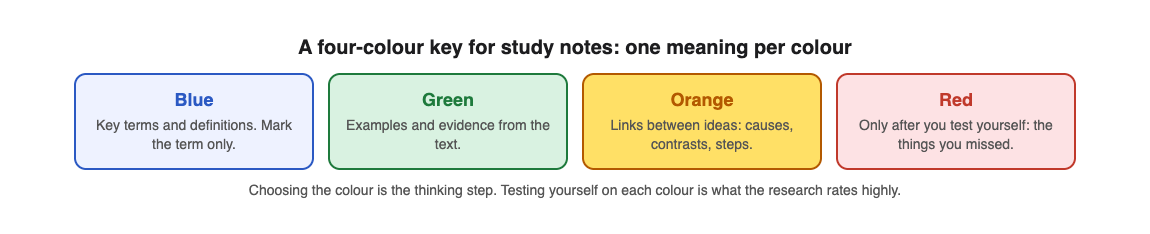
Here is a system you can start tonight. It uses four colors and one rule per color.
- Blue: key terms and definitions. Mark only the term itself, not the whole sentence.
- Green: examples and evidence. A case, a number from the text, a worked problem.
- Orange: links between ideas. Causes, contrasts, "this leads to that."
- Red: mistakes and weak spots. Add red only after you have tested yourself and missed something.
Write a small key in the corner of your first page so the meanings stay consistent across a whole course.
Here is how it looks on a biology page about photosynthesis. "Chloroplast" gets blue. "Leaves of a plant in sunlight" gets green. "Light reactions produce the energy used to build sugar" gets orange. Later, after a practice quiz, any idea you missed gets a red mark in the margin.
Notice what the system does. Blue and green are about knowing facts. Orange is about understanding connections. Red is about tracking what you do not know yet. That last color only exists because you tested yourself, which is the point.
Pair color with active recall and spaced review
Color organizes. Testing yourself and spacing your review are what build memory. Here is a weekly workflow that combines all three.
- Day 1: take and code your notes. Apply the four color system while you read or right after class.
- Day 1, end of session: test yourself. Close the notes and try to recall each blue term and each orange link. Mark misses in red.
- Day 3: test again. Focus on red first, then everything else.
- Day 7: test once more. If a red item is now solid, leave it. If not, it gets another round.
Writing your own questions for every page takes time, and it is easy to only ask yourself the easy ones. This is where Study Shot fits. You photograph the page and it writes multiple-choice questions about it, from basic to advanced, then checks each answer and explains it.

A worked example with your color coded biology page:
- Open Study Shot in your phone or computer browser, choose Make a new quiz, then Take photo or Choose photo. Hold the page flat and fill the frame. Handwritten notes, diagrams and whiteboards work too.
- Pick 10 questions (the default) or up to 20.
- Leave the level on Tiered. It splits the questions across Basic (key terms, facts and definitions), Intermediate (explain, compare and connect ideas) and Advanced (apply and predict in new situations), in that order. That lines up neatly with your colors: blue terms show up in the basic questions, orange links in the harder ones.
- Press Create questions. It can take up to a minute.
- Answer one question at a time. After Check answer you see whether you were right, the correct answer, and a short explanation.
On the results screen, you get a score for each level and a Look at these again list of the questions you missed, with your answer next to the right one. Those misses are your red marks. Copy them onto your page in red. Then on Day 3 and Day 7, open the quiz from your library and choose Retake quiz. Your best score is saved on each quiz card, so you can see whether the red items are fading.
One caution: the questions are written by an AI model and can contain mistakes. Read the explanation, compare it to your notes, and if a question is wrong, use Report a problem with this question. Checking a doubtful answer against your page is good study practice in itself.
Frequently asked questions
Which colors are best for remembering notes?
No single color is proven best for memory. What matters is that each color has one consistent meaning and that you use only a few, so the marked items still stand out.
Is color coding better than highlighting?
No study we found compared them directly. Coding by category at least makes you decide what each line is, while plain highlighting was rated low utility in a 2013 review.
Does color coding work for digital notes?
Yes, the same rules apply: few colors, one meaning each, and high contrast. Digital tools make it easy to recolor everything, so be strict about keeping marks sparse.
Can color coding replace flashcards or practice tests?
No. A 2013 review of study techniques rated practice testing and spaced practice much higher than highlighting. Use color to decide what to test yourself on, then actually test yourself.
Get started: turn your color coded notes into Study Shot reviews
Color your next page with the four color system, then photograph it and see how many of the basic, intermediate and advanced questions you can answer. Mark your misses in red and retake the quiz in a few days. Study Shot works in the browser on your phone or computer, and quizzes can be written in 50 languages.
Try Study Shot: it is free to start. Photograph the page you are studying tonight and get 10 practice questions on it, from basic to advanced.
Comments
No comments yet.
Sign in or make an account to comment.