Does Studying With a Timer Help You Focus? What Research Says
Does studying with a timer help you focus? The honest answer is that it depends on what you measure. In studies with university students, timed breaks sometimes left people less tired and more focused, and sometimes did the opposite. None of the studies below found that a timer changed how much work got done or how well students scored. This post sets out what each study found, where timers can backfire, and how to use one well if you choose to.
Does studying with a timer help you focus? The short answer
A timer gives a vague task ("study biology tonight") a clear end ("read pages 40 to 46 until the bell"). Some students find that helpful, and some find it gets in the way. The timer is a tool for structure. The learning still comes from what you do inside each block.
So it is worth knowing both why people like timers and what the studies show.
Why students reach for a timer
A near deadline beats a distant one
An exam three weeks away feels abstract. A bell in 25 minutes feels real. Many students say a close finish line makes it easier to start, because they know a dull page will only last until the bell.
You commit before you start
Starting a timer is a small promise: you decide in advance what you will do and for how long. When the urge to check your phone arrives, the choice is already made.
Fewer small decisions
Without a timer, you keep asking yourself: Should I take a break? Have I done enough? Is this a good place to stop? Each question pulls you out of the material. With a timer, the answer is always the same: keep going until it rings.
What the research says about timed work sessions and breaks
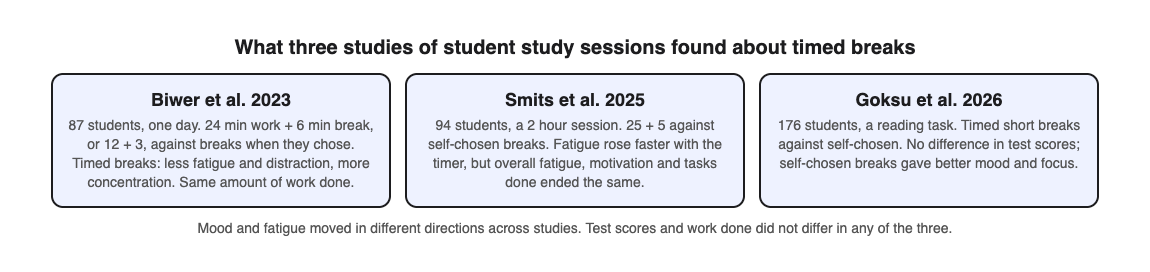
The evidence on timers is thinner than the internet suggests, and the studies that exist do not agree. Three experiments from the same research group compared timed breaks with breaks students chose for themselves.
- Timed breaks felt better. In a 2023 study of 87 students during a real day of self-study, students took a 6 minute break after every 24 minutes, or a 3 minute break after every 12. Students who chose their own breaks studied and rested longer, and reported more fatigue and distraction and less concentration and motivation. The amount of work finished was the same.
- Timed breaks felt worse, then evened out. In a 2025 study of 94 students in a 2 hour session, the 25 and 5 schedule made fatigue rise and motivation fall faster than self-chosen breaks. By the end, though, fatigue, motivation, productivity and tasks done did not differ.
- Self-chosen breaks felt better. In a 2026 study of 176 students reading a text and then taking a comprehension test, scores did not differ between the two break styles. Students who chose their own breaks reported more energy, concentration and motivation, and less distraction.
A 2025 review of 32 studies reads the evidence more warmly: across three small trials, timed intervals came with about 20% less fatigue than self-paced breaks. Most of those results were students rating how they felt, not test scores.
So there is no strong proof that one exact interval is best for everyone, or that a timer raises scores. Treat any number as a starting point to test, not a rule.
The Pomodoro Technique and other timer methods compared
Pomodoro
The best-known version is 25 minutes of work and a 5 minute break, with a longer break after a few rounds. The 2025 study above used exactly this schedule; the 2023 study used 24 and 6. Some students like it for starting hard tasks and for days when focus is low.
Longer blocks
Some students prefer 45 to 50 minutes of work and a 10 minute break, because 25 minutes can end just as they get into a reading or a problem set. No study above tested this length, so treat it as a preference.
Flexible timing
Another approach is to work until your focus breaks, note how long that took, and then rest for a fraction of it. The 2025 study tested this as "Flowtime", and it ended level with the other two schedules.
Which one to pick
Because the studies point both ways, try each for a few days and keep the one you actually stick with. If a timer leaves you more tired or less motivated, choosing your own breaks did just as well in all three experiments.
When a timer can hurt your focus
- The countdown becomes the task. If you glance at the clock every minute, the timer is now a distraction. Hide it or use a sound only.
- The bell feels like pressure. If a ticking clock makes you tense, use longer blocks, a silent timer, or no timer at all.
- The bell cuts off real progress. If you are in the middle of a hard problem and thinking clearly, it is fine to finish the thought before you stop.
- Time replaces output. Four completed blocks feel productive. But if you spent them rereading the same page, you logged time, not learning. Set a goal for each block, not just a duration.
How to set up a study timer that actually works
- Write one goal per block. "Read section 3.2 and summarize the three causes" is better than "study chapter 3."
- Remove the phone from reach. If you use your phone as the timer, start it and put it face down across the room.
- Choose a length you can finish. Start with 25 minutes. Move to longer blocks once that feels easy.
- Make breaks real breaks. Stand up, drink water, look out a window. Scrolling a feed is not rest for your attention.
- End each block with a check. Before the break, close the book and test yourself on what you just read. This is where the timer pays off.
Breaks themselves have their own research. Our post on whether short breaks help you study better covers it.
Pair your timer with other evidence-based habits like sleep and active recall
A timer manages your time. It does not decide what sticks. Two habits have stronger evidence for memory than any interval.
Active recall
Testing yourself beats rereading for memory. In a classic study, students who took recall tests remembered more after two days and after a week than students who restudied the same passages. A natural rhythm is to read during the timed block, then quiz yourself at the end.
Here is one way to do that with Study Shot, which turns a photo of a page into a multiple-choice quiz. Study Shot has no timer of its own, so use whatever timer you already have.
- Set a 25 minute timer and read one page of your textbook or notes.
- When it rings, open Study Shot in your phone or computer browser, choose Make a new quiz, then Take photo. Hold the page flat and fill the frame.
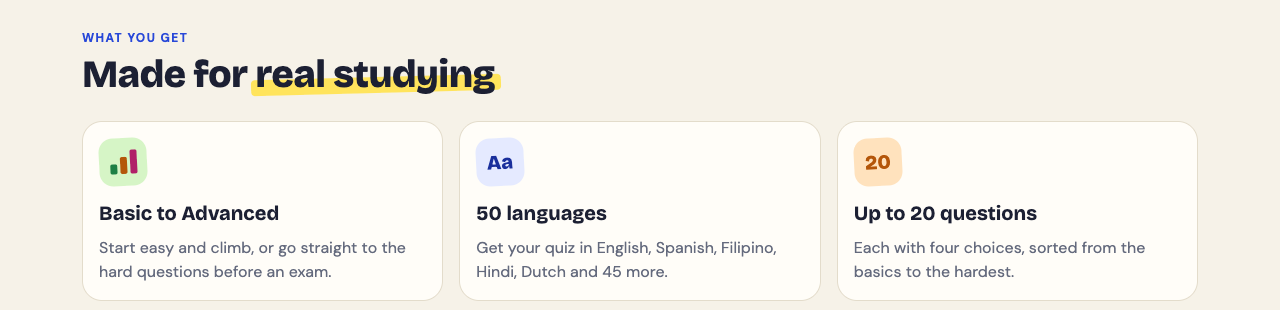
- Pick 10 questions and the Tiered level, which starts with basic questions and climbs to advanced. Press Create questions. It can take up to a minute.
- Answer one question at a time. Each answer is checked right away and comes with a short explanation.
- On the results screen, read the Look at these again list of missed questions. That is your goal for the next timed block.
The quiz is saved to your library with your best score, so you can retake it tomorrow. That gives you spacing without extra planning. The questions are written by an AI model and can contain mistakes, so use the explanation to check the answer against your page, and use Report a problem with this question if something is wrong.
Sleep
Sleep after studying has its own body of research, with some strong findings and some limits. Read does sleeping after studying help you remember before you trade sleep for one more round.
Tonight, set a timer for 25 minutes, pick one page, and read it with a single goal in mind. When the timer rings, test yourself before you take your break.
Frequently asked questions
Is 25 minutes the best length for a study session?
No study shows one length is best for everyone. 25 minutes is a common starting point; adjust it to what you can keep up.
Should I take breaks even if I feel focused?
The studies disagree. Fixed breaks helped mood in one study and self-chosen breaks helped it in another, so if you feel focused, finishing your thought first is reasonable.
Does a visible countdown cause anxiety?
For some people it does. If watching the numbers tick makes you tense, hide the display and rely on a sound.
Is a phone timer or a dedicated app better for studying?
A simple timer works as well as any app. What matters more is keeping the phone out of reach so notifications do not pull you away.
Get started
Try Study Shot: it is free to start. Photograph the page you are studying tonight and get 10 practice questions on it, from basic to advanced.
Comments
No comments yet.
Sign in or make an account to comment.