Does Watching Lectures at Double Speed Hurt Learning?
Does watching lectures at double speed hurt learning? The honest answer is that the research does not agree yet. One study found younger adults lost little at faster speeds, another found a clear drop in recall, and a third found that letting students pick their own speed kept their minds from wandering. This post sets out what each found, what none of them tested, and how to check for yourself whether a fast lecture actually stuck.
Does watching lectures at double speed hurt learning? What three studies found
Here are three recent studies, each looking at a different part of the question.
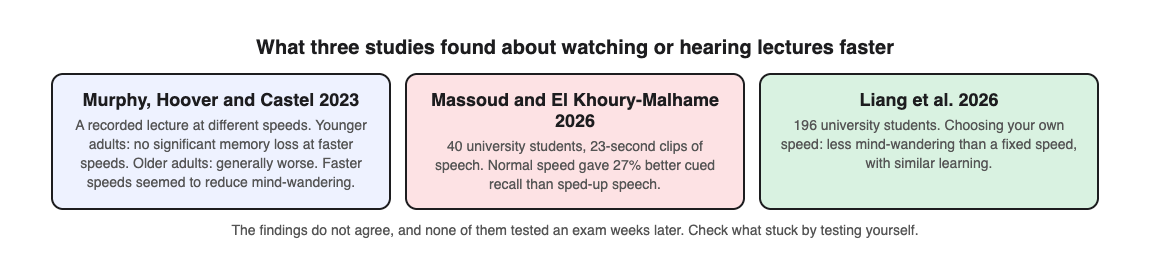
- Murphy, Hoover and Castel, 2023. Younger and older adults watched a recorded lecture played at different speeds, then took a memory test. Younger adults showed no significant memory loss at faster speeds. Older adults generally did worse. Faster speeds also seemed to reduce mind-wandering, which the authors suggest may help explain why younger adults kept up.
- Massoud and El Khoury-Malhame, 2026. Forty university students heard short 23-second passages of speech, some at normal speed and some sped up. Normal speed led to 27% better cued recall. The authors note that earlier studies conflict and that results can vary by person and material.
- Liang and colleagues, 2026. In two studies with 100 and 96 university students, some could change the playback speed of a lecture while others watched at a fixed speed. The self-paced group had less mind-wandering, and learning was about the same in both groups.
Why the studies disagree
The three studies tested different things, so their answers are not directly comparable.
- Length. Massoud's clips lasted 23 seconds. Murphy and Liang used lectures. A short clip and a long lecture make different demands.
- Who was tested. Murphy found the cost depended on age. Liang found that what predicted learning differed between the self-paced and fixed-speed groups.
- Who set the speed. In Liang's study, choosing your own speed made a difference to attention. A fixed 2x is not the same as speeding up the easy parts and slowing down the hard ones.
- When the test came. None of these studies tested students weeks later, the way a real exam does.
So the research does not tell you that 2x is safe, and it does not tell you that 2x is harmful. It tells you the answer depends on the material, on you, and on how you use the speed control.
When speed is more likely to cost you
The studies point to a few situations to watch for:
- Dense material. If each sentence adds a new term or a step in a process, there is no slack to skip over. Slow down for those parts.
- Your mind wanders. Two studies looked at mind-wandering. If you notice you have drifted, the speed is not saving you time.
- You are older than a typical undergraduate. The 2023 study advised against older adults watching at faster speeds.
- A second language. None of these studies tested it, so you will have to check for yourself whether faster speech costs you more.
How to choose your playback speed lecture by lecture
Since choosing your own speed was linked to less mind-wandering, treat the speed control as something you use during a lecture, not a setting you leave alone.
- Start a little faster than normal on familiar parts, such as the recap at the start.
- Slow down when the slides fill with new terms, diagrams or steps, or as soon as you rewind twice.
- Pause to write a note in your own words rather than copying at speed.
- Check yourself at the end before you decide the speed worked, using the routine below.
If your lecture comes with slides, our guide on how to make a quiz from lecture slides shows how to quiz yourself on them as well as on your notes.
Spend the time you save on testing yourself
Watching a lecture, at any speed, puts information in. What makes it last is pulling it back out. In a 2006 study by Roediger and Karpicke, students who took recall tests on a passage remembered more of it two days and one week later than students who reread it, even though rereading made them feel more confident. Our post on retrieval practice explains why.
So if speed saves you twenty minutes, spend some of them testing yourself on what you just watched. That also answers the speed question for you: if you can answer questions on the lecture, the speed worked.
A worked example: checking a fast lecture with Study Shot
Study Shot turns a photo of a page into a multiple-choice practice quiz. It runs in the web browser on your phone or computer, and it works from photos, not video, so you quiz yourself on your notes.
- Watch the lecture at the speeds you chose, and keep your notes to one or two pages in your own words.
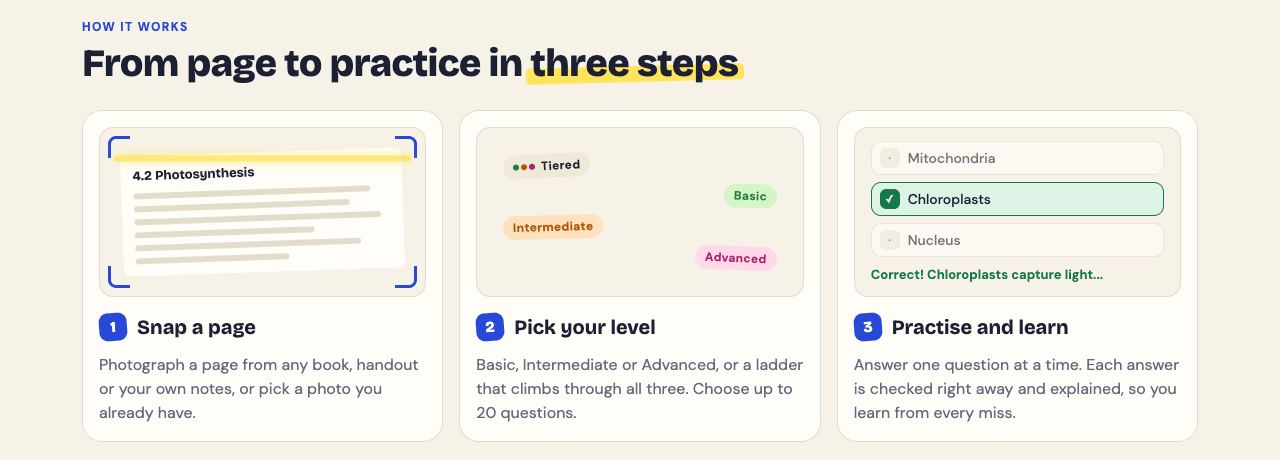
- Open Study Shot, choose Make a new quiz, then Take photo. Hold the page flat and fill the frame. You can also use Choose photo to pick a screenshot of a slide you saved. Study Shot does not take PDF files, so a screenshot or a photo of a printed page is the way in.
- Keep 10 questions and the Tiered level. Tiered splits the questions as evenly as it can across Basic, Intermediate and Advanced, in that order.
- Press Create questions. It can take up to a minute.
- Answer each question from memory, then press Check answer to see whether you were right, the correct answer and a short explanation.
The results screen shows a right/total score for each level. Say you get every Basic question right but only one Advanced question. The terms went in, but the reasoning did not, so rewatch the hard part of the lecture at normal speed. The Look at these again list shows each missed question with your answer and the right answer, so you know where to look.
The quiz is saved in your library with its page photo and your best score. Retake it a few days later; our post on spaced repetition for exams gives a simple review schedule. If you watch lectures in a second language, you can set the quiz to one of 50 languages, so you can check the ideas in your first language too.
The questions are written by an AI model and can contain mistakes. Read each explanation to check it against your notes, and use Report a problem with this question if one looks wrong.
Frequently asked questions
Is 2x speed bad for learning?
The studies disagree. One found no significant memory loss for younger adults at faster speeds, another found 27% better recall at normal speed on short clips. Test yourself afterwards to find out whether it worked for you.
What is the best playback speed for lectures?
No study has found one best speed. Students who could change the speed themselves had less mind-wandering in one study, so speed up the easy parts and slow down the hard ones.
Does watching at faster speed affect older students more?
In a 2023 study, older adults generally did worse on a memory test at faster speeds, while younger adults did not show a significant drop. The authors advised older adults against watching at faster speeds.
How do I know if I understood a lecture I watched fast?
Test yourself without looking at your notes. Questions that ask you to apply ideas, not only define them, show whether you followed the reasoning.
Get started
Speed is a tool, not a verdict. Use it, then check what stuck. After your next lecture, photograph your notes and let your scores tell you whether the speed worked.
Try Study Shot: it is free to start. Photograph the page you are studying tonight and get 10 practice questions on it, from basic to advanced.
Comments
No comments yet.
Sign in or make an account to comment.