DOM-based XSS: stop page scripts writing unsafe data
DOM-based XSS is a cross-site scripting bug that lives in your own page script, not in your server. The server can send a clean page, and then a script on that page takes data an attacker can control and writes it somewhere the browser runs it. OWASP's DOM based XSS Prevention Cheat Sheet is the plain source for this post. It boils down to one habit: treat untrusted data as text to display, never as code or markup. Here is a checklist you can run on your own front end, with one worked example.
DOM-based XSS: what it is and why the server cannot see it
Cross-site scripting (XSS) means an attacker gets a script to run in your user's browser, on your site's behalf. OWASP separates two ways of describing it. "Stored" and "reflected" say how the attack payload reaches the victim. "Server-side" and "client-side" say where the untrusted data is handled unsafely.
In server-side XSS, the server puts untrusted data into a response without making it safe for where it lands. DOM-based XSS comes from unsafe client-side handling instead: your JavaScript reads something and uses it badly. The sheet notes that both stored and reflected attacks can be DOM-based. Either way, the injected script runs in the browser, so you pick controls for the real path the data takes.
That is why the server cannot be your only defense. If the unsafe write happens in the browser, encoding on the server does not touch it. Our XSS testing post covers how to hunt for these bugs from the outside; this one is about fixing the code.
Sources and sinks: the two ends of the path
A simple way to think about it is a pipe. Data comes in at a source and ends up at a sink. The bug is a path from a source an attacker controls to a sink that can run what it receives, with nothing safe in between.
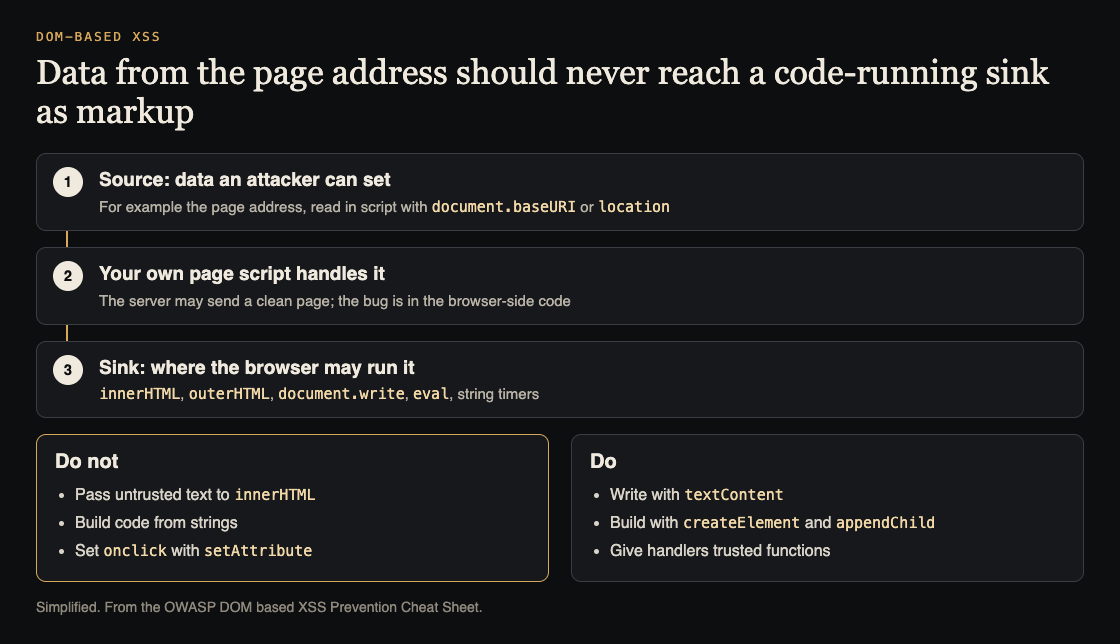
Where the data comes from, where it can do harm, and the safe swaps. Simplified from the OWASP DOM based XSS Prevention Cheat Sheet.
A source is anything an attacker can set: the page address and the parts of it your script reads, text a user typed, a value that came back from a request.
The sheet names these sinks that render HTML from script:
element.innerHTMLandelement.outerHTMLdocument.writeanddocument.writeln
If these get untrusted input, an XSS bug can result. Other sinks take a string and run it as code: eval, setTimeout, setInterval and Function all interpret strings as code.
A worked example: the page that shows its own address
This is the example the OWASP sheet fixes. A page shows the user the address they are on. The script writes it into a div like this:
document.getElementById("contentholder").innerHTML = document.baseURI;
Think through what happens.
- The attacker crafts a link to your page with markup hidden in the address.
- A user clicks it. Your server sends the normal page, so nothing odd shows in a server check.
- Your script reads the address. That is the source.
- It assigns the text to
innerHTML. That is the sink. The browser reads the text as HTML, and any script in it can run with your site's permissions.
The fix in the sheet is one line. You do not need the markup, only the text, so write it as text:
document.getElementById("contentholder").textContent = document.baseURI;
It shows the same thing on screen, and it is not open to DOM-based XSS. OWASP's advice is to fix a bug like this by using the right output method (sink), rather than by trying to encode the data correctly, which it calls a hassle that can easily go wrong.
Write text with textContent, not innerHTML
The most basic safe way to put untrusted data into the page is the textContent property. It does not run code. The sheet's seventh rule says the same in other words: to write user input into a div, do not use innerHTML; use innerText or textContent.
Its first guideline is the one to pin above your desk: untrusted data should only be treated as displayable text. Avoid treating it as code or markup anywhere in your JavaScript.
Build elements instead of strings
When you need a dynamic interface and not only text, the sheet's third guideline says document.createElement, element.setAttribute and element.appendChild are safe ways to build it.
One warning from the sheet: setAttribute is safe only for a limited set of attributes. Plain ones such as alt, class, title, value and width are on its safe list. Any attribute that is a command execution context, such as onclick or onblur, is dangerous. The reason is that setAttribute turns the value into the type the attribute expects. For an event handler, that type is code.
If you need a click handler, assign a function you wrote. The sheet points out that assigning a plain string to the onclick property just sets it to null, and a real handler is a function. Keep the untrusted value as data inside that function and never compile it into code.
Remove code that runs strings
On eval, the sheet is blunt. Using untrusted input in it is a bad idea, and the fix is to not do it, rather than trying to sanitize the input. The same risk applies to setTimeout, setInterval and Function when you give them a string. Pass a function instead.
The sheet also shows why clever escaping does not rescue you here. A string written with JavaScript escape codes still runs as code, because JavaScript treats those codes as valid text. HTML works differently: an HTML tag has no alternate spelling. So JavaScript encoding is not a defense when untrusted data lands in an event handler or in script code. OWASP's main advice for those spots is to keep untrusted data out of them.
When you must encode, encode for the place it lands
Sometimes the data has to go into a particular spot. The sheet gives a rule per spot, and each one pairs encodings in order:
- HTML written from script: HTML encode, then JavaScript encode.
- Attributes that do not run code: JavaScript encode only. HTML attribute encoding inside script breaks the display: the sheet shows "Johnson & Johnson" coming out double encoded.
- URL attributes: URL encode, then JavaScript encode. This suits a relative path; a fully qualified URL breaks, because the colon after the protocol gets encoded.
- Styles: URL encode what you pass to a CSS
url(), then JavaScript encode.
Its design advice is to encode on the server for the output context where data enters the application, then encode in the browser for the specific DOM spot the data is sent to. The sheet is honest that this is hard. It calls DOM-based XSS extremely difficult to stop because of its large attack surface and the lack of standardization across browsers. That is a good reason to prefer the plain safe swaps above over hand-made encoding.
Other layers can limit the damage if a bug slips through. Our posts on writing a Content Security Policy, limiting third-party JavaScript and HTML5 security cover them. They are a second line, not a fix.
A short checklist for your front end
- Search your code for
innerHTML,outerHTML,document.write,document.writeln,evalandnew Function. - For each hit, follow the value back. Does any source an attacker can set reach it?
- Where text is enough, switch to
textContent. - Where you build elements, use
createElementandappendChild, and set only plain attributes. - Look for
setAttributecalls with attribute names that start with "on". - Check any value used in an
hreforsrcfrom data. - Re-test the page with the old attack link, and keep that check as a regression test.
A checklist like this will not find every weakness; the paths that run through several functions are the hardest to see. If you want a second set of eyes on your front end, whitehatstoic runs cybersecurity and AI safety testing for web apps and APIs, with a written report and fixes and a retest after fixes.

You can also read our input validation checklist for the server side of the same habit, and the AJAX security checklist for the calls your page makes. The full source is the OWASP DOM based XSS Prevention Cheat Sheet.
Frequently asked questions
Is DOM-based XSS the same as stored XSS?
No. Stored and reflected describe how the payload reaches the victim. DOM-based describes where the data is handled unsafely: in the browser. OWASP notes that a stored or reflected attack can also be DOM-based.
Does escaping on the server stop DOM-based XSS?
Not by itself. The unsafe write happens in the browser, so you need safe output methods there. OWASP's ideal is both: encode on the server for the place data enters, and handle each DOM spot safely in script.
Is textContent always safe?
For putting text into an element, OWASP calls it the most basic safe method. It does not protect other sinks, so keep untrusted values away from eval, string timers and event handler attributes too.
Get started
Start with one search: find every innerHTML in your code and trace it to its source. Swap in textContent wherever plain text will do.
Building something that has to be safe? Book a meeting with whitehatstoic: tell us the product, the deadline and your biggest worry, and we reply with a plan.
Comments
No comments yet.
Sign in or make an account to comment.