DOM clobbering: stop injected HTML hijacking your code
DOM clobbering is an attack where someone injects plain HTML, with no script in it, and uses it to overwrite a variable your JavaScript trusts. It matters because many teams stop at "we block script tags". This guide follows the OWASP DOM Clobbering Prevention Cheat Sheet and turns it into checks you can run on your own app.
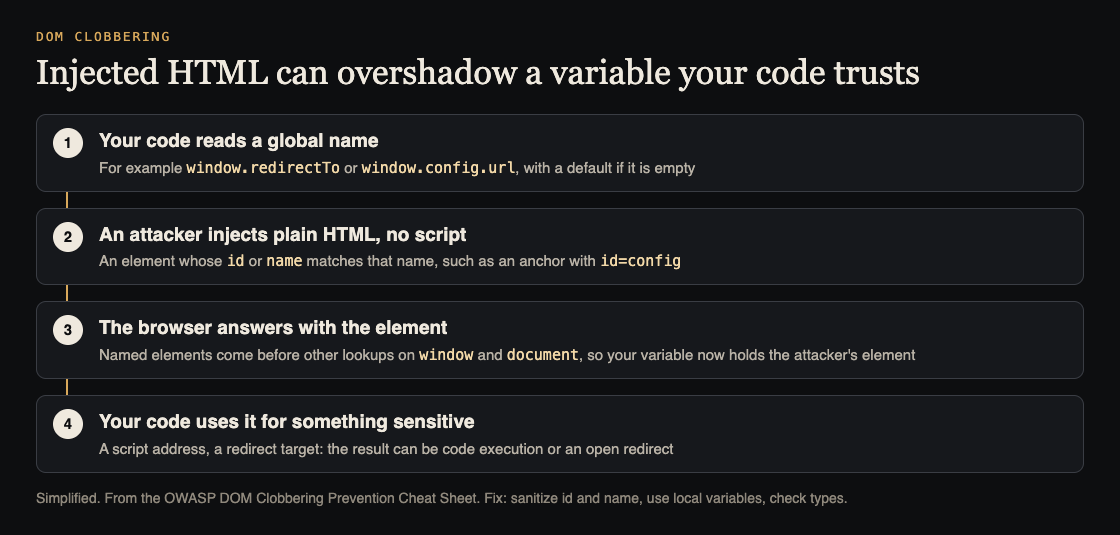
Injected HTML with a matching name wins the lookup. Simplified from the OWASP DOM Clobbering Prevention Cheat Sheet.
DOM clobbering: how HTML takes over your variables
OWASP describes DOM clobbering as a code-reuse, HTML-only injection attack. The attacker injects elements whose id or name matches the name of something your code relies on, such as a variable used to fetch remote content, or a built-in browser API. The injected element then overshadows the real value.
It is most useful to an attacker when script injection is not possible, for example when an HTML sanitizer strips scripts or a policy controls script execution. Non-script markup may still get through. OWASP says that markup can turn a page that looked secure into executable code, which ends as cross-site scripting.
Why the browser lets a named element win
When a page loads, the browser builds a tree of the page, called the DOM, and your JavaScript can read and change it. For some elements that have an id or name, the browser also creates a named reference on the window and document objects. OWASP's example is a form with id=x and name=x. The name attribute is what makes document.x work, and the form is then reachable as document.x, window.x and plain x.
The catch is the lookup order. OWASP says that when you read a property of window or document, named element references come before built-in APIs and before other properties you defined yourself. Developers who do not know this may use such a property for something sensitive, like a URL to fetch. An attacker who can inject markup with a colliding name changes that value without touching your script.
Two attacks from the cheat sheet
The first example is a redirect. The code reads window.redirectTo, falls back to /profile/ if it is empty, and sends the user there. OWASP shows two injections:
- An anchor with
id=redirectToand ajavascript:link gives cross-site scripting. - The same anchor pointing at another site gives an open redirect.
The second example builds a script tag. The code reads window.config.url, falls back to script.js, and sets that as the script's source. The attacker injects two anchors that share the id config, one of them with name=url and a link to the attacker's file. The page then loads the attacker's JavaScript, which is arbitrary code running in your page.
Neither attack needed a script tag. Both needed only a place where untrusted HTML reaches the page, such as a comment, a profile field or a rich-text box. If you test for that class of bug already, our guide to XSS testing is the place to find those inputs, and our post on open redirect testing covers the second outcome.
Sanitize the HTML first
OWASP lists sanitizing as its first guideline: use a robust HTML sanitizer, and sanitize the id and name attributes before any markup goes into the DOM. A sanitizer can help in three ways, according to the sheet:
- Remove the
idandnameattributes completely. This works, but it hurts if your content needs them. - Prefix their values with a fixed string so they cannot collide with your names.
- Check the injected markup against the existing page and remove any names that collide.
OWASP recommends DOMPurify or the browser's Sanitizer API. DOMPurify removes collisions with built-in APIs by default. To also protect your own variable names, turn on its SANITIZE_NAMED_PROPS option, which prefixes names with user-content-.
For the Sanitizer API, OWASP says to use it only where the methods are supported. Start from the default configuration, call removeAttribute() for id and name, and insert the result with setHTML(). In an unsupported browser, use the DOMPurify setup, and never fall back to inserting unsanitized HTML.
What a Content Security Policy and Object.freeze can and cannot do
Two common controls help only a little here, and OWASP says so.
A Content Security Policy limits where scripts may load from. OWASP notes it can stop attacks that clobber a script source, but not attacks that abuse code already on the page, such as clobbering the input of eval(). Treat it as a second layer. Our post on Content Security Policy shows how to write one you can keep.
Freezing is the other. Object.freeze() is only an extra control for configuration objects your app owns, set up with trusted values and kept in local scope. It is shallow, so nested objects and values from getters can still change. OWASP also warns against freezing window, document or page elements to stop named-property clobbering: Object.freeze(window) throws an error.
Write code that a named element cannot replace
The rest of the cheat sheet is defensive coding. These are the patterns it lists:
- Declare every variable with
var,letorconst. Note thatletdoes not create a property onwindow, but avardoes, and awindow.NAMEread can still be clobbered. - Do not keep globals on
windowordocument, and keep variables in local scope where you can. - Do not trust document properties before checking them. OWASP says they can be overshadowed even right after you assign them.
- Check types. A clobbered value is an element, so test it with
instanceofbefore a sensitive use. - Use strict mode, so you do not create globals by accident and so writes to read-only properties raise errors.
- Use feature detection instead of assuming a browser feature exists. A missing API acts like an undefined property, which an element can fill.
- Use unique names in production, and encapsulate variables and functions in objects or classes so outside code cannot reach them.
Worked example: audit one page for DOM clobbering
Say you have a page that shows user comments and also runs a small script that reads window.config. Here is a plan for one afternoon.
- Find the reads. Search your front-end code for
window.anddocument.reads of your own names, and for the patternx || 'default'. List each one that feeds a URL, a redirect or a script source. - Find the inputs. List every place a user's HTML is shown: comments, profiles, imported text, rich-text fields.
- Try it. On a test copy, put an anchor with the matching
idinto one of those inputs, and see what the code does. Use a harmless address you control. - Fix the reads. Move the config into a local
const, add aninstanceofor type check, and enable strict mode. - Fix the input. Sanitize with DOMPurify and
SANITIZE_NAMED_PROPS, or removeidandnamefrom user content. - Re-run step 3. The injected anchor should now have no effect.
Frequently asked questions
Is DOM clobbering the same as XSS?
No, but it can end in XSS. It uses plain HTML to change a value your code relies on, so it can work when script injection is blocked.
Does blocking script tags stop it?
No. The attack uses non-script markup such as anchors and forms. Sanitize the id and name attributes as well.
Will a Content Security Policy fix it?
Only in part. OWASP says a policy can stop clobbered script sources, but not abuse of code that is already on the page.
Get started
Start with the list from step 1 of the worked example: every place your code reads a global name and uses it for a URL or script source. That list is short on most pages, and each item is worth a type check.
whitehatstoic's cybersecurity and AI safety testing includes a web app and API review, a written report with fixes, and a retest after you apply them. It is scoped after a short call. No test finds every weakness, but injecting a harmless named element into your own test copy shows quickly whether your front end trusts the wrong thing.

Building something that has to be safe? Book a meeting with whitehatstoic: tell us the product, the deadline and your biggest worry, and we reply with a plan and a price.
Comments
No comments yet.
Sign in or make an account to comment.