Eisenhower matrix: sort problems by urgent and important
You have more problems than hours, and most of them feel like they need you right now. The Eisenhower matrix is a simple way to sort problems by urgent and important and decide which ones actually do. You draw two lines, make four boxes, and put every open problem into one of them. This post shows you how to run it on a real list of problems, how to keep it current, and how to avoid the common mistakes.
What the Eisenhower matrix is and why it works for problems
The matrix asks two questions about each item. Is it urgent? Is it important? Two yes or no answers give you four boxes, and each box comes with an action.
The matrix is often used for tasks. You can also use it for problems. A task is a single step, like "email the landlord." A problem is the thing behind the step, like "the heating fails every cold night." When you sort problems instead of tasks, you stop ranking chores and start ranking the things that cause chores. One problem solved in the right box can remove several tasks from your week.
It also slows you down for a moment per item, long enough to ask whether something loud is also something big.
Urgent vs important: how to tell the difference
Urgent means there is a deadline or a cost to waiting, and it is close. A bill due Friday is urgent. A ringing phone feels urgent.
Important means it moves something you care about: your health, your money, your work, your people. If it stayed unsolved for a year, would your life be worse? Then it is important.
Two quick tests help:
- The week test. If you ignore it for seven days, what happens? If the answer is "nothing much," it is not urgent.
- The year test. If it is still unsolved in a year, do you care? If not, it is not important.
Be honest with the second test. Some urgent things fail it, and spotting them is the point of the exercise.
The four quadrants: do, schedule, delegate, drop
- Urgent and important: do. Work on these first. A car registration that expires Friday. A client who has not paid in 45 days.
- Important, not urgent: schedule. These shape your life but never shout. A sore back from a bad desk setup. Learning a skill your job will need next year. Put a time on them, or they will sit forever.
- Urgent, not important: delegate. Someone needs an answer soon, but it does not have to be you. Hand it to a person who can own it, or shrink it to the smallest possible reply.
- Neither: drop. Let it go. Write it down once so it stops circling in your head, then stop spending attention on it.
Watch quadrant 2 closely. Some problems in quadrant 1 are quadrant 2 problems that waited too long.
How to run the matrix on your problems in 15 minutes
Here is a short routine you can run today. Set a timer.
- Minutes 0 to 5: dump. Write every open problem as one line. No solutions yet. "Back hurts after work" is enough. If you already keep a running list, like the one in how to keep a list of open problems in your field, start from that.
- Minutes 5 to 10: two passes. First pass, mark each line U or not. Second pass, mark each line I or not. Do the passes separately. Judging both at once lets urgency leak into importance.
- Minutes 10 to 13: assign actions. UI is do. I alone is schedule. U alone is delegate. Blank is drop.
- Minutes 13 to 15: pick one per box. One problem to do today, one to schedule with a date, one to hand off, and one to drop on purpose.
You can do this on paper. In Problem Graph, each line becomes a problem node the moment you press Enter. There is no urgency field, so use a plain habit: start each line with its box, like Q2: back hurts after work. Put it in a lane too (personal, work, expert or scientific), so you can filter by lane later and switch to the List view when you want the plain list.
Worked example: sorting a real backlog of problems
Say your dump produced these eight lines:
- Client invoice 45 days unpaid (work)
- Car registration expires Friday (personal)
- Back hurts after long desk days (personal)
- Need SQL for the reporting project next quarter (work)
- Weekly status report nobody seems to read (work)
- Group chat asking who will book the venue (personal)
- Bathroom fan rattles (personal)
- Want to reorganize old photo folders (personal)
After the two passes:
- Q1, do: unpaid invoice, car registration.
- Q2, schedule: back pain, SQL.
- Q3, delegate: status report, venue booking.
- Q4, drop: fan rattle, photo folders.
Now attach what you will try. Under the invoice, add a solution: "Send a reminder with a firm due date." Mark it as the one you are trying. Under the back pain, add two ideas: "Raise monitor to eye level" and "Walk ten minutes at lunch." Next week you record the outcome of each as worked, partly or failed.
Here is the step that a flat matrix cannot show you. Link problems that belong together. Maybe the unpaid invoice links to a Q2 problem you had not written yet: "No written payment terms with clients." Add it and link the two. The Q1 fire now points at its Q2 cause. Patterns like that show up on a map and stay hidden in a list.
For Q3, delegation needs a place to hand things over. The venue booking belongs to the group, not to you. If you want the group to see it, mark that problem as a main node and share it into a private network made for the group. Members with the invite code see it and its solutions. Nobody else does. The posts on keeping one shared list for a volunteer group and solving roommate problems with a shared list cover that kind of setup in more detail.
For Q4, you write the line and do nothing more. It is out of your head and that is enough.
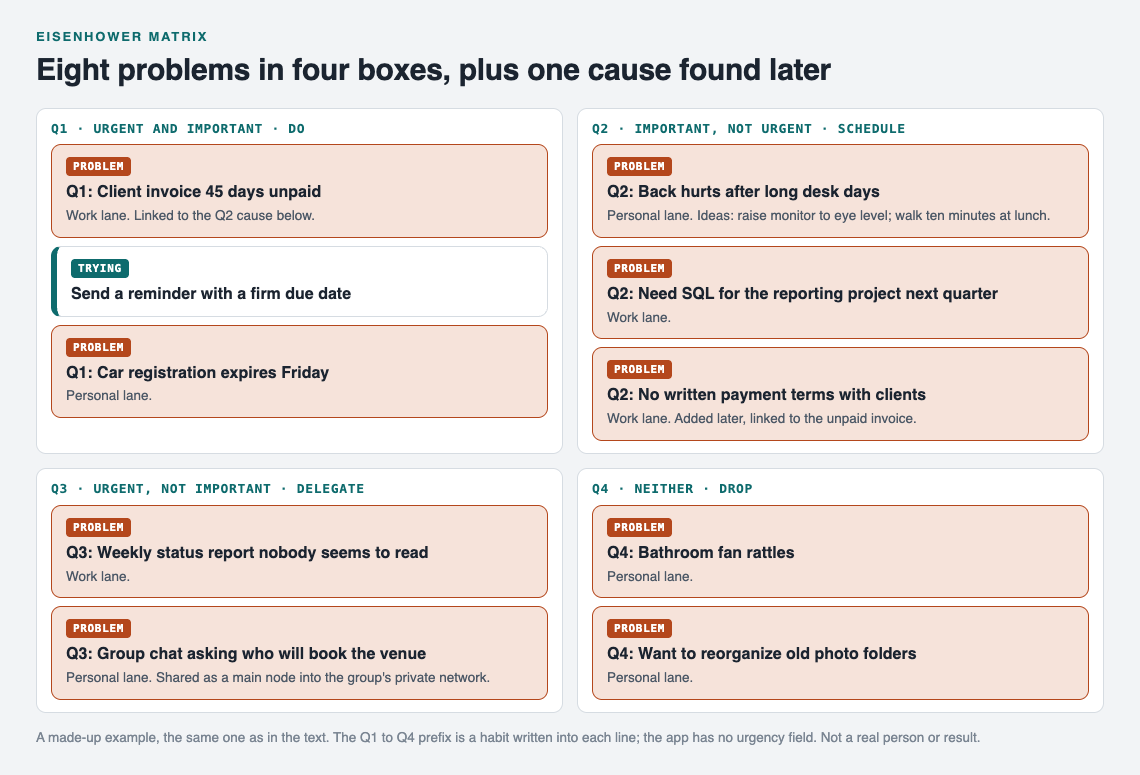
The made-up backlog from this post after the two passes.
Common mistakes when using the urgent-important matrix
- Everything lands in Q1. If most of your list is "do now," your bar for urgent may be too low. Rerun the week test.
- Q2 never gets a date. "Schedule" means a day and a time. Without one, Q2 is a polite word for Q4.
- Delegating without handing over context. If you pass a problem on, pass on what you already tried and how it went. The handover notes guide shows a format for that. When a main node is shared, its solutions and their outcomes go with it, so the next person sees what failed too.
- Sorting tasks and problems together. "Email Sam" and "Sam never replies on time" are different kinds of thing. Sort the problem. The tasks follow.
- Hiding failures. If a solution failed, keep it marked failed. A failed attempt tells you what not to repeat.
- Sorting once and never again. Deadlines move. A list sorted last month may be out of date now.
Keep the matrix alive: review and re-sort your problems
A short weekly review keeps the matrix honest. Ten minutes is enough.
- Look at last week's Q1. Mark the outcome of each solution you tried. Solved problems leave the list.
- Look at Q2. Did the scheduled time happen? If not, give it a new date, or admit it moved to Q4.
- Check for things that changed boxes. The SQL problem becomes urgent once the project starts. Rename the line from
Q2:toQ1:. - Look for repeats. If the same kind of fire keeps hitting Q1, there is a Q2 cause behind it. Add it and link them.
The record of what you tried builds up over time. After a month you can see which fixes worked on which kinds of problems. If you want to pick a single problem to start on, the post on how to choose which problem to solve first goes deeper on that one choice.
Frequently asked questions
Is the Eisenhower matrix the same as a to-do list?
No. A to-do list holds steps in the order you wrote them. The matrix sorts each item by two questions, urgent and important, and gives each of the four boxes its own action.
What goes in quadrant 2 of the Eisenhower matrix?
Quadrant 2 holds problems that are important but not urgent: health habits, skills, relationships, and the root causes behind recurring fires. They need a scheduled time, because nothing will force them onto your calendar.
Can a team use the Eisenhower matrix on shared problems?
Yes. Agree on the urgent and important tests first, then sort the shared list together. In Problem Graph you can share a main node into a private network so the team sees the problem, its solutions and their outcomes.
How often should I re-sort problems by urgent and important?
Once a week is a good default. Re-sort sooner when a deadline moves or a new problem arrives that is clearly urgent.
Get started
Open the app, write your first problem in one line, and prefix it with its box. If you want to see how a graph looks before you start, press "Load example set" on the empty graph. Then add one solution to your top Q1 problem and one date for your top Q2 problem.
Try Problem Graph: it is free, and you can look around the public network without an account. Write one problem down in a line and attach the first thing you will try.
Comments
No comments yet.
Sign in or make an account to comment.