Error Buzz Sounds for a Quiz Show Segment: Time, Mix and License
A quiz segment needs a clear "no" when someone gets it wrong. This guide covers error buzz sounds for a quiz show segment. You will learn how to pick one, where to place it, how to mix it under voices, and which license covers each place you publish it.
Wavecrate licenses royalty-free music, sound effects, photos and videos, and every download comes with a license certificate and a code anyone can check on its verify page.

What to look for in error buzz sounds for a quiz show segment
A wrong answer buzz has one job. It tells the viewer "wrong" before the host says a word. A few traits help it do that.
- It starts hard. A buzz that fades in feels late, even when it sits in the right place.
- It is short. A long buzz talks over the host.
- It ends cleanly. The host should be able to speak again right after it.
- It sounds different from your "right" sound. Viewers learn your two sounds fast, so make them easy to tell apart.
These are general editing habits, not research findings. Trust your ears on your own show.
Error Buzz and Success Chime on Wavecrate
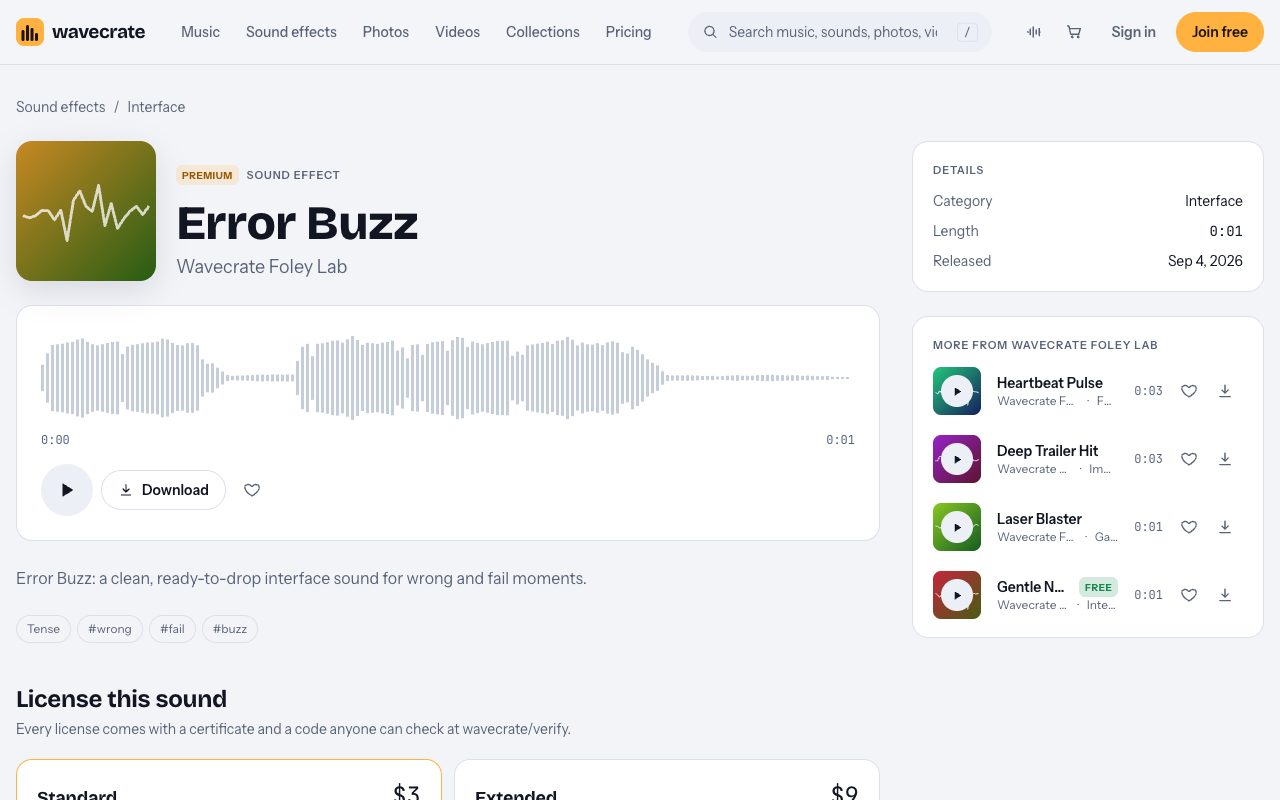
On Wavecrate, the sound built for this is Error Buzz. Its page lists it under Sound effects, Interface, by Wavecrate Foley Lab. It runs 0:01 and came out on September 4, 2026. The page calls it "a clean, ready-to-drop interface sound for wrong and fail moments." Its tags are tense, wrong, fail and buzz.
Error Buzz is marked Premium. It has no Free license. Its page lists two licenses: Standard at $3 and Extended at $9.
Your buzz needs a partner for correct answers. Success Chime sits in the same Interface sounds category. The Interface sound kit collection describes it as "for win and complete moments." On the day of writing, Success Chime was marked Free. Items on Wavecrate can change between Free and Premium, so read its page again on the day you download it.
The Interface category also holds Soft UI Click, Bubble Pop, Gentle Notification, Glass Notification, Data Beeps, Scanner Sweep and two UI Tap sounds. Play a few next to Error Buzz if you want a softer cue for a quiz aimed at learners.
Where to place the buzz
Timing matters more than the sound itself. A buzz in the wrong spot feels sloppy, however good it is.
- Find the reveal. Mark the frame where the answer is shown wrong, or where the host reacts.
- Put the buzz on that frame. Line up the start of the sound with the reveal, not a moment after it.
- Cut or drop the music at the same point. A short silence after the buzz makes the miss land.
- Bring the host back after a short pause. Give the buzz time to register, then move on before the energy drops.
If your segment has a music bed, try placing the buzz on a beat near the reveal. Your editor's grid or snapping can help. Keep the reveal and the buzz together either way.
How to mix the buzz against voice and music
The voice is the most important sound in a quiz. The buzz supports it. A simple order of work keeps things clear.
- Level the voices first. Get the host and players even and easy to follow.
- Keep the music under the speech. Nobody should strain to hear the question.
- Set the buzz lower than the voice. Raise it until you hear it clearly, then pull it back a little. A buzz that jumps out makes people reach for the volume.
- Keep it short. Trim any tail that runs into the host's next line.
- Match the buzz and the chime by ear. If one is much louder than the other, the show feels lopsided.
- Check on a phone. Small speakers show you quickly if the buzz is too loud or lost.
Use the same buzz at the same level across the whole series. That repeat is what makes it feel like your show.
Which license your quiz segment needs
The license depends on where the segment goes, not on the sound. Here is what Wavecrate's pages say. Paid licenses are not on sale yet (Wavecrate says purchases open soon), so the prices below are the listed prices for when sales open; items marked Free can already be downloaded with a free account.
- Free license (only on items marked Free): online videos and podcasts, with credit. It names YouTube, TikTok, Instagram, Twitch and podcasts, and monetized channels. Credit text is required in the description. A free account gets 3 free downloads a month.
- Standard license (listed at $3 for Error Buzz): online content for one creator or business, with no credit needed. It covers all online platforms, monetized, and your own business and brand videos. Your registered channels are printed on the certificate.
- Extended license (listed at $9 for Error Buzz): everything in Standard, plus paid advertising and TV or radio broadcast, apps, games and software, and client work with unlimited impressions.
Pro is listed at $99 a year (shown as $8.25 a month billed yearly) or $12 month to month, and it is not on sale yet. It gives the Standard license on everything. Pro is Standard only. It never includes Extended.
So a quiz segment on your own channel is Standard, or Pro. A quiz shown on TV is broadcast, so it needs Extended. A quiz app or game needs Extended. A quiz video you make for a client needs Extended. Playing the buzz out loud at a live event is not named anywhere in the license table, so treat it as not covered. The full table is on the pricing page.
Worked example: one quiz segment, three uses
Say you build one quiz segment. It uses Error Buzz for wrong answers and Success Chime for right ones. Here is how the licenses change as the segment travels.
1. Your own YouTube channel
Success Chime was marked Free on the day of writing, so its Free license covers your channel. You must put credit text in the description. Error Buzz is Premium, so this use needs its Standard license (listed at $3) or Pro, once purchases open.
2. A video for your own business or brand
Now the same segment promotes your own shop or brand. The Free license does not tick "Your own business and brand content". That row starts at Standard. So you need Standard for both sounds, even though Success Chime is marked Free. Pro would also cover both, since it gives Standard on everything.
3. A broadcast, a client or an app
Now a client pays you to make the segment, or it airs on TV, or it goes inside a quiz app. Each of these needs Extended for both sounds. For Error Buzz that is listed at $9. A Free mark or a Pro plan does not cover any of these uses.
The pattern is simple. Check each sound against each place the segment will appear.
Keep your license code ready
Every license comes with a certificate and a code. Anyone can check the code on the verify page. If a platform flags your segment, Wavecrate's pricing page says to send the platform your license code or certificate link.
With Pro, content you publish while subscribed stays covered. Keep in mind that a license lets you use the sound. Wavecrate keeps the copyright.
Frequently asked questions
Is Error Buzz free?
No. Error Buzz is marked Premium and has no Free license. Its page lists Standard at $3 and Extended at $9, for when sales open.
Does Pro cover a quiz show on TV?
No. Pro gives the Standard license only. TV broadcast needs Extended, which for Error Buzz is listed at $9.
Can I use Success Chime in a video for my business?
Not with the Free license. That license does not cover your own business and brand content, so you need Standard or Pro.
How long is Error Buzz?
Its page lists it at 0:01. That keeps it short enough for the host to speak again right after it.
Get started
Audition Error Buzz and Success Chime back to back, line the buzz up with your reveal, and note the license for where your segment will run. You can join free to start.
Browse Wavecrate: you can join free and download items marked Free now, paid licenses are not on sale yet (purchases open soon), and every download comes with a license certificate and a code anyone can check on its verify page.


Comments
No comments yet.
Sign in or make an account to comment.