Error handling: stop error pages leaking details
A stack trace on a public error page can tell a stranger your framework, its version, your file layout and sometimes your database queries. Good error handling keeps that story in your logs and gives users a calm, generic answer. This guide shows what leaks, how to test your own app in a few minutes, and how to fix it the way the OWASP Error Handling Cheat Sheet describes.
Why error handling is a security issue
An error page is written for developers. It shows the code path that failed so you can fix it fast. That is useful on your laptop. In production, the same page reaches anyone who can make a request fail.
The OWASP Error Handling Cheat Sheet starts from how attacks begin. First comes reconnaissance: the attacker gathers as much technical detail as possible, often names and versions of the server, frameworks and libraries. Unhandled errors help with exactly that step. The leak rarely breaks anything by itself. It makes every other weakness cheaper to find.
What error pages leak
OWASP gives two examples of what an error can hand over, and a few more are worth knowing:
- Your technology stack. An exception shown to the user can name the framework and the server, with their versions. With a version in hand, an attacker knows which published bugs to try.
- SQL errors. A database error can show part of the query and the installation path. OWASP notes this can point straight to an injection point.
- Stack traces. File names, function names and line numbers show how your code is organized.
- File paths. A path such as
/home/deploy/app/src/billing/charge.jsshows folder names and which parts of the app matter.
If a database error shows up during testing, treat it as a lead for a deeper check: see SQL injection testing.
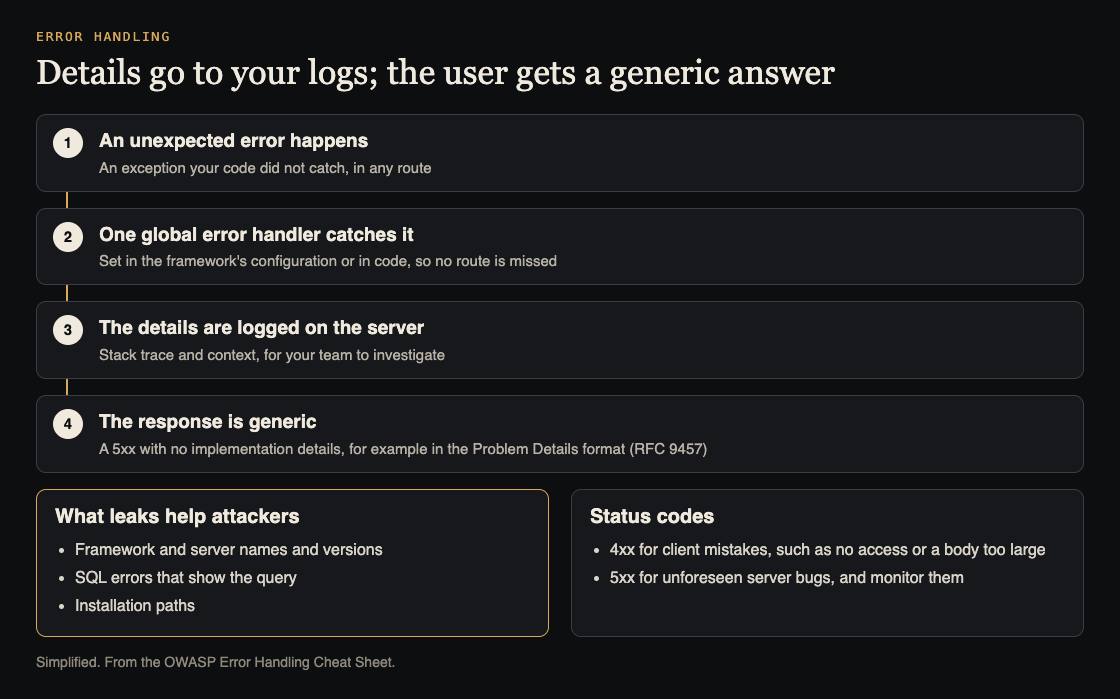
One global handler: details to the logs, a generic answer to the user. Simplified from the OWASP Error Handling Cheat Sheet.
Worked example: test your own app in ten minutes
You need only a browser and curl. Test only sites you own or have written permission to test, and use a staging copy where you can. Then make things fail on purpose:
- Request a page that does not exist. Visit
/this-page-does-not-exist-123. A good 404 is plain. A bad one shows a route table or a framework banner. - Break a parameter. If you have
/orders?id=42, tryid=',id=abc,id=-1and a very long string. Watch for database messages. - Send the wrong body. Send broken JSON, such as
{"name":, to an API endpoint, and a request body far bigger than it expects. - Read the headers. Run
curl -I https://staging.your-app.exampleand read every line, then repeat it on an error response. - Read the raw response. Some apps show a friendly page but put the trace in an HTML comment or a JSON field. View the source and check the network tab.
Write down each request and what came back. That list is your fix list, and running the same requests later proves the fix.
The fix: one global handler, details in your logs
OWASP's target approach has two halves. When an unexpected error happens, the app returns a generic response. The details are logged on the server for investigation, and never returned to the user.
The way to make that hold everywhere is a global error handler, set in your framework's configuration or in code, so no route can forget it. In plain steps:
- Catch every unhandled error in one place, such as a top-level error middleware.
- Create a random reference ID for the error, for example
err_7f3a91. - Log the full details on the server with that ID: the trace, the request path and a timestamp. Follow your logging rules for what to leave out, such as passwords and tokens, and escape what you keep (see log injection).
- Return a short response with the right status code and the reference ID, and nothing else.
The user sees something like: "Something went wrong on our side. Please try again, and quote reference err_7f3a91 if it keeps happening." Your team searches the logs for that ID and finds the full trace.
OWASP shows this pattern for several stacks. Spring Framework 6 introduced a ProblemDetail class for these responses, and ASP.NET Core can send every exception to one dedicated error controller. Whatever your stack, check the running app with the five tests above, not only the config file.
Error responses in APIs and status codes
OWASP writes the cheat sheet for API backends, since most recent apps are built that way. An API should cover its failure modes on purpose and return no content that reveals how it is built. For the shape of the body, OWASP points to Problem Details for HTTP APIs, a standard document format for error responses (RFC 7807, with RFC 9457 in its references).
Keep status codes honest, as OWASP's appendix describes:
- 4xx for mistakes on the client's side, such as no access or a request body that is too large.
- 5xx for unforeseen bugs on the server.
- Monitor your 5xx errors. OWASP calls them a good sign that the app is failing for some inputs.
A server fault that returns 200 with an error message inside hides the problem from your monitoring.
Headers that name your stack
Headers go out on every response, not only on errors. MDN warns that a Server header with fine-grained details about your server software may make known vulnerabilities easier to detect. The non-standard X-Powered-By header names the framework; Express apps usually send X-Powered-By: express.
Trim both to the least detail your setup allows. MDN also notes that hiding them has debatable value, because software can be fingerprinted in other ways. So treat this as tidying, not protection: you still need to patch what you run.
Keep it fixed with a test
Leaks come back in rushed fixes. Add three questions to code review:
- Does any response include a raw exception, its message or its trace?
- Does every new route go through the global handler?
- Is there a test that forces an error and checks the body holds only the generic message?
The third one is cheap and stops the same leak from coming back.
Frequently asked questions
Is showing a stack trace really a security risk?
Yes. A trace does not break in by itself, but it reveals your framework, versions, file paths and code flow. That is the reconnaissance OWASP says every attack starts with.
What should a safe error page say?
Say that something went wrong, suggest trying again, and give a reference ID to quote to support. Leave out technical details, paths and versions.
How do I keep enough detail to debug?
Log the full trace and request context on the server, tagged with the reference ID. Show only the ID to the user, then search your logs with it.
Do API errors need the same treatment?
Yes. Return a consistent body, such as the Problem Details format, with an honest status code and no raw exceptions, SQL errors or traces.
Get started
Run the five failure tests on your staging app today, then read your headers. Fix what you find with one global handler, and add the test so it stays fixed.
If you want a second set of eyes, whitehatstoic's security testing covers web app and API review, with a written report, fixes and a retest after fixes. It is scoped after a short call, and no test can promise to find every weakness.

Building something that has to be safe? Book a meeting with whitehatstoic: tell us the product, the deadline and your biggest worry, and we reply with a plan and a price.
Comments
No comments yet.
Sign in or make an account to comment.