Event planning problems: track what went wrong
Event planning problems are usually small and specific. The check-in line backs up. The vegetarian meals run out. The projector cable is the wrong kind. Everyone notices, someone says "we should fix that next time," and a year later the same thing happens again. This post shows you how to track what went wrong while it is fresh, review it with your team, and turn a pile of one-off mistakes into a short list you actually fix before the next event.
Why the same event planning problems keep coming back
Event mistakes repeat for a simple reason: nobody writes them down in a place that survives until next year.
During the event, you are busy. After the event, you are tired. By the time anyone plans the next one, the details are gone. You remember that "registration was a mess" but not why. Was it the guest list format? Too few volunteers? One table instead of two?
There is a second reason. When problems do get written down, they usually land in a message thread or a meeting note. Those are lists. A list tells you what happened. It does not tell you that the check-in delay, the late start and the cold food were all the same problem: not enough people at the door in the first 20 minutes.
To stop the repeat, you need two things. A record made close to the moment. And a way to see which problems are connected.
Common event planning problems and where they start
Many problems that show up on the day start weeks earlier. It helps to know where to look.
- Arrival and check-in. Long lines, missing names, people who registered but are not on the list. These can start with how sign-ups were collected and how many people were assigned to the door.
- Food and drink. Running out, too much left over, dietary needs missed. These start with the headcount and the dietary question on the sign-up form.
- Equipment and venue. Sound that cuts out, no extension cords, locked rooms. These start with nobody owning a setup checklist or a test run.
- Timing. Speeches that run long, a schedule nobody saw, cleanup that drags past the venue's closing time. These start with a plan that lived in one person's head.
- People. Volunteers who did not know their job, or two people doing the same job. These start with unclear roles.
Notice the pattern. The visible problem is on the day. The cause is in the planning. If you only record the visible problem, you fix the symptom. If you record what you tried and whether it worked, you start to see the cause.
How to track what went wrong during the event, not weeks later
The rule is simple: one line, as soon as you notice it. Do not try to explain it. Do not try to solve it. Just capture it.
Problem Graph is built for this. You write a problem in one line, put it in a lane (personal, work, expert or scientific), press Enter, and it lands on your graph. It runs in your phone's browser, so you can do it from the hallway with a cart of chairs in one hand.
Here is what a fundraiser dinner might look like by the end of the night:
- Check-in line took 25 minutes
- Ran out of vegetarian meals at 7:40
- Mic cut out during the raffle
- Nobody knew who was locking up
- Raffle tickets sold out early
That is enough. Five lines, written in the moment, with real detail like times and numbers. Get it out of your head first and sort it later.
If you fixed something on the spot, attach it as a solution while you remember. "Moved two volunteers from the kitchen to the door" is a solution. Mark the outcome: worked, partly or failed. Your future self needs to know that the quick fix only partly helped.
Running a quick post-event review with your team
Hold the review within a few days, while details are fresh. Keep it to 30 minutes, with one keeper who writes the entries.
Go through the problems one at a time and ask three questions:
- What did we try? Add each attempt as a solution, including ideas nobody tried yet.
- What happened? Mark each one worked, partly or failed. Be honest. A failed fix is useful information.
- What would it need? Some solutions depend on something else. "Two check-in tables" needs a second printed guest list and a second volunteer. In Problem Graph that is a requirement, a third kind of node next to problems and solutions.
The failed ones matter as much as the wins. The app's own home page puts it well: "The graph is honest. A solution that failed three times stays on the map as a failed solution, and that is exactly what the next person needs to know." If the committee tried a sign-up sheet at the door last year and it slowed things down, that should be on the map so nobody suggests it again as if it were new.
Turning one-off mistakes into a shared problem list
A list that only you can see helps you. A list the whole planning team can see helps the next event.
Problem Graph is private by default. Only you see your problems, and they follow you to any phone or computer you log in on. To share with your team, you create a private network and give people the invite code. Members see what you share into it. Nobody else does. Keep in mind the app says anyone with the invite code can join, so share the code only with the people you mean to include.
Here is the detail that changes how you set things up. Only a main node can be shared. When you share a main node, its solutions, their outcomes and the requirements they need go along with it. A problem you only link to it stays home in your private graph.
So for an event, decide what the team needs to see. Two setups work well:
- One main node per recurring problem. "Check-in line too slow at spring dinner" becomes a main node, with every fix you tried attached as a solution. Share it into the committee's network. Do the same for food and equipment.
- One main node per event, with fixes attached. "Spring dinner 2026: what to change" becomes the main node, and each fix (two check-in tables, add a vegetarian count to the form, test the mic at 5pm) is a solution under it.
Either way, the team opens the app, filters by Network, and sees the problems, what was tried and how it went. You can switch to the List view if the map feels like too much.
Spotting patterns across events and fixing the few that matter
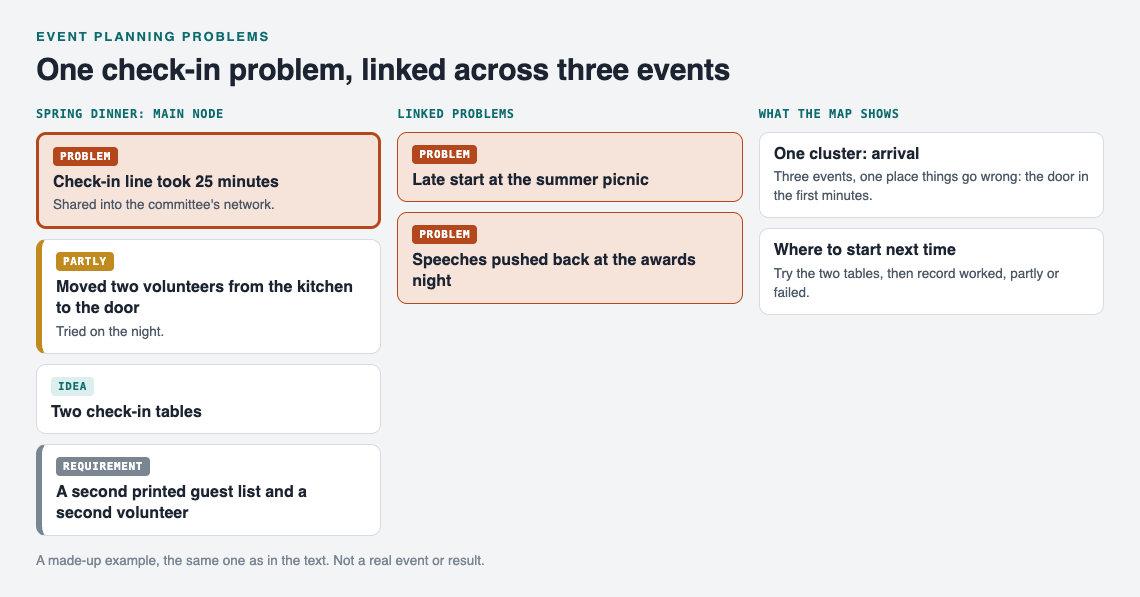
The fundraiser dinner's check-in problem, linked to two later events: one cluster, arrival.
After two or three events, the map starts to show you things a list never would. Link problems that belong together, even across lanes. Link "Check-in line took 25 minutes" from the spring dinner to "Late start at the summer picnic" and "Speeches pushed back at the awards night." Now you can see one cluster on the map: arrival.
Look at the solutions in that cluster. Maybe "more volunteers at the door" was marked partly three times. Maybe "pre-printed name badges" worked once and was never tried again. That tells you where to spend your effort.
You will not fix everything. You do not need to. Pick the two or three clusters that cause most of the trouble and fix those properly. The Pareto 80/20 rule suggests a few causes may explain most of what went wrong, and the post on the Pareto principle for everyday problems shows how to find them.
If you are stuck for new ideas, the app has two options. It is built to show you similar problems other people have shared, in any lane, and which of their solutions worked, so you can borrow one into your graph with one tap and it keeps a link back to where it came from. You can also ask for suggestions, and the AI proposes new solutions grounded in what worked for others on problems like yours. Treat each proposal as an idea to test, not an answer. Try one at the next event and record the outcome.
Frequently asked questions
What should go in a post-event problem log?
One line per problem, with a time or number if you have it, like "ran out of vegetarian meals at 7:40." Under each problem, add what you tried and mark it worked, partly or failed. Add any requirements a fix depends on, such as a second volunteer or a printed list.
How soon after an event should we review what went wrong?
Within a few days, while people still remember details. Capture the problems on the day itself, then use the review to add solutions and outcomes.
How do volunteers add problems without a meeting?
Ask each volunteer to send you one line per problem on the night, and add them to your graph. Volunteers can also keep their own graph in the app, and members of your private network can see the main nodes you share there.
How do we stop the same mistake at next year's event?
Make the recurring problem a main node, attach every fix you tried with its outcome, and share it into your team's private network. When planning starts next year, the team opens it and sees what failed and what to try instead.
Get started
Before your next event, open Problem Graph on your phone. If you want to see how a graph looks first, an empty graph offers a "Load example set" button. On the day, write each problem in one line as it happens. After the event, attach what you tried, mark the outcomes, and share the main problems with your team.
Try Problem Graph: it is free, and you can look around the public network without an account. Write one problem down in a line and attach the first thing you will try.
Comments
No comments yet.
Sign in or make an account to comment.