Evolved, Edge or Fun: Which 2048 Mode Should You Pick?
Evolved, Edge or Fun: which 2048 mode should you pick? Evolved 2048 asks you before every game, on a cube with six faces of nine squares. The three modes share the same cube, the same twists and the same turns. They differ in one thing: what a slide does. This guide sets out each mode, a test that shows the difference, who each mode may suit and how to switch.
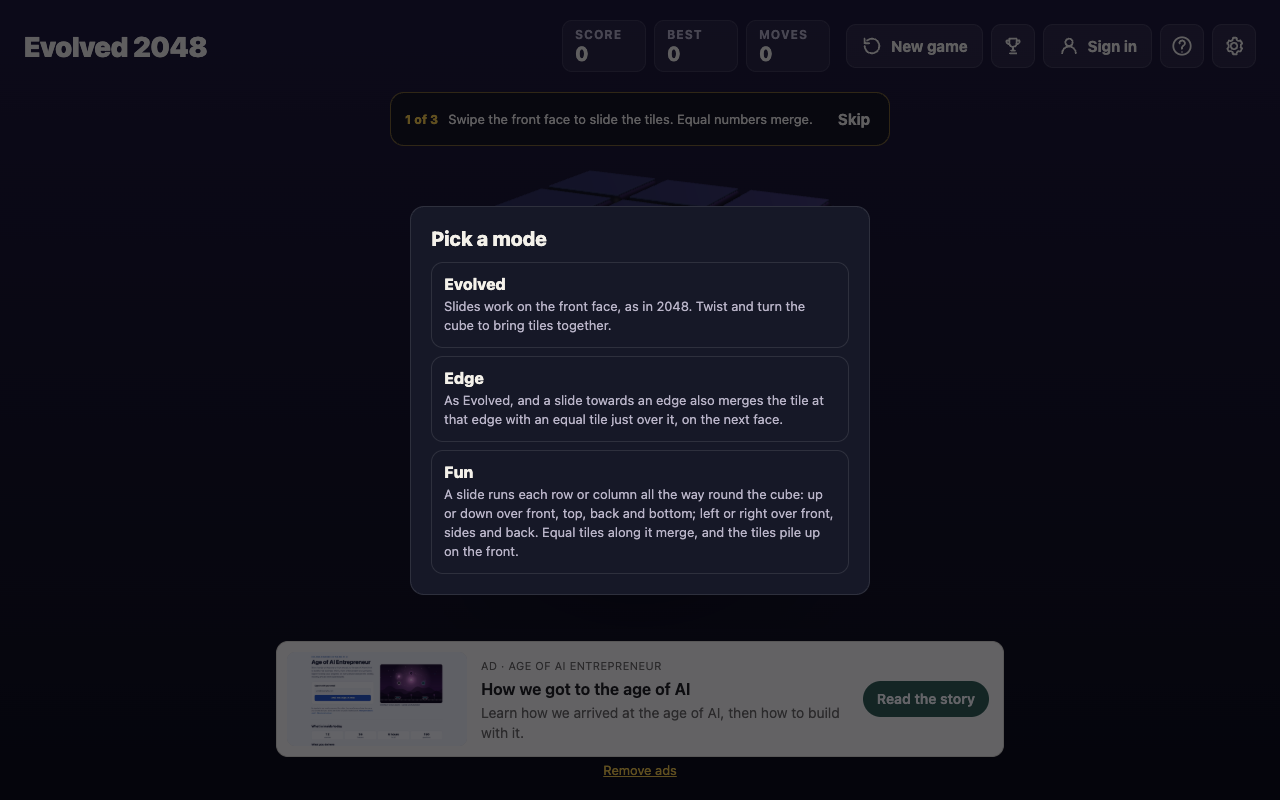
The three 2048 modes at a glance
The game's own descriptions are short, so here they are in plain words.
- Evolved: slides work on the front face only, as in 2048. You twist and turn the cube to bring tiles together.
- Edge: the same as Evolved, plus one extra. A slide towards an edge also merges the tile at that edge with an equal tile just over it, on the next face.
- Fun: a slide runs each row or column all the way round the cube. Equal tiles along it merge, and the tiles pile up on the front.
Every mode keeps its own best score. If you switch around, the Best box shows the best for the mode you are in, not an overall figure.
Evolved mode: the classic rules with a twist
Evolved is the baseline. You swipe the front face, or press the arrow keys or W A S D, and tiles slide as in 2048. Two equal tiles merge into their sum. A tile made in a merge does not merge again in the same slide: in a test, a row of 2 2 2 slid left became 4 2, and 2 2 4 became 4 4.
The cube is what makes it different. A slide only acts on the front face, so tiles on other faces sit still until you bring them round. You do that with twists. Drag a row on the right face sideways, or a column on the top face, and that layer turns a quarter and carries its tiles to the next face. On a keyboard, 1 2 3 twist the rows right and 4 5 6 twist the columns up, and Shift twists the other way.
Turning the whole cube is separate. Shift and an arrow key does it, or you can drag the space around the cube. The game says turning is free, and in tests it left Moves and Score unchanged.
Edge mode: when sliding towards an edge pays off
Edge mode starts from the same rules and removes some of the twisting. When you slide towards an edge of the front face, the tile sitting at that edge can merge with an equal tile just over it. The new tile stays on the front.
The match has to line up exactly. In a test of Edge mode, an 8 on the front's top middle square and an 8 on the middle of the top face's bottom row made a 16 on a slide up, with Score 16 and Moves 1. An 8 on either neighbouring column of the top face did not merge.
Edge mode can also chain. In another test there was a 16 on the front's top left, an 8 on its top right and an 8 just over the right edge. One slide right made the two 8s into a 16 and slid it next to the other 16, so the top row read empty, 16, 16. The two 16s did not merge in that slide, because a tile made in a merge waits for the next one.
The end rule changes too. In Edge mode the game ends when all 54 squares are full and no two equal tiles sit side by side, on a face or across an edge. In Evolved mode it ends when no face has two equal tiles side by side. For the thinking behind Edge, see 2048 Edge mode tips: when to slide towards an edge.
Fun mode: slides that run round the cube
Fun mode changes what a slide is. Up or down runs the tiles over the front, top, back and bottom faces. Left or right runs them over the front, the two sides and the back. Equal tiles along that ring merge, and the tiles pile up on the front.
So a slide is no longer limited to nine squares. A tile on the back face can take part in a slide you make from the front, and some of the faces you cannot see. You still have twists and turns, but you will use them for different reasons. The post 2048 Fun mode tips: when a slide runs round the cube goes through how to read the ring before you move.
A side by side example: one pair of 8s
Here is the difference in one picture. Put an 8 on the front's top right square and an 8 on the right face, just over that edge, and slide right.
- In Evolved mode they did not merge in a test. To join them you would have to twist or turn first.
- With edge merging on, the pair made a 16 on the front's top right in one slide, with Score 16 and Moves 1. That test was played when edge merging was a setting, before it became Edge mode, and it is the same rule.
- In Fun mode the slide runs round the whole cube instead, so that pair is not the question there, and this pair was not tested in Fun mode.
The lesson is to look at what each mode lets one slide do before you press a key.
Evolved, Edge or Fun: which 2048 mode should you pick? A match to your style
The site gives no difficulty ratings for the three modes, and no source ranks them. What follows is a match between how you like to play and what each mode asks of you, so treat it as advice, not a measurement.
If you are new
Start with Evolved. It has the fewest rules, and it matches the first-game tips: swipe the front face, drag a row or column to twist, turn the cube to use the other sides. Learn how a twist carries tiles round first. Everything else builds on that.
If you like to plan
Try Edge. Each slide towards an edge asks a question: is there a match just over it? You can set up an edge pair one move ahead and use one slide where Evolved needs a twist and a slide. Mind the other side of the rule: a tile left at an edge can merge when you did not plan it.
If you take risks
Try Fun. One slide can touch four faces, so one move can change a lot. Check the whole ring before you press a key.
One note for score chasers. The best score is kept for each mode, so a score in Fun mode never competes with one from Evolved. Pick the mode you want to improve in and stay there for a while.
How to switch modes with the Pick a mode box
On a first visit the game opens a box titled Pick a mode. It shows Evolved, Edge and Fun. On that first visit it has no Keep playing button, and Escape does not close it. You have to pick one. After you pick, the bottom left of the screen names your mode, for example Evolved mode.
To change later, press New game. The same box opens. If you have made moves, it says that the game ends and its score is kept only if it is your best. It tags the running mode with "this game" and offers a Keep playing button. Keep playing or Escape closes the box with your score, moves and mode unchanged.
Picking any mode starts a new game with Score 0, Moves 0 and two tiles on the front. That includes the mode you are already in. A reload keeps your mode. There is a full walkthrough in how to change the 2048 mode with the Pick a mode box.
Frequently asked questions
Which 2048 mode is easiest for beginners?
Evolved is the best starting point because it has the plainest rules: slides on the front face, twists to bring tiles round. The site does not rate the modes by difficulty, so treat that as advice.
Does the mode change where the next tile appears?
The How to play box gives the new tile rule once, under New tiles, and not under any mode: every slide or twist adds a 2 or a 4, on the front face when it has room. The post on where the next tile appears explains the rule.
Can I switch modes in the middle of a game?
Not without ending the game. Picking a mode in the New game box starts a fresh game, even if you pick the one you are in. If you change your mind, press Keep playing or Escape to go back to your game.
Which mode is best for chasing a high score?
No source ranks the modes for score. Each mode keeps its own best, so choose one and compare yourself against your earlier games in it.
Get started: play Evolved 2048 and pick your mode
You do not need an account to play. Open the game, pick a mode and make your first slide. If it does not suit you, press New game and try another.
Play Evolved 2048: it is free and plays in your browser on a computer or a phone.
Comments
No comments yet.
Sign in or make an account to comment.