Flatmate bill problems: one shared list for the house
Flatmate bill problems are rarely about money alone. They are about nobody remembering who agreed to what. Most houses handle bills through memory, a group chat and a vague sense of who paid last. That works until it does not. This post shows you how to keep every bill problem, and every fix you try, on one map the whole house can see.
Why flatmate bill problems keep coming back
Bill arguments rarely come from one big event. They come from small things that nobody wrote down. Someone covered the internet for two months. Someone moved out and the account is still in their name. Someone said they would sort it and then did not.
The same problems return because the fix is never recorded. You agree on something in the kitchen, it feels settled, and three months later nobody remembers the rule. So you have the same talk again.
A written list breaks that loop. It holds the problem, what you tried, and what happened.
The most common flatmate bill problems
These come up in almost every shared house:
- One person pays the bill and then waits to be paid back.
- The split is equal, but usage is not. One flatmate works from home all day and the heating bill shows it.
- A new flatmate arrives or an old one leaves, and the split is never updated.
- A bill is in one person's name, so that person carries the risk when it is paid late.
- Shared items like cleaning supplies and toilet paper have no clear owner.
- Nobody knows when each bill is due.
Each of these is a separate problem. Some are linked. A late payment, for example, often traces back to the unclear due dates.
Why one shared list works better than group chat
A group chat is good for quick questions. It is poor at keeping decisions where you can find them. A decision from March sits under four hundred messages about the bins.
A list is different in three ways:
- Each problem has its own line, so it cannot get buried.
- Each problem carries the fixes you tried and whether they worked, partly worked or failed.
- Everyone sees the same thing, so nobody has to rely on one person's memory.
The failed fixes matter most. If you tried a rotating payer and it fell apart in a month, that stays on the record. The next person who suggests it can see what already happened. It is the same idea behind our post on one shared list for coworking space members: a shared place for problems beats scattered complaints.
What to put on the shared house list
Write each problem as one line. Keep it plain and specific. Compare these:
- Vague: "Money stuff is annoying."
- Useful: "The electricity bill is in Sam's name and Sam is often paid back late."
Then add the solutions you could try, as ideas. For the electricity example, you might list:
- Everyone sets up a monthly transfer on the first of the month.
- Move the account to a joint arrangement the whole house can see.
- Agree that anything unpaid after seven days is raised at the house meeting.
Mark the one you are trying. Later, record the outcome: worked, partly, or failed. Problem Graph keeps these as nodes on a map, so you can see the problem and its attempts together. Our post on writing a problem statement in one line shows how to keep each line short and clear.
How to set up your list step by step
- Open the app. Go to problemgraph.vlvd.net/app. It runs in the browser and works on your phone. You can look around the public network without an account.
- Create an account. You need a username and a password to add problems.
- Write the first problem. One line is enough. Put it in a lane. For bills, Personal or Work are the closest fits, since the lanes are personal, work, expert and scientific. Pick the one that suits how your house thinks about it.
- Mark a main node. Choose one problem, such as "House bills are paid late and unevenly", and mark it as a main node. Only a main node can be shared.
- Create a private network. Make a network, then give your flatmates the invite code. Note that anyone with the invite code can join, so only hand it to people in the house.
- Share the main node into the network. Its solutions, their outcomes and the requirements they need go along with it.
- Link related problems. Link "Unclear due dates" to "Bills paid late". Problems you link to a main node stay in your own graph, so only the main node and what hangs off it is shared.
Your own problems are private by default. Nobody else sees them unless you share a main node. That means you can keep a personal note, like "I feel awkward asking for money", on your own graph and share only the house-level problem.
How to review the list in a monthly house meeting
Keep the meeting short. Aim for about fifteen minutes, with the list doing the work. Open the map or the List view and go through it in this order:
- Check what you were trying. Look at each solution marked as being tried. Ask what happened.
- Record the outcome. Mark it worked, partly, or failed. Do this in the meeting so it does not get skipped.
- Add new problems. Anything that annoyed someone this month gets one line.
- Pick one thing to try. Do not fix everything. Choose one solution per open problem at most.
For a longer routine, see weekly review: close the problems you solved. Write the attempt, then the result.
Turning bill problems into agreed fixes
A fix only counts once everyone agrees to it. Here is a worked example from start to finish.
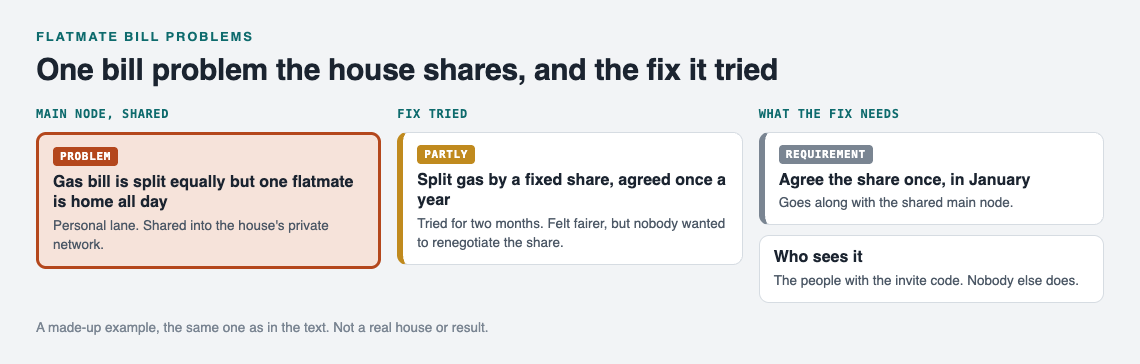
Problem: "Gas bill is split equally but one flatmate is home all day."
Ideas:
- Keep the equal split and accept it.
- Split the gas bill by a fixed share agreed once a year.
- Ask the home-based flatmate to pay a small extra amount in winter months.
The house tries the second idea for two months. At the next meeting you record it as partly worked: the split felt fairer, but nobody wanted to renegotiate the share. You add a requirement, "agree the share once, in January", and keep that idea as the one you are trying.
Now the graph shows the problem, the options, what each did, and the rule you landed on. A new flatmate can read it and understand why things are the way they are.
You can also ask the app for suggestions. The AI proposes new solutions based on what worked for others on similar problems. Treat these as proposals to discuss, not answers. Check anything you borrow against your own house and your own bills.
Frequently asked questions
Can my flatmates see all of my problems?
No. Private is the default, so only you see your problems. Flatmates see a main node only after you share it into your private network.
Do my flatmates need an account?
To add a problem, recommend a solution or borrow one, yes. They create an account with a username and a password. Browsing the public network needs no account.
Can anyone join our house network?
Anyone who has the invite code can join. Share the code only with the people who live in the house.
Does it work on a phone?
Yes. It runs in the web browser and works on your phone.
Get started
Try Problem Graph: it is free, and you can look around the public network without an account. Write one problem down in a line and attach the first thing you will try.
Living with others in other ways? See how to solve roommate problems with a shared list and shared car problems.
Comments
No comments yet.
Sign in or make an account to comment.