Fun mode 2048: can you plan a slide round the whole cube?
Fun mode 2048: can you plan a slide round the whole cube? Yes, and that is the skill the mode asks of you. In Fun mode a slide does not stop at the edge of the front face. It runs round a whole ring of squares, and equal tiles along that ring merge. This post shows which squares share a ring, with tests played on the live game, and a short routine for planning a slide before you press a key.
Fun mode 2048: can you plan a slide round the whole cube? Yes, ring by ring
The cube has six faces of nine squares, 54 in all. The Pick a mode box describes Fun in one line: "A slide runs each row or column all the way round the cube: up or down over front, top, back and bottom; left or right over front, sides and back. Equal tiles along it merge, and the tiles pile up on the front."
In Evolved mode a slide works on the front face only, as in the original 2048. In Fun mode the slide uses a longer track. That track is what this post calls a ring: the squares that one slide can carry tiles across. If you have not picked the mode yet, how to change the 2048 mode explains the box.
Which squares are on a ring
The words in the box give the faces. A test shows the squares. The test board had a 4 on the front's centre square and a second 4 on one other square, and one test was played for each of the other 53 squares, pressing the Up arrow once. The 4s merged into an 8 only when the second 4 was on one of 11 squares: the other two squares of the front's middle column, and the three middle-column squares on each of the top, back and bottom faces. That is 12 squares with the centre one, which is a ring of 12. None of the other 42 squares merged with it, not even a tile on the front's own middle row.
A second test used the Left arrow. A 4 on the front's middle row merged with the centre 4, and so did 4s on the right, back and left faces in that same row of the ring. A 4 on the top face's middle column or the bottom face's middle column did not. So up and down use one family of rings, left and right use another, and a square belongs to a different ring for each pair of keys.
These were tests played one at a time on a set-up board, not an average over many games.
A worked example you can repeat
Here is the test the pictures come from. Pick Fun mode, then set up a board with a 4 on the front's centre square and a 4 on the centre square of the top face. The first picture shows it. The top 4 is out of the front's reach in Evolved mode.
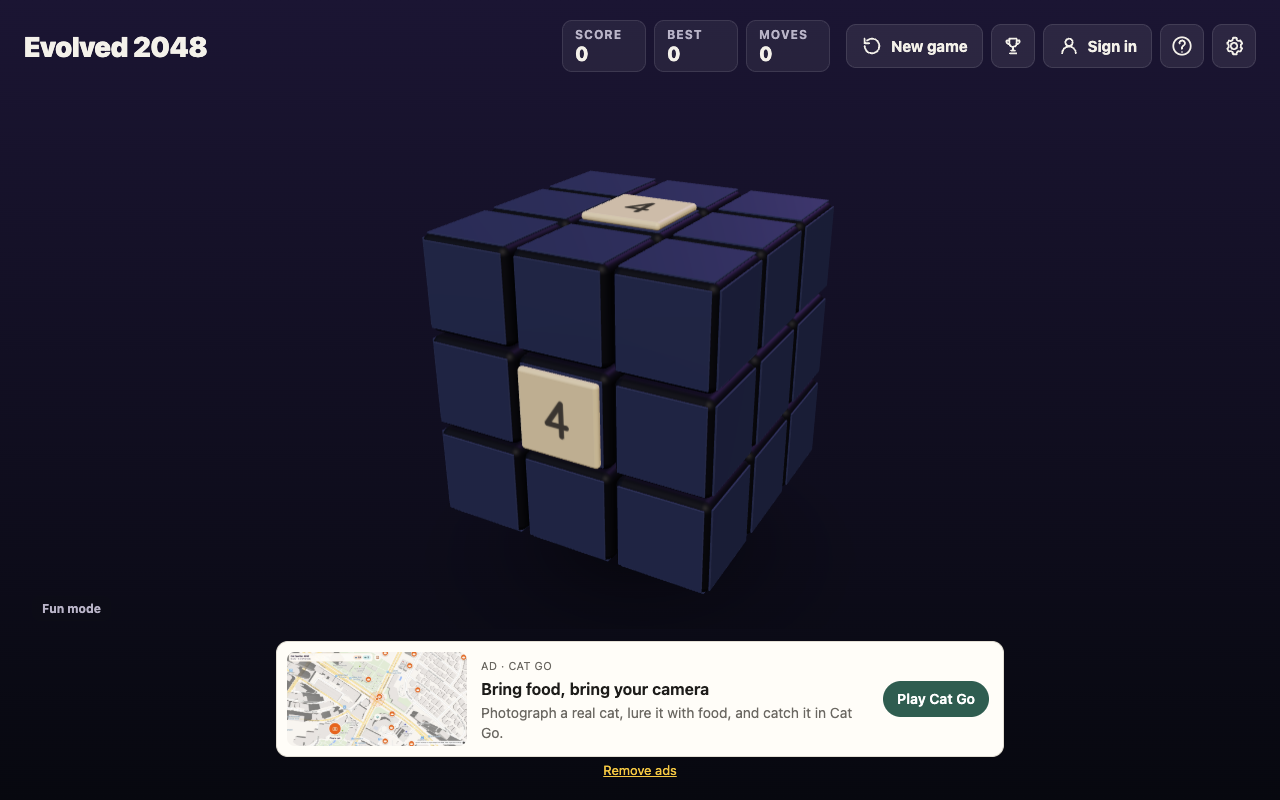
One press of the Up arrow gave the second picture. The two 4s merged into an 8 on the front's top middle square. Score read 8 and Moves read 1. A new 2 appeared on the front's bottom right square.
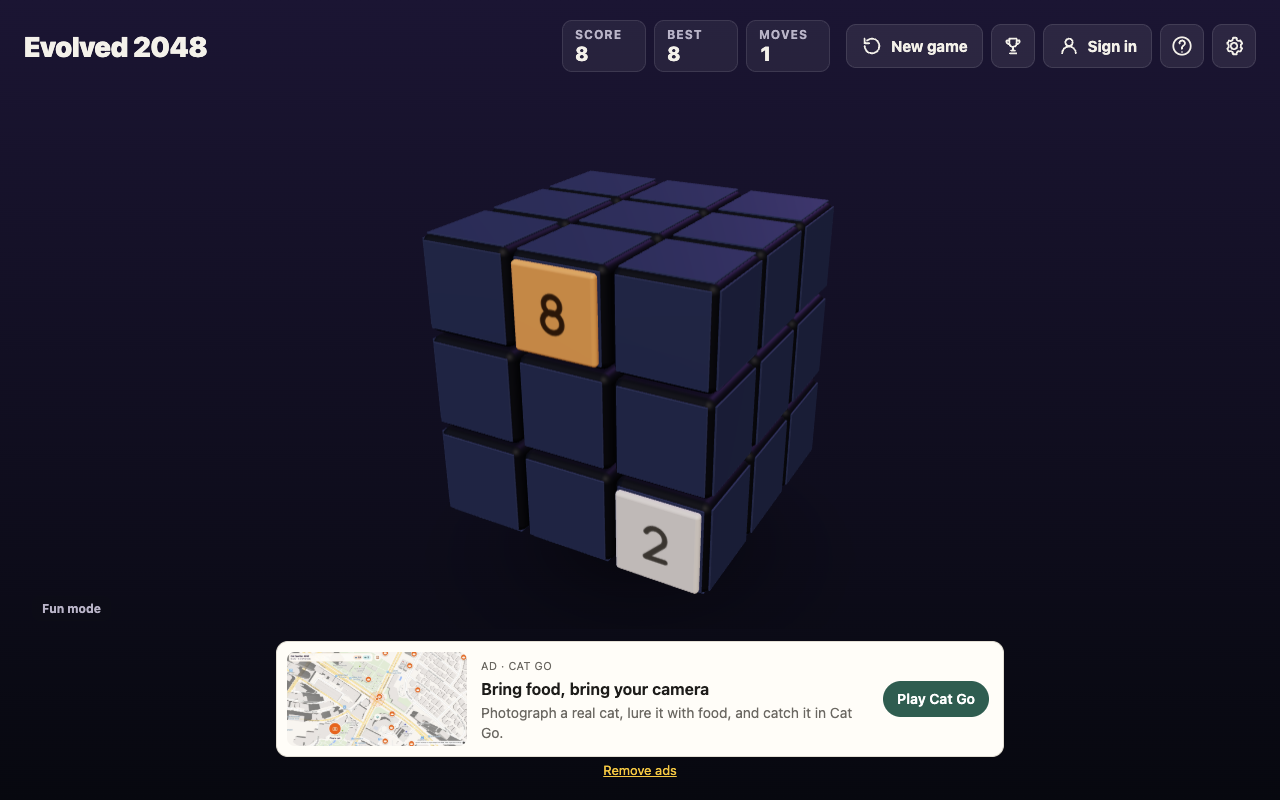
Two things to take from it. The merge needed no twist and no turn. And the tile that merged did not come from the front at all in the sense you can see: it came from the top face, which sits on the same ring as the front's middle column.
The same two tiles, the wrong key
Planning goes wrong when two tiles are equal and close, but on different rings. Take a 4 on the front's centre and a 4 on the top face, in its middle column. With the Up arrow they merge, because both are on the middle-column ring. With the Left arrow they do not: in the test, Score stayed 0, Moves read 1, the front 4 slid to the front's middle left square and the top 4 stayed where it was.
So before every slide, name the key, then name the ring that key uses. A pair is only a pair for the key that puts both tiles on one ring.
A four step routine to plan a slide
- Choose a key. Up or down means the middle-column kind of ring for a column of the front; left or right means a row.
- List the tiles on that ring, in order, round all four faces it crosses. Ignore the empty squares.
- Look for equal tiles next to each other in that list. Those are the merges the slide can make.
- Check the front. The result piles up on the front, and every slide adds a 2 or a 4 there when it has room, so keep a few front squares empty.
This routine rests on the box's own words and on the tests above. What it does not cover is the order in which one slide resolves several merges on a long ring, or what a ring does with three equal tiles: those were not tested for this post, so press the key once and read the board before you rely on it.
Turning the cube is free planning
Turning changes which squares are in front of you. Drag the space around the cube, or press Shift and an arrow key. The game says the whole cube turns and that turning is free: it adds no points, counts no move and adds no tile. That makes it the cheapest way to look at the faces you cannot see before you commit to a slide. The post on turning the whole cube with Shift and the arrow keys covers the keys.
Mistakes that waste a slide
- Reading only the front. A slide that looks useless on nine squares may merge a pair on the back.
- Mixing up the rings. The top 4 and the front 4 above merge for Up and not for Left. Check the key first.
- Filling the front. New tiles land on the front when it has room, and merged tiles pile up there. A slide that moves nothing is refused with "Nothing moves that way. Try another way, or twist a row."
- Assuming the end rule. The How to play box words The End by mode, and the Fun wording was not read for this post. Press H in your own game and read it.
For ideas on what to do once you can read a ring, see 2048 Fun mode tips, and for how the three modes compare, Evolved, Edge or Fun: which 2048 mode should you pick.
Best is kept for each mode, so a good Fun game never competes with your Evolved best. A pick in the Pick a mode box also starts a new game, even if you pick the mode you are already in, so choose before you start something you want to keep.
Frequently asked questions
Can you plan a slide round the whole cube in Fun mode?
Yes. Each key uses a ring of 12 squares over four faces. List the tiles on it, find equal neighbours, and you know what the slide can merge.
Which faces does an up slide use in Fun mode?
The front, top, back and bottom. In the test, a second 4 merged with the front's centre 4 only on those faces' middle columns.
Does turning the cube cost a move?
No. The game says turning is free. Use Shift and an arrow key to look at the other faces before you slide.
Where do the merged tiles end up?
On the front, as the Fun mode line says. In the worked example the 8 sat on the front's top middle square.
Get started
Open the game, pick Fun and try the routine on your first few slides. For the board itself, how many squares are on a 2048 board shows the 54 squares.
Play Evolved 2048: it is free and plays in your browser on a computer or a phone.
Comments
No comments yet.
Sign in or make an account to comment.