Game State Machine: How One Tank Game Switches Screens
A game state machine is a simple rule for running a game: the game is always in exactly one named state, such as the title screen or a stage in play, and it only moves to another state when a clear trigger fires. This guide explains the idea in plain words, then walks you through the five real states in the code of Tank City Reboot, a browser tank game, naming the trigger behind every switch.
What is a game state machine?
Computer science calls this idea a finite-state machine. Wikipedia describes it as an abstract machine that can be in exactly one of a finite number of states at any given time. It can change from one state to another in response to inputs, and that change is called a transition.
The same article says a state machine is defined by three things. You need a list of its states. You need its initial state, the one it starts in. And you need the inputs that trigger each transition. Its first example is a coin-operated turnstile, which is either locked or unlocked and switches when you drop a coin or push the arm.
A game works the same way. At any moment it is showing a title screen, or running a stage, or showing a score tally, or showing game over. It is never two of those at once. A game state machine makes that rule part of the code.
The three parts: states, a starting state and triggers
Every state machine you build has the same three parts.
- States. The named modes. Each state decides what the game does each frame and what it draws.
- A starting state. The mode the game opens in. Without one, the game would not know what to do on its first frame.
- Triggers. The inputs or conditions that move the game from one state to another. A button press, a timer running out or the last enemy falling are all triggers.
A good habit is to draw the machine before you code it. Put each state in a box. Draw an arrow for each transition and label it with its trigger. If an arrow is missing from your drawing, that move cannot happen in your game, and that is the point.
The five states in Tank City Reboot's code
In Tank City Reboot you drive an antivirus tank and guard a CPU core from waves of enemy tanks. The game teaches the idea behind each name it uses, and it is not a course. Its code names the whole flow of the game with one line: enum State { Title, Card, Play, Clear, Over }. An enum is a short, fixed list of names, and our post on what an enum is in programming explains the numbers behind them.
- Title is the title screen. The game enters it when it starts.
- Card is the short card shown before each stage.
- Play is the stage itself, where you drive and shoot.
- Clear is the tally screen after you finish a stage.
- Over is the game over screen.
The game keeps one field of this type, called state. That single value answers the question "what is the game doing right now?"
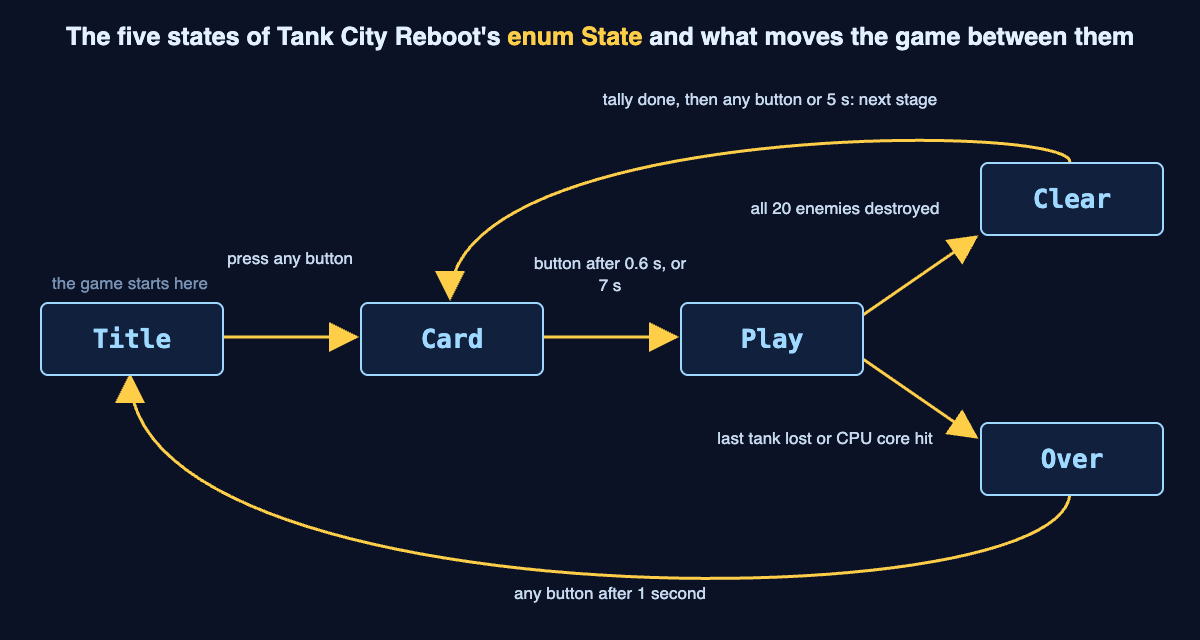
The five states from Tank City Reboot's code, with the trigger that moves the game along each arrow.
A worked example: one run through every state
Follow one run from start to finish. Each step names the state you are in and the trigger that moves you on.
- Title. The game opens here. When you press any button, after the screen has been up for 0.3 seconds, a new game starts. Your score goes to 0, you get 3 lives and the stage is set to 1. Then the game enters Card.
- Card. Entering Card starts the stage. The card waits. Press any button after 0.6 seconds, or wait 7 seconds, and the game enters Play.
- Play. You fight. Each stage sends 20 enemy tanks. When all 20 are destroyed and none are left on the field, the game waits 2.2 seconds and then enters Clear.
- Clear. The tally counts up, one tick at a time. You can press a button to skip the count. When the count is done, press any button after 0.3 seconds, or wait 5 seconds. The stage number goes up by 1 and the game enters Card again, ready for the next stage.
- Play again, and a loss. This time your last tank is destroyed, or an enemy hits the CPU core. Either one starts game over. The words GAME OVER rise up the screen, and after 3.4 seconds the game enters Over.
- Over. The game over screen waits. After 1 second, any button takes you back to Title, and the loop can start again.
Notice the small waits, like 0.3 seconds on the title and 1 second on game over. They mean each screen stays up for a moment before a button can move it on. Our post on what a game over screen is for looks at that last screen in more detail.
How the code switches states with an enum and a switch
You can build a state machine like this with two tools: the enum that names the states and a switch statement that acts on the current one. Tank City Reboot uses both.
One place to change state. The code never sets state all over the file. Every switch goes through one small method, Enter. It sets state = s, resets a timer called stateT to 0, and then runs a one-time setup for the new state. Entering Title resets the world and loads the first map. Entering Card starts the stage. Entering Play plays the start sound. Entering Clear resets the tally counters. That reset timer is why every "after 0.6 seconds" rule works: each state counts its own time from zero.
One switch per job. The code switches on the state in three places. One is inside Enter and runs the one-time setup. One is switch (state) in the frame update, which checks buttons and timers for the current state. The last builds the overlay screens, such as the title text and the tally. Each block has one case per state, so each state's code sits in one easy-to-find spot. If you want to see where that frame update fits, our guide to how a game loop works covers input, update and render.
Not everything needs to be a state. Pause is not in the enum. It is a separate true or false flag called paused, and the code only checks it while the game is in Play. That is a useful choice to copy. Make something a state when it changes what the whole game does. Use a flag when it only matters inside one state.
Growing the machine: the Upgrade state in Zero Day
A state machine is easy to grow. Tank City Zero Day, the second game, uses enum State { Title, Card, Play, Upgrade, Over }. Clear is gone, and Upgrade takes its place. Two seconds after you clear a wave, the game enters Upgrade. You pick an upgrade, and pressing a button installs it and moves the game to the card for the next wave.
In the code, that screen is one more name in the enum, with its own case and its own triggers in and out. The rest of the flow keeps the same shape.
Frequently asked questions
What is a game state machine in simple terms?
It is a rule that keeps your game in exactly one named state at a time, like Title or Play. The game only moves to another state when a set trigger fires, such as a button press or a timer running out.
Why use an enum for game states?
An enum gives each state a readable name and limits the state to a short, fixed list. Your switch then needs only one case per name.
Should pause be its own state?
It depends on your game. Tank City Reboot keeps pause as a separate flag that only matters during Play, which keeps the enum small.
How many states does Tank City Reboot have?
The first game has five: Title, Card, Play, Clear and Over. Zero Day also has five, with Upgrade in place of Clear.
Get started
Play one stage and name each state as you pass through it, along with the trigger that moved you on. Play Tank City Reboot in your browser on a computer or a phone. Playing never needs an account.
Comments
No comments yet.
Sign in or make an account to comment.