Gemba walk for a small office: go and see the problem
A gemba walk in a small office means you go and see the problem where it actually happens, instead of hearing about it in a meeting. The Lean Enterprise Institute's entry on gemba calls it the Japanese term for "actual place", the place where value is created. In a factory that is the shop floor. In a small office it might be a shared inbox, a desk with a paper tray, or the phone of the person who answers customer calls. This guide shows you how to run one in about 30 minutes, what to watch for, and how to turn what you see into small fixes that last.
What a gemba walk is
The same page describes a gemba walk as a management practice for grasping the current situation through direct observation and inquiry before taking action, and links it to the phrase genchi gembutsu, essentially "go and see". You go to where a process runs, you watch it, and you ask questions. You do not fix anything on the spot. You do not judge the person doing the work. You look at the process.
It suits a small office for a plain reason. Much of what goes wrong is invisible from where you sit. You hear "invoices are slow" or "clients keep asking the same thing." Those are summaries. They can hide the real cause, which is often a small step nobody thinks about: a file saved in the wrong folder, a form retyped by hand, a question that waits for one person who is out on Fridays.
Where the gemba is when the work happens on screens, phones, and paper
Office work is hard to see because much of it lives inside screens. The institute's own table even gives software code as the gemba for software. So you have to decide where to stand. Some examples:
- Screens: sit beside someone while they process one real item from start to finish. Watch the tabs they open, the copy and paste, the searching.
- Phones: listen in on a few calls or messages, with permission. Note what the caller needs and what the person has to look up.
- Paper: follow one physical document. Where does it land? How long does it sit? Who touches it?
- Shared inboxes and folders: look at what is waiting right now, and how old it is.
The rule is the same in every case. Follow one real piece of work, not a description of how work is supposed to go.
How to prepare: pick one process and one question
A common mistake is trying to see everything. Pick one process that touches a customer or costs money. Then write one question you want answered.
Here is an example. Say you run a five-person office and suppliers have started chasing you for payment. Your process is "supplier invoice arrives to invoice is paid." Your question is: where does an invoice wait, and why?
Before the walk, tell the people involved what you are doing and why. Something like: "I want to watch how one invoice moves through our office. I'm looking at the process, not at you. You know this better than I do, so I'll ask a lot of questions." That one sentence changes how the walk feels.
How to run a gemba walk in 30 minutes, step by step
- Start at the trigger (5 minutes). Go to where the work begins. For invoices, that might be the email inbox or the mail tray. Ask the person to show you the last item that came in.
- Follow one item (15 minutes). Watch each step. Write down every handoff, every wait, every time something is typed twice. Ask "what happens next?" and go there.
- Look at the queue (5 minutes). At each stop, look at what is waiting. How many items? How old is the oldest one?
- Close the loop (5 minutes). Thank the person. Read back what you saw in one or two sentences and ask, "Did I get that right? What did I miss?"
In the invoice example, you might see this: invoices arrive by email, one person prints them, the printouts sit in a tray until the owner signs them, then someone types them into the accounting software. The wait is not the typing. It is the tray.
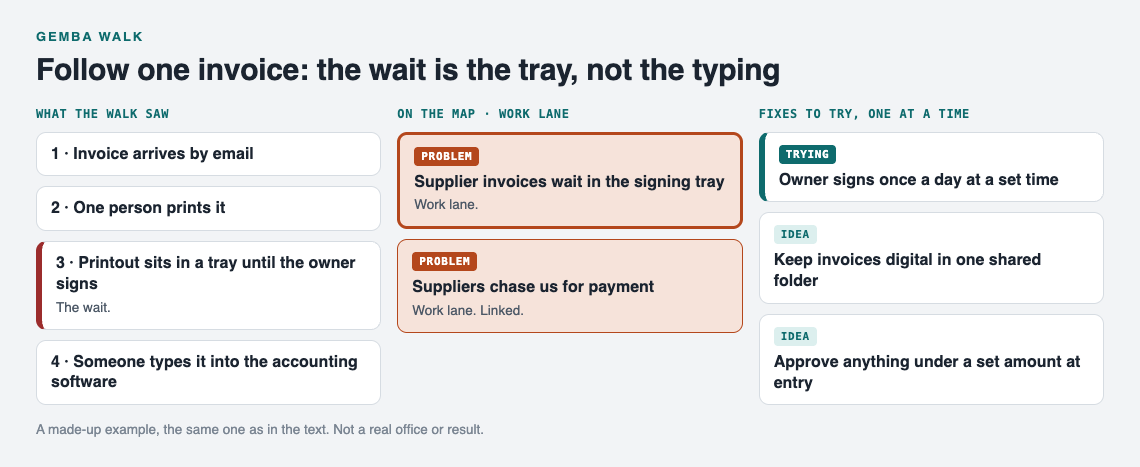
The made-up invoice walk from this post and what went on the map.
What to look for: waiting, rework, handoffs, and workarounds
Four things are worth watching for in office work.
Waiting
Work sitting still. Emails waiting for a reply, paper waiting for a signature, a task waiting for the one person who knows the password. Waiting can be the biggest delay and the easiest to miss, because nobody is doing anything wrong.
Rework
Doing the same thing twice. Retyping data from a PDF, fixing an order because a field was left blank, calling a client back to ask what you should have asked the first time.
Handoffs
Every time work passes from one person to another, something can drop. Count the handoffs. Ask what information travels with the work and what gets lost.
Workarounds
These are the gold. A sticky note on a monitor, a private spreadsheet, a "just text me" habit. A workaround means the written process does not fit reality. Do not take it away. Ask why it exists.
Questions to ask without making people feel watched
People can get nervous when the boss shows up to watch, so choose questions that point at the process. Try these:
- "Can you show me how you do this, as if I were new?"
- "What usually slows this down?"
- "Where do you have to go looking for information?"
- "What do you do when this goes wrong?"
- "If you could change one thing about this step, what would it be?"
Avoid "why didn't you" and "why do you." Ask "what" and "how." Point at the process: "this step seems to wait a lot" is better than "you seem slow here." And never use what you saw on a walk in a performance review. If you do, the next walk will show you a performance, not the work.
Turning what you saw into small fixes that stick
A walk is only useful if something changes afterward. Keep the changes small. One fix, tried for a week or two, then checked. This is the same idea behind kaizen and small fixes that add up: you improve by many small, tested steps rather than one big overhaul.
For the invoice tray, you might try three things:
- The owner signs invoices once a day at a set time instead of "when there's a moment."
- Invoices stay digital and go to one shared folder, so nothing gets printed.
- The person who enters invoices can approve anything under a set amount.
Try one. Record what happened. Some fixes work, some partly work, some fail. A failed fix is still useful, because it tells you not to try it again.
Gemba walks also connect to what customers tell you. If you keep a customer complaints log, read it before you pick a process to walk. Complaints point you to where the gemba is. A walk then shows you the cause behind the complaint.
Frequently asked questions
How often should a small office do a gemba walk?
Once a week or once every two weeks is a good rhythm for a small team. Pick a different process each time, and come back to an old one after you have tried a fix.
Can you do a gemba walk with a remote or hybrid team?
Yes. Ask the person to share their screen and process one real item while you watch. The gemba is the shared inbox, the folder, or the tool they work in, not a physical room.
What is the difference between a gemba walk and a status meeting?
A status meeting asks people to describe their work. A gemba walk watches the work happen, which can show waits, rework and workarounds that a summary leaves out.
Get started
After a few walks, your notes pile up. The invoice tray, the client who calls back three times, the password only one person knows. In a list, they look like separate issues. Often they are connected.
Problem Graph is a problem and solution journal drawn as a graph. You write a problem in one line and put it in a lane, in this case Work. It lands on the graph when you press Enter. For the example above, you might write: "Supplier invoices wait in the signing tray." Then you attach the fixes as solutions, mark the one you are trying, and later record the outcome as worked, partly, or failed. A failed fix stays on the map marked as failed, so when you come back next quarter you can see what was already tried and how it went.
Then link problems that belong together. Link "Supplier invoices wait in the signing tray" to "Suppliers chase us for payment" and to the matching entry from your complaints log. Patterns show up on a map that you would not spot in a list.
If your team should see the map too, mark the invoice problem as a main node, create a private network, and give your coworkers the invite code. Only a main node can be shared. Its solutions, their outcomes and the requirements they need go along with it, while the problems you only linked to it stay home. Problems are private by default.
Not sure what a graph looks like yet? Open the app and press "Load example set" to see one, then switch to List view if you prefer reading over the map. It works on your phone in the browser, so you can add a line right after a walk.
Try Problem Graph: it is free, and you can look around the public network without an account. Write one problem down in a line and attach the first thing you will try.
Comments
No comments yet.
Sign in or make an account to comment.