Gentle notification tones for a habit tracker demo: which license?
Gentle notification tones for a habit tracker demo set the mood of the whole video. A viewer sees a reminder pop up and hears it at the same moment. If the sound is soft and short, the app feels calm. If it is sharp, the app feels pushy. This guide shows you one calm tone on Wavecrate, Gentle Notification, and walks it through three real uses so you know which license each one needs.
Why to choose gentle notification tones for a habit tracker demo
A habit tracker demo is short. You show a reminder, a tap, a check mark and maybe a streak. Sound tells the viewer what just happened without extra narration.
A reminder that sounds like an alarm sends the wrong message about your product. A soft chime says the app nudges rather than nags.
The tone also has to share space with your voice. Most demos have a voice-over or on-screen text. A quiet, brief sound fits under that without fighting it. On Wavecrate, you can play calm interface tones one after another and read each one's license cards before you choose.

What makes a notification tone feel gentle
You do not need a sound design background to judge a tone. Listen for three things.
- Softness. Round, bell-like sounds feel calm. Buzzy or harsh sounds feel urgent, so save those for error moments.
- Length. Short is better for a reminder. A tone that hangs on starts to sound like a ringtone.
- Volume against your voice. Play the tone under your voice-over. If it pulls your attention off the words, turn it down or pick a softer one.
Meet Gentle Notification
Gentle Notification is a sound effect in the Interface category on Wavecrate, by Wavecrate Foley Lab. Its page describes it as "a clean, ready-to-drop interface sound for alert and chime moments." It runs 0:01 and was released on Sep 10, 2026. Its tags are calm, alert, chime and app.
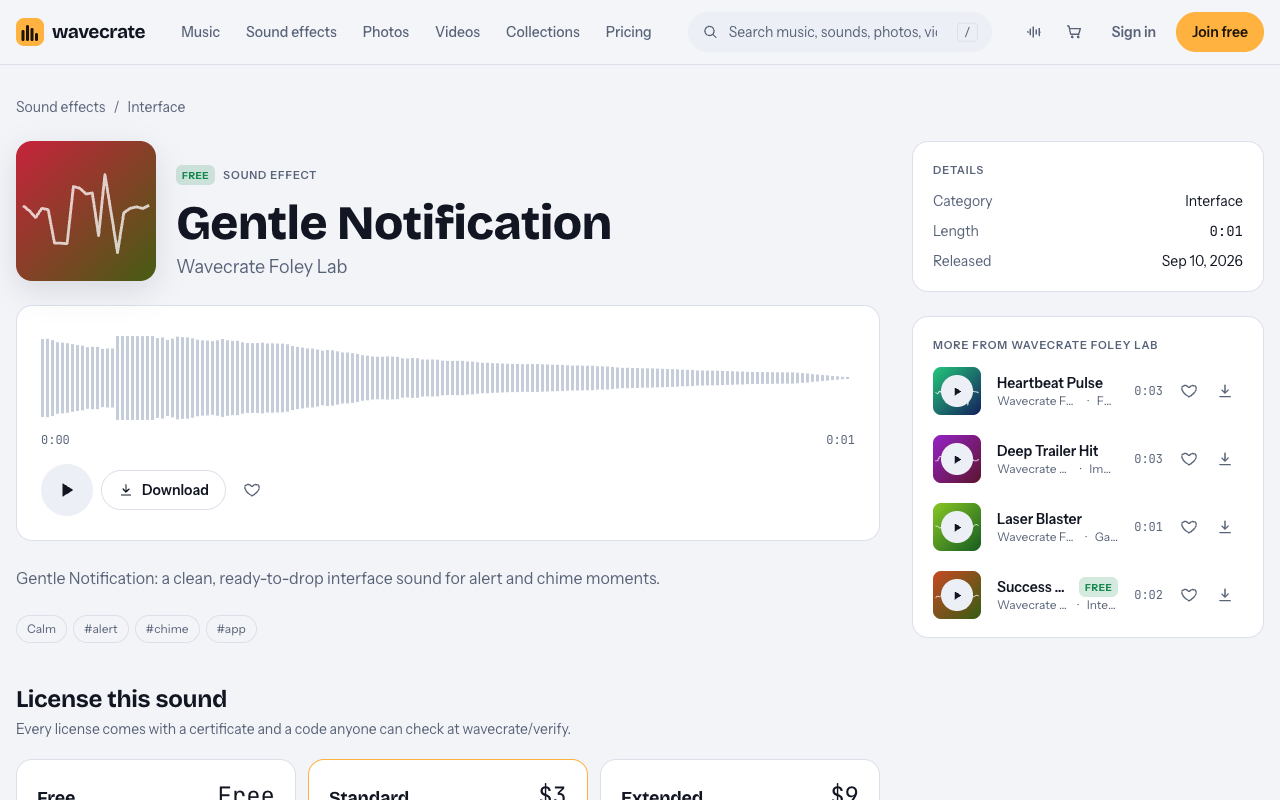
It was marked Free when we read the page on 11 October 2026. Items on Wavecrate can switch between Free and Premium, so read the page on the day you download. The page also shows three license cards: Free, Standard and Extended. Those cards decide what you can do with the sound, and they matter more than the Free label.
Other calm interface sounds to compare
A demo often needs more than one sound. You might want a tone for the reminder, a tap for checking off a habit, and a chime for finishing the day. The Interface sound effects category lets you audition them side by side.
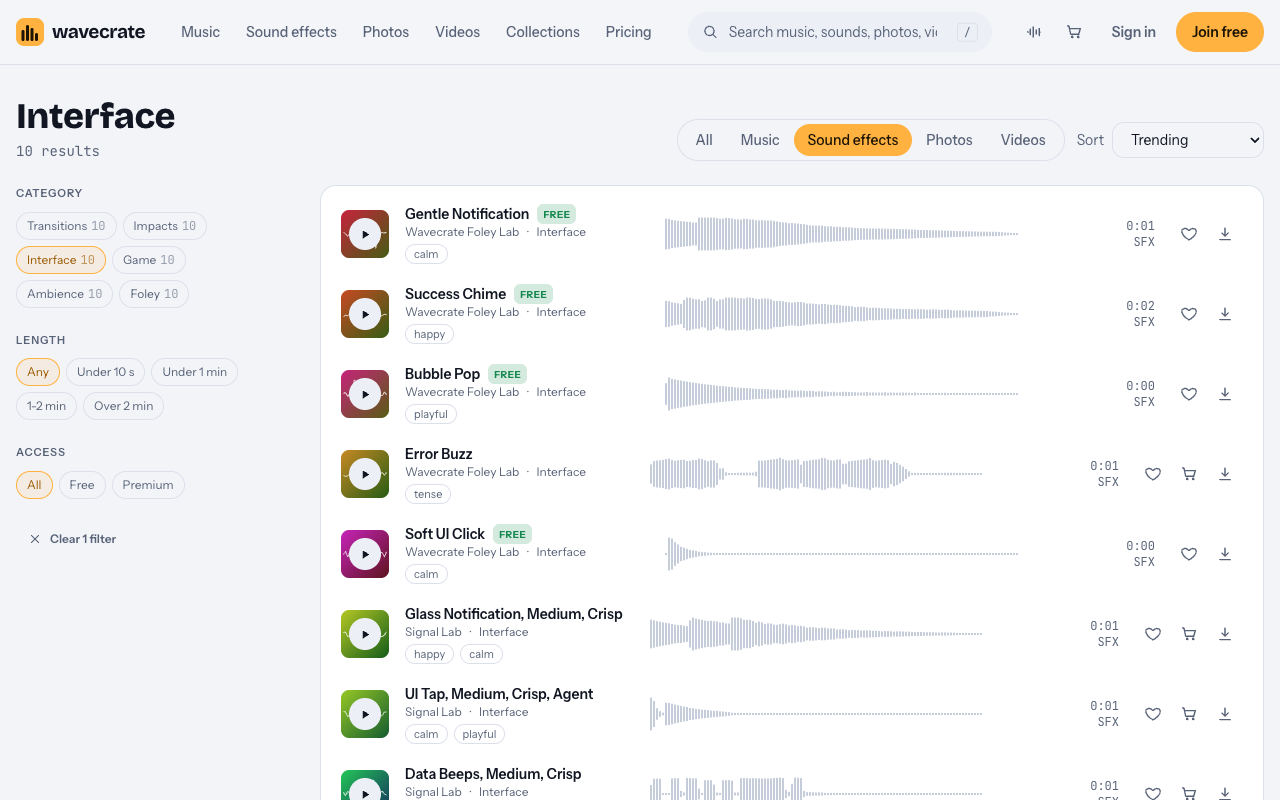
On 11 October 2026 that category listed Gentle Notification, Success Chime, Bubble Pop, Error Buzz, Soft UI Click, Glass Notification, two UI Tap sounds, Data Beeps and Scanner Sweep. Gentle Notification, Success Chime, Bubble Pop and Soft UI Click were marked Free. Error Buzz was Premium.
Gentle Notification's page also suggests a few sounds like it:
- Glass Notification, Medium, Crisp by Signal Lab. Premium, 0:01. Its page showed Standard at $5 and Extended at $19.
- Soft UI Click, marked Free. A fit for the tap when someone checks off a habit. It showed Standard at $3 and Extended at $9.
- UI Tap, Medium, Crisp by Signal Lab. Another option for the tap.
- Success Chime, marked Free, 0:02. A fit for the moment a daily goal is done. It showed Standard at $3 and Extended at $9.
If you want a ready set, the Interface sound kit collection groups six sounds: Soft UI Click, Bubble Pop, Gentle Notification, Success Chime, Error Buzz and Air Cut Whoosh. Wavecrate describes it as "clicks, pops and chimes for apps, games and explainers." Skip Error Buzz for a missed habit, though. A missed day is not an error, and a buzz there feels like a scolding.
One sound, three uses: which license fits
The same one-second tone can need a different license depending on where it ends up. Here is Gentle Notification taken through three common uses. Paid licenses are not on sale yet: Wavecrate says purchases open soon, so the prices here are the listed prices for when sales open, while items marked Free can already be downloaded with a free account.
Use 1: your own video reviewing habit apps
Say you run a YouTube or TikTok channel and you make a video comparing habit trackers. You drop Gentle Notification in each time a reminder pops up on screen. The Free license covers this. Its card reads "Online videos and podcasts, with credit." It covers YouTube, TikTok, Instagram, Twitch and podcasts, including monetized channels. You must put the credit text in the video description. A free account gets 3 free downloads a month.
Use 2: the habit tracker company's own demo video
Now say you work at the company that makes the habit tracker. You post a demo video on your site and your social accounts. That is your own business and brand content. The Free license does not cover it, even though the sound is marked Free. It needs Standard, which Gentle Notification's page lists at $3. Its card reads "Online content for one creator or business, no credit needed." It covers all online platforms, monetized, and your own business and brand videos, with no credit required. Your registered channels are printed on the certificate. Standard is also included with Pro.
Use 3: the real app sound, a paid ad, or client work
Three things move you up to Extended, which Gentle Notification's page lists at $9. The first is using the tone as the real notification sound inside the app. That counts as apps, games and software. The second is running the demo as a paid ad. The third is making the demo for a client. Extended's card reads "Paid ads, broadcast, apps, games and client work." It includes everything in Standard, plus paid advertising and TV or radio broadcast, apps, games and software, and client work with unlimited impressions.
If you make a lot of brand videos, read about Pro on the pricing page. It is listed at $99 a year or $12 month to month, is not on sale yet, and gives a Standard license on the whole catalog. It never includes Extended, so the in-app sound, paid ads and client work still need an Extended license. Content you publish while subscribed stays covered.
Putting the tone into your demo video
Once you have the right license, the editing is simple.
- Line the tone up with the moment the reminder appears on screen, or with the tap that checks off a habit. Sound that lands a beat late feels off.
- Keep the volume under your voice. The tone should be heard, not noticed.
- Use the same tone for the same action every time. Viewers learn the pattern fast, and it makes the app look consistent.
- Give the completion moment its own sound, like a short chime, so the viewer can tell a reminder from a finished habit.
- Watch the whole demo once with your eyes closed. If you can follow the flow by ear, the sounds are doing their job.
Keep your license code handy
Every Wavecrate license comes with a certificate and a code. Anyone can check that code on the verify page without contacting Wavecrate. Keep the code with your project files. If a client, a teammate or a viewer asks where the sound came from, you can point them to it.
For the Free license, remember that the credit text goes in the description. For Standard, your registered channels are printed on the certificate, so check that the channels you post on are the ones listed.
Frequently asked questions
Is Gentle Notification free to use in my demo?
It was marked Free on 11 October 2026, so the Free license covers online videos and podcasts with credit. A company's own demo video is business and brand content, which needs Standard, listed at $3 on its page.
Can I use Gentle Notification as the actual notification sound in my app?
Only with an Extended license, which its page lists at $9 for when sales open. Using a sound inside an app counts as apps, games and software, and only Extended covers that.
Does Pro cover an in-app notification sound?
No. Pro gives you a Standard license on the whole catalog and never Extended. In-app use, paid ads and client work need Extended.
How long is Gentle Notification?
Its page lists it at 0:01. That is short enough to sit under a voice-over without getting in the way.
Get started
Browse Wavecrate: you can join free and download items marked Free now, paid licenses are not on sale yet (purchases open soon), and every download comes with a license certificate and a code anyone can check on its verify page.
Open the Gentle Notification page, check its label and license cards on the day you download, and match the license to your use. Then sign up for a Wavecrate account and start building the sound for your habit tracker demo.


Comments
No comments yet.
Sign in or make an account to comment.