Glass notification sounds for a fintech app promo, and the license
A fintech promo leans on small sounds. The moment a payment lands or a balance updates on screen, a short bright tone tells the viewer that something finished cleanly. This guide covers how to pick glass notification sounds for a fintech app promo on Wavecrate, how to place them in a short edit, and, most important, which license each kind of use needs. It ends with a worked example so you can see the license change as the same promo moves from a personal demo to a client job.
Why glass notification sounds for a fintech app promo work
Most fintech promos are built from screen recordings: a tap, a confirmation screen, a number that changes. Those moments are silent on their own. A short glass tone gives each one a clear full stop, so the viewer hears that the action is done without reading a caption.
Glass sounds work here because they are short, high and clean. They sit above a music bed without fighting the voiceover, and they read as precise rather than playful. That fits a product whose whole pitch is that things happen correctly.
Keep the number of tones small. One sound for "done" and, at most, one softer sound for taps is usually enough. If every tap gets a chime, none of them mean anything.
Wavecrate, the sound library used as the example in this guide, keeps its notification tones, chimes and clicks in one Interface category, and every download comes with a license certificate and a code.

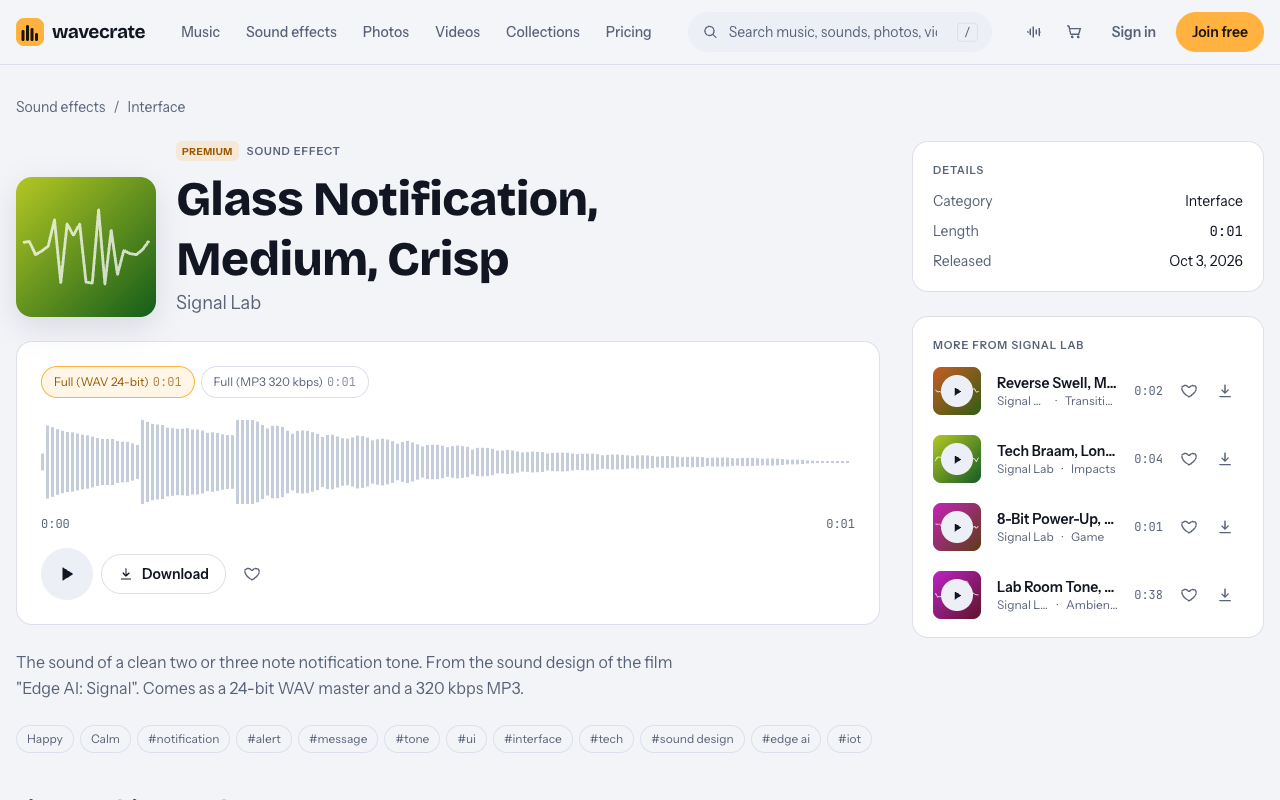
The sound this guide uses: Glass Notification, Medium, Crisp
The main example is Glass Notification, Medium, Crisp, a Premium sound effect in the Interface category by Signal Lab. Its page describes it as "The sound of a clean two or three note notification tone." It runs about one second and was released on Oct 3 2026.
Its tags are happy, calm, notification, alert, message, tone, ui, interface and tech, which is a good match for a confirmation moment. It comes as a 24-bit WAV master and a 320 kbps MP3. Use the WAV in your edit so you keep the most headroom when you adjust level and EQ.
Glass Notification has two licenses, and no Free license:
- Standard, listed at $5. Online content for one creator or business, no credit needed. It covers all online platforms, monetized, and your own business and brand videos. Registered channels are printed on the certificate. Standard is also included with Pro.
- Extended, listed at $19. Paid ads, broadcast, apps, games and client work. It covers paid advertising and TV or radio broadcast, apps, games and software, and client work with unlimited impressions.
Paid licenses are not on sale yet: Wavecrate says purchases open soon, so these are the listed prices for when sales open. Sounds marked Free can already be downloaded with a free account.
Other Interface sounds to pair with it
The Interface category holds the rest of the small sounds a promo might need. On the day of writing, four of them were marked Free:
- Gentle Notification, listed for alert and chime moments.
- Success Chime, listed for win and complete moments.
- Soft UI Click, listed for button and tap moments.
- Bubble Pop.
The category also lists Data Beeps, Error Buzz, Scanner Sweep and two UI Tap sounds. Labels can change, so re-read a sound's page on the day you download it rather than trusting a note you made earlier.
The Free sound license covers online videos and podcasts on YouTube, TikTok, Instagram, Twitch and podcasts, monetized channels included. Credit text is required in the description, and you get 3 free downloads a month. That last condition matters for a company promo, as the next section shows.
Which license a fintech app promo needs
The license depends on who the video is for and where the sound ends up, not on how short the clip is. The Wavecrate pricing page sorts sound uses like this:
- Your own business and brand content needs Standard or higher.
- Paid advertising, TV radio and cinema, apps games and software, and client work need Extended.
For a fintech that means three cases.
- The fintech's own promo, posted on its own channels, is its own business and brand content. That is Standard, or Pro. This applies even to sounds marked Free, because the Free license is for online videos and podcasts with credit, and your own brand content sits in the Standard row of the table.
- An agency making the promo for the fintech is client work, which is Extended. So is running the promo as a paid ad.
- Using the sound inside the app itself, as the real tone a user hears when a payment goes through, falls under apps, games and software. That is Extended too.
Pro is listed at $99 a year, or $12 month to month (about $8.25 a month when billed yearly), and is not on sale yet. It gives Standard on everything, but never Extended. Content you publish while subscribed stays covered. For many brand videos, Pro's listed price can come to less than Standard sound by sound. If the job is client work, a paid ad or in-app use, Pro does not cover it and each sound needs Extended.
A worked example: one 30 second promo, three uses
Take one 30 second promo. It uses Glass Notification (Premium) on the moment a transfer confirms, and Success Chime (marked Free on the day of writing; re-read its page on download day) on the final screen. Here is what each use needs.
1. A personal demo on your own channel. You cut the promo as a portfolio piece and post it on your own YouTube channel.
- Success Chime: the Free license works, with credit text in the description.
- Glass Notification: Standard, listed at $5, or covered by Pro.
2. The fintech's own promo. The company makes the video itself and posts it on its own channels.
- Success Chime: Standard, because this is the company's own brand content.
- Glass Notification: Standard, listed at $5.
- Pro would cover both.
3. An agency job, a paid ad, or the sound inside the app. An agency delivers the promo to the fintech, or the promo runs as a paid ad, or the team wants the same tone as the app's real notification.
- Success Chime: Extended.
- Glass Notification: Extended, listed at $19.
- Pro does not cover any of these uses.
The edit is identical in all three cases. Only the use changes, and the use is what sets the license. Decide where the video is going before you download, and match the license to it.
Timing and mixing the tone
A one second tone is easy to place badly. A few habits help:
- Hit the frame where the state changes. Put the start of the tone on the frame where the confirmation appears, not on the tap that started it.
- Leave room around it. Duck the music slightly under the tone so it reads clearly, then let the music come back.
- Keep it below the voice. If a line of voiceover lands at the same moment, move the tone a few frames or lower it so the words stay clear.
- Use one tone for one meaning. If Glass Notification means "payment done", do not reuse it for a menu opening.
Play the edit on phone speakers as well as headphones. A bright glass tone can turn sharp on small speakers, and a gentle cut in the high end often fixes that.
Frequently asked questions
Can a fintech use a Free sound in its own promo?
The Free license covers online videos and podcasts with credit. A company's own promo is its own business and brand content, which the pricing page puts at Standard or higher. So even a sound marked Free needs Standard or Pro in the company's own promo.
Does Pro cover an agency making the promo?
No. Pro gives Standard on everything and never Extended. Client work, paid advertising and use inside apps need Extended. For Glass Notification, Extended is listed at $19.
Can I use Glass Notification as the app's real notification sound?
Using a sound inside an app falls under apps, games and software, which needs the Extended license, listed at $19 for Glass Notification.
How can a client check my license?
License certificates and codes can be checked on the Wavecrate verify page. Send the client the certificate along with the delivered video.
Get started
Browse Wavecrate: you can join free and download items marked Free now, paid licenses are not on sale yet (purchases open soon), and every download comes with a license certificate and a code anyone can check on its verify page. Open Glass Notification, listen to it against your screen recording, and decide where the promo is going before you choose a license. Create a free Wavecrate account to get started.


Comments
No comments yet.
Sign in or make an account to comment.