Glitch transition clips for a gaming montage: pick, cut, sync
A gaming montage lives on speed, and a glitch is the quickest way to make a hard cut look planned. This guide shows you how to pick glitch transition clips for a gaming montage, land them on the beat, pair each one with a short sound, and choose the license that fits where your montage will go.
Wavecrate licenses royalty-free music, sound effects, photos and videos, and every download comes with a license certificate and a code anyone can check on its verify page.

What a glitch transition does in a montage
A glitch transition breaks the picture for a moment. The frame jitters, colors split, blocks of pixels smear, and then the next shot snaps in. It looks like a signal error, and that is the point.
In a gaming montage it does three jobs:
- It hides a jump. Going from a clutch round to a menu screen looks jarring. A glitch gives the eye a reason for it.
- It fits the subject. Games live on screens, so digital noise sits well next to a HUD or a damage flash.
- It marks the beat. A glitch is a visual hit. Land it on a kick or a drop and the edit feels tight.
The catch is that a glitch only works when it is rare and on time. Used on every cut, it stops meaning anything.
Glitch transition clips for a gaming montage on Wavecrate
On Wavecrate, the Transitions and overlays category listed 10 videos on 11 October 2026. One was a light leak overlay. The other nine were 2 second 4K transitions by Latent Frame, in slide, soft wipe, iris, crossfade, zoom-through and glitch styles.
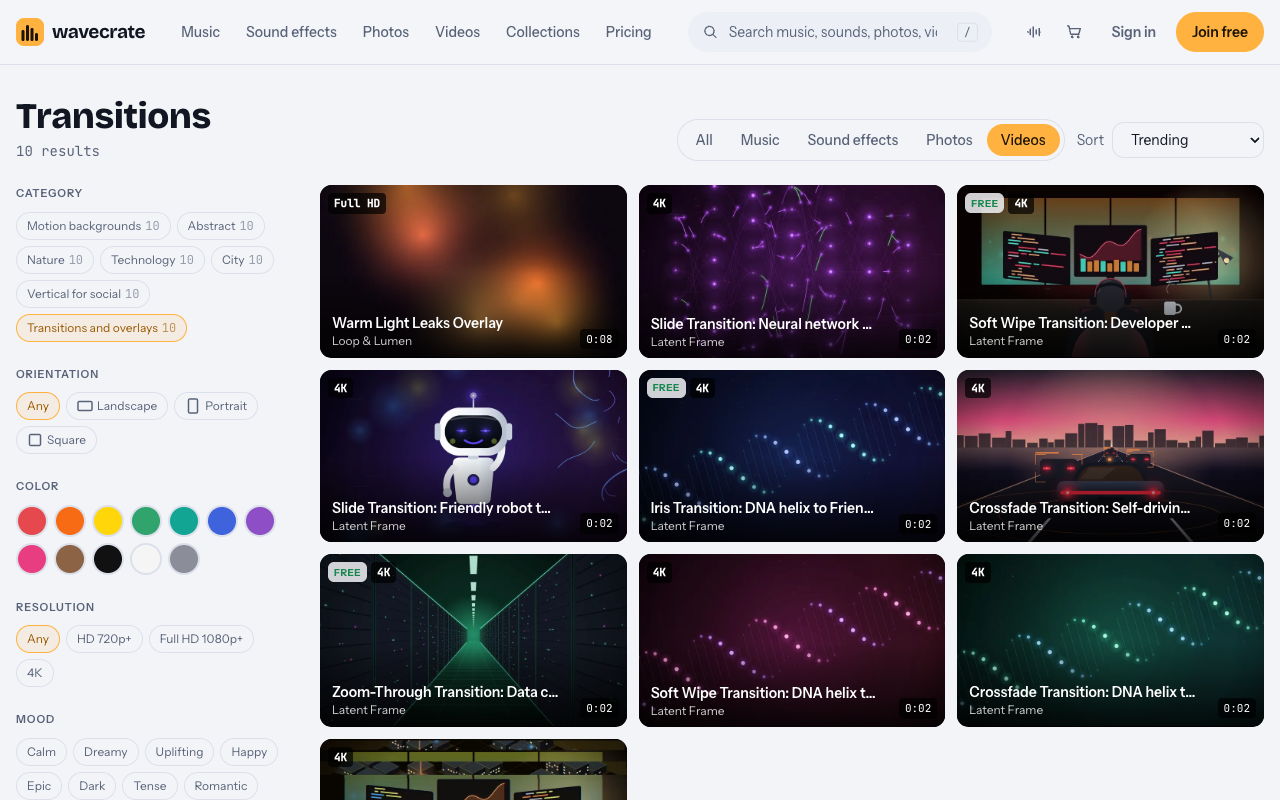
Be honest with yourself about what is there. On that day there was one glitch clip: Glitch Transition: Developer at night to Smart city. Its page calls it a 2-second 4K glitch transition and says to use it as a stinger between sections. It is marked Premium, so there is no Free license on it.
Three of the other transitions were marked Free: a soft wipe, an iris and a zoom-through. They are not glitches, but they are useful for the calmer cuts between your glitch moments. A montage that mixes one hard glitch with softer wipes often reads better than one that glitches every time.
Some details from the glitch clip's page that matter when you edit:
- It is 3840 by 2160 at 30 frames per second.
- You get the original 4K file, a Full HD 1080p file and an HD 720p file, all mp4.
- It is silent (Sound: None), so any sound is up to you.
- The preview carries one small moving watermark and no sound; licensed files are clean.
Which license covers your montage
Where the montage goes decides the license. Here is what the video license cards say. Paid licenses are not on sale yet (Wavecrate says purchases open soon), so the prices below are the listed prices for when sales open; items marked Free can already be downloaded with a free account.
- Free (only on items marked Free): online and social posts with credit, including websites, blogs, social posts and monetized channels. Credit text goes next to the clip or in the description. A free account gets 3 free downloads a month.
- Standard (listed at $29 on the glitch clip): your own websites, social, presentations and marketing, with no credit needed.
- Extended (listed at $99 on the glitch clip): paid ads, broadcast, products for resale and client work.
If you cut a lot of montages, Pro is listed at $99 a year or $12 month to month and is not on sale yet; it gives Standard licenses on the whole catalog. It never includes Extended. Content you publish while subscribed stays covered after Pro ends.
Every license comes with a certificate and a code. Anyone can check that code on the verify page without contacting Wavecrate. If a claim arrives, the site says to send the platform your license code or certificate link. It does not promise what the platform will do next.
A worked example: one montage, three places it can go
Say you are cutting a 60 second highlight montage. You use the Free soft wipe for two calm cuts and the Premium glitch clip once, on the drop. The items were marked this way on the day of writing; read each page again on the day you download, because items can change between Free and Premium.
- Your own gaming channel, monetized. The soft wipe is covered by its Free license if you put the credit text in the description. The glitch clip has no Free license, so it needs Standard ($29 listed) or Pro.
- Your own brand, such as a montage that promotes your coaching or your merch shop. This is your own marketing, which is Standard. The Free license on videos lists online and social posts but not "your own marketing", so the soft wipe needs Standard too, or Pro for both.
- A montage you cut for a team, a sponsor or any client, or one that runs as a paid ad. Client work and paid ads are Extended only. That is listed at $99 for the glitch clip, and the soft wipe needs Extended as well. Pro does not cover this.
Keep each certificate with your project files. If someone asks later, you can point them to the code instead of digging through old emails.
How to land a glitch on the beat
A glitch that lands half a beat late looks like a mistake. This workflow works in any editor.
- Pick the track first. For example, Last Train Out is a Rock track marked Free on the day of writing, at 140 BPM, with a 30 second edit and an 8 bar loop.
- Do the beat math. One beat lasts 60 divided by the BPM. At 140 BPM that is about 0.43 seconds, so a 2 second glitch clip spans a bit more than one bar of 4/4.
- Mark the hits. Play the track and drop a marker on each kick of the drop.
- Center the glitch on the cut. Put the busiest frame of the glitch on the marker, with the cut between your two game clips on that same frame. The noise covers the switch.
- Trim it. You rarely need the full 2 seconds. The most broken 8 to 12 frames often hit harder.
Music has its own license, separate from the clip. A track marked Free needs credit in the description, and the same three uses above apply to it.
Match the clip to your footage
A glitch that does not match your game stands out for the wrong reasons. Check three things.
Color
The video browse page has a color filter. A neon shooter wants a cool glitch; a warm one will look pasted on. If the clip is close but not right, a small hue shift in your editor usually fixes it.
Resolution
The resolution filter offers HD 720p+, Full HD 1080p+ and 4K. A 4K clip scales down cleanly into a 1080p timeline. Stretching a 720p file over 4K gameplay makes the glitch soft, which defeats the point.
Frame rate
The glitch clip is 30 fps, and a lot of gameplay is recorded at 60. For a glitch that usually looks fine, because the stutter blends into the effect. Set your editor to hold frames rather than blend them, so the clip stays sharp.
Give the glitch a sound
A silent glitch feels weightless. The Transitions sound effects include Digital Glitch, two Glitch Swipe sounds and Data Whoosh, each about a second long. For a longer build, Digital Riser, Long, Bright runs 4 seconds, and its page lists Standard at $5 and Extended at $19.
A simple recipe: start the riser so it peaks on the glitch frame, lay a one second glitch swipe on top, and dip the music a few decibels for that moment so the sound cuts through. Sound effects have their own listed price per item and are licensed apart from the clip, so check each page.
Frequently asked questions
Is there a free glitch transition on Wavecrate?
Not on 11 October 2026: the one glitch clip was Premium. The Free transitions that day were a soft wipe, an iris and a zoom-through.
How long should a glitch be on screen?
Usually under a second. Trim the 2 second clip to its busiest frames and center them on the beat.
Can I use the glitch clip in a montage for a sponsor?
A sponsor's montage is client work or a paid ad, and both are Extended only. Standard and Pro do not cover it.
Does the clip come with sound?
No. Its page lists Sound: None, so you add a sound effect and music, each with its own license.
Get started
Browse Wavecrate: you can join free and download items marked Free now, paid licenses are not on sale yet (purchases open soon), and every download comes with a license certificate and a code anyone can check on its verify page.
Open the Transitions and overlays category, pick one glitch for your biggest moment and softer wipes for the rest, then match each to the beat. Join Wavecrate free to download Free items and keep every license certificate in one place.


Comments
No comments yet.
Sign in or make an account to comment.