Glowing Grid Loops for a Startup Demo Day Intro
Most demo day slots start the same way: a title slide, a logo, and a few seconds of dead air while the founder walks out. Glowing grid loops for a startup demo day intro fill that gap with motion that does not compete with you. This post covers how to pick one, set it up, and test it before you go on stage.
Wavecrate licenses royalty-free music, sound effects, photos and videos, and every download comes with a license certificate and a code anyone can check on its verify page.

Why glowing grid loops for a startup demo day intro work
A grid is neutral. It suggests data, software and structure without showing a product screenshot or a stock handshake. The glow gives it depth on a big screen, and the motion tells the room that the show is about to start.
A loop is the right shape for this job. You do not know how long the host will take to introduce you. A seamless loop can run for 5 seconds or 90 seconds and never look cut off. When you are ready, you advance to your first real slide.
There is a second reason. Intro visuals are background, not content. If the audience is reading your background, it is too busy. Grids are calm by design, so they stay out of the way of your name and tagline.
Choose a grid style that fits your startup
Not every glowing grid says the same thing. Look at the tone you want first.
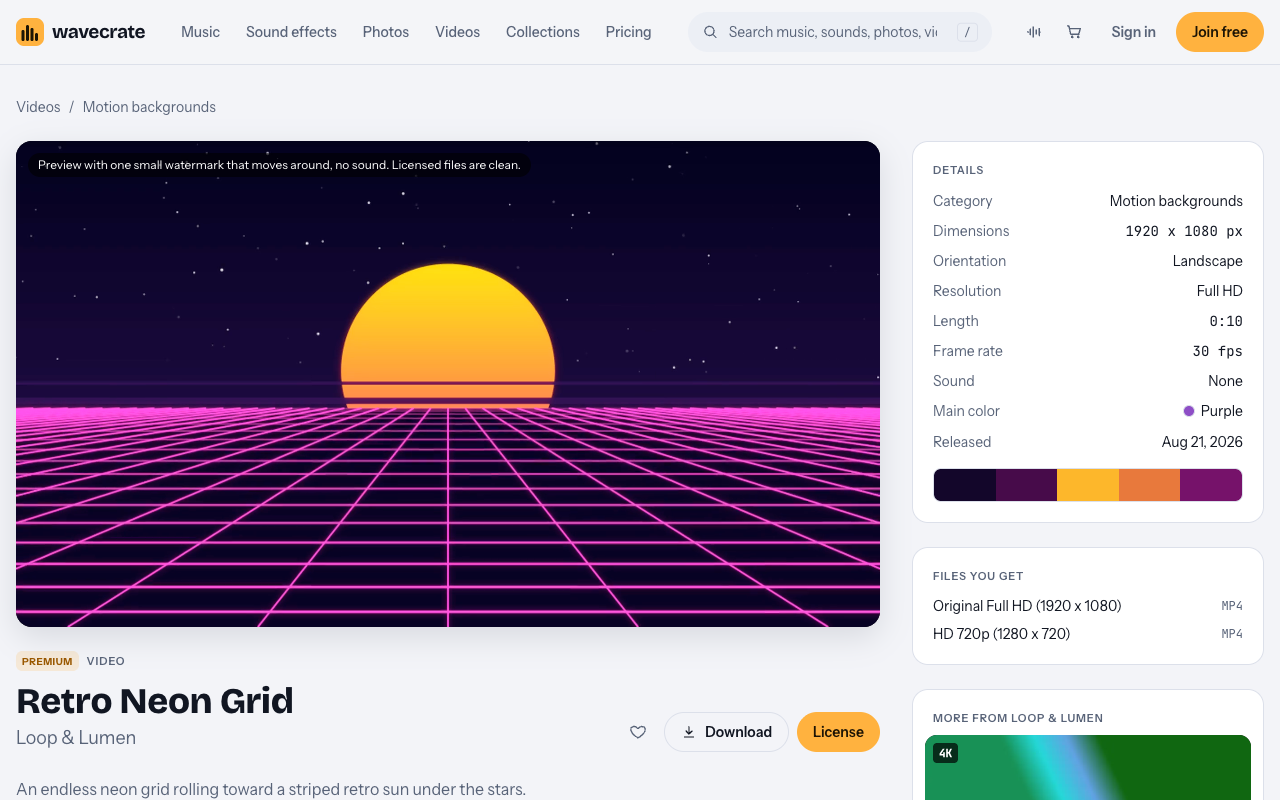
- Retro neon. Retro Neon Grid is described on its page as "an endless neon grid rolling toward a striped retro sun under the stars." It suits a playful or consumer product. It is a premium item, Full HD (1920 x 1080), 10 seconds, 30 fps, with no sound.
- Technical mesh. Hex mesh Loop in Blue is marked Free and is a 4K, 12 second honeycomb of hexagon cells. It suits infrastructure, developer tools or hardware.
- Soft and abstract. Slow Gradient Flow is marked Free. Its page says "blue and violet gradients drifting slowly, for titles and presentations." It has no grid, but it works if a hard grid feels too loud.
You can find all of these on the motion backgrounds page. On 16 October 2026 that category listed 10 loops. Use the video filters for orientation, color, resolution and length to narrow them down. Counts change, so treat that number as a snapshot.
One more option is a still. Data tunnel in Blue is a free landscape 4K photo of "a flight down a neon grid corridor toward a glowing horizon." Use it as a backup slide in case the video player fails on the venue laptop.
Set the length, speed and loop point
A fast grid on a large screen reads as chaotic from the back row. Slow, steady forward motion feels confident.
A few rules that work well:
- Prefer the longer loops. The category runs from 6 to 12 seconds, and a 12 second loop repeats half as often as a 6 second one, so people notice the seam less.
- Let the player loop it. In your slide tool or video player, turn on repeat. Stitching copies in an editor is only needed if your tool cannot repeat a video.
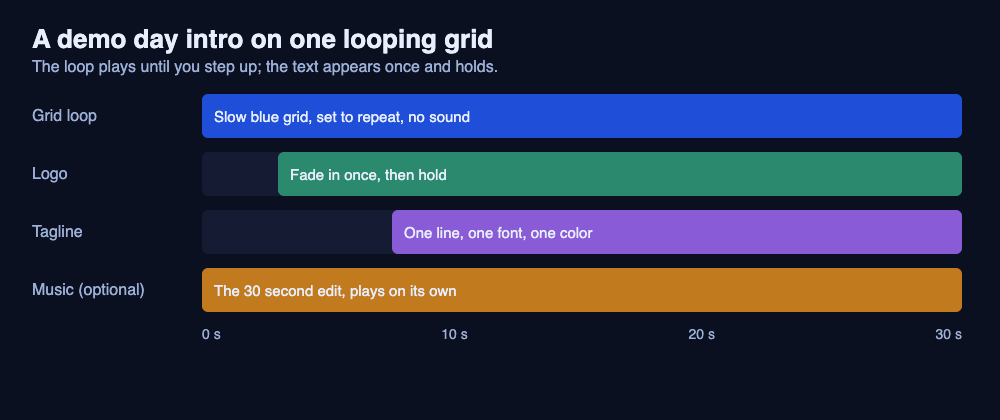
- Do not sync it to music. The grid loops read here have no sound. If you add a track, let it run on its own; a 10 second loop will not stay lined up with a track's beat.
If you want music under the intro, the music pages offer a full track, a 30 second edit and an 8 bar loop. For example, the corporate track Forward Motion is 118 BPM, and its page describes it as uplifting and confident, good for ads and presentation. Check the license card on the track page for what the license covers before you use it on stage.
Pick glow colors that stay readable on a venue screen
Venue projectors rarely match your laptop screen. Deep blacks turn gray, and saturated colors shift. Plan for that.
- Keep a clear dark or mid-tone area where text will sit. Light text on a dark glow loop is easy to read. Dark text on it is not.
- Stick to one or two glow colors. Blue, teal, pink and violet all work. A rainbow grid fights your logo.
- Match your brand color if you can. The video browse page has a color filter, so start there instead of recoloring in an editor. Retro Neon Grid is built around a neon palette, while the Hex mesh Loop in Blue is blue.
If your logo is already blue, a blue grid will make it disappear. Pick a color across from it, or use a dark neutral base and let the glow accent be your only color.
Add your logo and tagline without cluttering the loop
The loop is the stage lighting. Your logo and tagline are the actors. Keep the actors simple.
- Place the logo in the center or the lower third, large enough to read from the back of the room.
- Use one line for the tagline. If it takes two lines, shorten it.
- Use one font, one weight, one color for the text.
- Avoid animating the text over a moving background. Fade it in once, then hold.
A good test is to freeze the loop on any frame. If the logo and tagline are readable on every frame, you are done. If they are readable on some frames only, move the text or choose a calmer loop.
Export and test the loop before you go on stage
Do this at least a day before. Do it again at the venue if they let you.
- Choose the right file. A Full HD video such as Retro Neon Grid comes as an Original Full HD (1920 x 1080) mp4 and an HD 720p (1280 x 720) mp4. Use the Full HD file for a projector or large screen. Keep the 720p file as a lighter fallback if a laptop struggles.
- Embed or link? Embed the video in your deck if your tool supports it. Also keep the raw mp4 on a USB drive and on the laptop desktop.
- Check the loop at full screen. Watch for a stutter at the loop point. Play it for two minutes.
- Test the aspect ratio. The loops read here are landscape. If the venue screen is 4:3, you will see bars or a crop.
- Prepare a fallback. A still frame or the Data tunnel in Blue photo as a slide means the intro still looks designed if video playback fails.
Also check the license for how you use the file. On Wavecrate's photo and video pricing table, websites, blogs and social posts start at Free, which needs a credit line. Presentations and your own marketing start at Standard, with no credit needed. Paid advertising, broadcast, products for resale and client work are Extended. If you are making the intro for another startup as a client, that is Extended. A stage deck at your own demo day is your own presentation, so Standard is the cautious reading. The pages do not spell out every case, so plan for the higher license if you are unsure.
Make your loop faster with Wavecrate
Wavecrate's video pages show what you are getting before you commit. Each item page lists resolution, length, frame rate and whether it has sound, plus the files you receive. Previews carry a small moving watermark and no sound. Licensed files are clean.
Listed prices differ by item, so read the card on the page. On 16 October 2026, Retro Neon Grid listed Standard at $29 and Extended at $99. Pro is listed at $99 a year, or $12 month to month, and covers Standard licenses for the whole catalog. It never covers Extended. Paid licenses and Pro are not on sale yet (Wavecrate says purchases open soon), so these are the listed prices for when sales open; items marked Free, like Hex mesh Loop in Blue, can already be downloaded with a free account.
Every download comes with a license certificate and a code. If an organizer or a partner asks where the visuals came from, send them to the verify page. They enter the code and see who holds the license, for which item, and what it covers. No account is needed.
See the pricing page for exactly what each license covers. If you want a matching set of backgrounds for your slides, the collections page includes a Backgrounds for designers set with gradients, textures and motion loops to put behind titles, slides and social posts.
Frequently asked questions
How long should a demo day intro loop be?
Prefer the longer loops and let your player repeat them. The motion backgrounds category runs from 6 to 12 seconds, and a longer loop repeats less often.
Do I need a 4K loop for a demo day screen?
Not usually. A Full HD (1920 x 1080) file is enough for most projectors and screens. Some loops come in 4K, such as Hex mesh Loop in Blue, and its page also lists Full HD and 720p files you can use.
Can I use a free loop for my demo day?
Free items are licensed for online and social posts with a credit line, and a free account gets 3 free downloads a month. A stage presentation is listed at Standard on the photo and video pricing table, so check the item's license cards before you decide.
Will the loop come with sound?
The grid and gradient loops read here say Sound: None. Add music separately and check that track's license card.
Get started
Pick two or three loops, test them on the screen you will use, and keep a still as a backup. Write your logo and tagline on top, and rehearse the first ten seconds with the loop running.
Browse Wavecrate: you can join free and download items marked Free now, paid licenses are not on sale yet (purchases open soon), and every download comes with a license certificate and a code anyone can check on its verify page.


Comments
No comments yet.
Sign in or make an account to comment.