Group project problems: a shared list for students
A student team can stall over ten small group project problems that nobody wrote down, not one big disaster: a missing file, a section with no owner, a teammate who went quiet. This post shows you how to keep group project problems on one shared list that the whole team can see and trust. The example uses Problem Graph, a free problem and solution journal drawn as a map, but the method works even if you start on paper.
Why group project problems pile up before anyone says a word
In a group project, a problem can go unsaid. Raising it can feel like blaming someone, so it is easy to wait and hope it fixes itself.
By the time someone speaks up, the problem has company. The survey data is late, so the analysis is late, so the slides are late. Now you are not dealing with one issue. You are dealing with a chain, and nobody remembers where it started.
A shared list breaks that pattern. Writing "survey data not in yet" in one line can be easier than starting an awkward conversation. Once it is written down, it is a fact about the project, not a complaint about a person.
The most common group project problems students run into
The details change by class. Here are six to watch for:
- Unclear ownership. A section, the slides, or the final edit belongs to "the group," which means nobody.
- Free riders. One person contributes very little and the rest cover for them.
- Missed internal deadlines. The draft that was due Tuesday shows up Friday, or not at all.
- Silent teammates. Someone stops replying, and you cannot tell if they are busy, stuck, or gone.
- Version chaos. Two people edit the same part and overwrite each other.
- Access problems. One person has the file, the login, or the data, and everyone else is waiting.
Every one of these is easier to fix in week one than in the last 48 hours.
A shared list that keeps the team honest
A list keeps a team honest because it remembers what people forget. In Problem Graph, each problem gets attached solutions, and each solution gets an outcome: worked, partly, or failed. The home page puts it plainly: "The graph is honest. A solution that failed three times stays on the map as a failed solution, and that is exactly what the next person needs to know."
That matters in a group. If "send a reminder in the group chat" has failed twice, the list shows it. You stop repeating the same fix and try something else. Nobody has to argue about what already happened.
Problem Graph also lets you link problems that belong together. When "survey data late" connects to "analysis not started" and "slides empty," you can see the chain on the map. The home page says patterns show up on the map that never show up in a list, and in group work that pattern can be one blocker holding up three people.
Setting up your list: what to log, who owns it, and when it is fixed
Here is a worked example. Say your team of four is writing a market report.
Step 1: Write the main problem in one line
Open the app and type: Market report draft is behind for the check-in. Put it in the work lane. It lands on the graph the moment you press Enter. One line is enough.
Step 2: Make it a main node and share it
Mark that problem as a main node. This is the part to understand: only a main node can be shared. When you share it, its solutions, their outcomes, and the requirements those solutions need go along with it. A problem you only link to it stays private, like the rest of your graph.
So if a blocker matters to the whole team, make it a main node too. "Survey data not received" should be its own main node, shared, not just a private link. Keep your personal worries, like "I am behind in my other class," linked and private.
Step 3: Create a private network for the team
Create a network, then give the invite code to your three teammates. Share your main nodes into it. Members see them and nobody else does. The app notes that anyone with the invite code can join, so send it directly to your teammates. Do not post it in a class-wide forum. You keep the list; teammates see the shared main nodes and tell you what changed.
Step 4: Attach solutions with a name in the line
Under "Survey data not received," add solutions as ideas:
Priya sends the raw file by Wednesday nightIf no file, Sam runs a short backup survey
Put the owner's name right in the solution text. That one habit fixes the "who was doing this?" question. Mark the one you are trying. If a solution needs something first, add it as a requirement, such as Everyone has edit access to the shared folder.
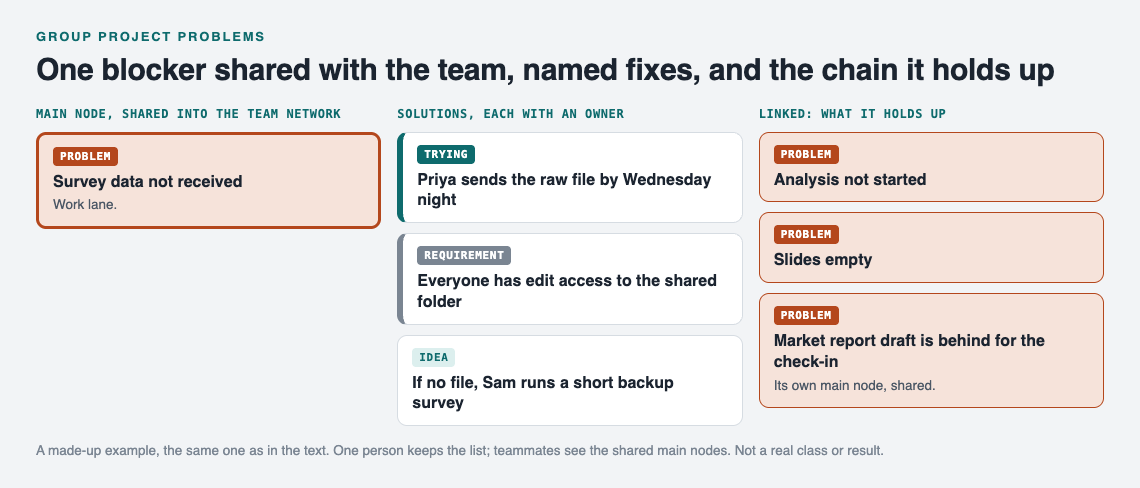
The market report example on the graph. A made-up team, not a real class or result.
Step 5: Decide what "fixed" means
Agree on this out loud. A problem is fixed when a solution is marked worked, and the person who reported it agrees. Partly means keep it open. Failed means try the next idea and leave the failed one on the map.
Handling free riders, missed deadlines, and silent teammates without drama
The list helps most with the problems people avoid talking about. The trick is to write about the work, not the person.
- Not "Sam is lazy." Write
Competitor section has no draft, two days before check-in. - Not "Jordan ignores us." Write
No reply on slide plan since Monday. - Not "Alex always misses deadlines." Write
Intro draft missed Tuesday and Friday dates.
Then attach solutions and record what happens. "Messaged directly instead of group chat: worked." "Split the section in half: partly." This turns a personal conflict into a shared problem with a record. If someone truly is not contributing, the map shows it over weeks, without anyone writing an angry message.
One note: the pages describe sharing, linking and borrowing, not notifications, comments or chat. So the team needs a habit of opening it, and check-ins are the natural place.
Using the list at check-ins and when you talk to your instructor
At each team check-in, open the shared graph. Filter by Network to see only what the team shared, or switch to the List view beside the map if a list is easier to read in a meeting. Then go through three questions:
- Which problems have a solution marked worked since last time?
- Which ones are stuck on partly or failed?
- Does any open problem have no named owner?
Ten minutes, and everyone leaves knowing what is blocked and who is on it.
If you need to raise a problem with your instructor, the list gives you something specific to show. Instead of "our group isn't working," you can say: "This section has been open for two weeks. We tried a direct message, splitting the work, and a new deadline. Here is what happened each time." That is a much easier conversation for everyone. It works on your phone in the browser, so you can pull it up in office hours.
Learning from other shared lists: hackathons, side projects, and more
Students are not the only groups who struggle with shared problems. A hackathon team fix list deals with the same ownership issues on a much shorter clock. A tenant association's shared list shows how to keep a larger group honest without anyone being "the boss." If you work solo on a capstone, the side project log covers tracking what blocked you and why.
Problem Graph also lets you put a main node out publicly. Others can link their own problems to it and borrow solutions that worked. The app shows similar problems other people have shared and which of their solutions worked, and you can borrow one into your own graph with one tap. It keeps a link back to where it came from. If you get stuck, you can also ask for AI suggestions, which propose new solutions based on what worked for others on similar problems. Treat those as ideas to test, not answers.
Frequently asked questions
What are the most common group project problems?
Unclear ownership, free riders, missed internal deadlines, silent teammates, overwritten work, and one person holding the only copy of a file or login.
How do you deal with a group member who does nothing?
Write the problem about the work, such as "competitor section has no draft," and attach solutions with outcomes, like a direct message or a smaller task. If nothing works over time, the record of tried and failed solutions gives you a fair basis to raise it with the team or your instructor.
Should we tell the professor about group project problems?
Yes, if the team has tried to fix it and it still threatens the project. Bring specifics: what the problem is, how long it has been open, and what you already tried.
Get started
Before your next team meeting, write down the one problem everyone is quietly worried about. Make it a main node, create a private network, and send the invite code to your teammates. Add the first fix with a name in the line. If you want to see how a map looks first, the app offers a "Load example set" button on an empty graph.
Try Problem Graph: it is free, and you can look around the public network without an account. Write one problem down in a line and attach the first thing you will try.
Comments
No comments yet.
Sign in or make an account to comment.