Hackathon team problems: a shared fix list that beats the clock
Hackathon team problems can be small at 9 a.m. and serious by midnight. Someone's environment will not build, two people edit the same file, an API starts returning errors, and nobody remembers what was already tried. This post shows you how to handle them with a shared fix list: one place where every problem gets a line, every fix gets an outcome, and the whole team can see what held and what did not.
Why hackathon team problems snowball in the first six hours
The first hours are when you set up repos, pick a stack, wire up APIs and split the work. A problem in that window can block something else.
The real damage is not the bug itself. It is the repeat. Priya spends 40 minutes on a broken install. Two hours later, Tom hits the same error and spends another 40 minutes, because Priya's fix lived in her head and a scrolled away chat message.
A shared fix list stops the repeat. When Tom hits the error, he checks the list first and finds the fix in a minute.
The usual hackathon team problems: setup, merge conflicts, scope creep, API limits, burnout
This post plans for five common ones:
- Setup. Versions do not match, environment variables are missing, one laptop will not run the dev server.
- Merge conflicts. Two people touch the same component, and the main branch breaks an hour before a checkpoint.
- Scope creep. The idea grows a login system, a dashboard and a mobile view, and none of them are finished.
- API limits. A third party service rate limits you, or a key stops working at 2 a.m.
- Burnout. Someone has been awake for 20 hours and nobody has planned a break.
These are predictable, which is good news. If you know they are coming, you can give each one a line on the list before it hurts.
What one shared fix list looks like: problem, owner, fix tried, did it hold
Each entry needs four things:
- Problem, in one line. "Dev server crashes on Tom's laptop."
- Owner, the one person chasing it. Put the name right in the line: "Dev server crashes on Tom's laptop (Priya)."
- Fix tried, each attempt as its own entry. "Reinstall dependencies." "Pin the runtime version."
- Did it hold: worked, partly, or failed.
The fourth field matters most. A list of fixes with no outcomes is just a list of guesses. A list that says "Reinstall dependencies: failed. Pin the runtime version: worked" tells the next person exactly what to do. The same idea drives a home repair log where you record whether each fix held, and it works just as well with code.
Problem Graph fits this shape. You write a problem in one line, attach solutions as you try them, and mark each one worked, partly, or failed. Failed fixes stay on the map as failed. As the home page puts it: "The graph is honest. A solution that failed three times stays on the map as a failed solution, and that is exactly what the next person needs to know."
Setting up the list at kickoff in under ten minutes
Do this during the kickoff, before anyone writes code. Here is a workflow for a four person team using Problem Graph in the browser.
Minutes 1 to 3: one person creates the network
Pick one teammate to keep the list. They open the app, create an account with a username and password, and create a private network. They post the invite code in the team chat. The app says anyone with the invite code can join, so keep the code inside the team.
Minutes 3 to 6: write the predictable problems first
Put each of the five usual problems in as a one line problem in the work lane. It lands on the graph the moment you press Enter. For example:
- "Setup: the app will not run on every laptop (Priya)"
- "Main branch breaks after merges (Sam)"
- "Demo scope keeps growing past three screens (Lena)"
- "Weather API hits its rate limit (Tom)"
- "No planned breaks for sleep (Lena)"
Minutes 6 to 10: mark main nodes and share them
Here is the detail to get right. In Problem Graph, only a problem marked as a main node can be shared. When you share it, its solutions, their outcomes and the requirements they need go with it. A problem you only link to it stays on your own graph. So mark each problem the team needs to see as a main node, then share it into the network. Teammates who joined with the code can filter to Network and see the list. The List view beside the map is handy when you just want to scan entries quickly on a small screen.
One honest note on how this works day to day. The pages describe sharing, linking and borrowing, not live co-editing or comments. So the simplest pattern is that the list keeper adds entries as teammates report them in chat. That also gives you one clear owner, which you want anyway.
Running the list during the build: quick fixes versus deep fixes before the demo
Once the build starts, the rule is short: check the list before you debug, update it after you fix.
Say it is 11 p.m. and the weather API returns errors. Tom tells the list keeper. She opens the "Weather API hits its rate limit" node and adds a solution: "Cache responses for 10 minutes." She marks it as trying. Thirty minutes later Tom reports the errors are gone, and she marks it worked. If they come back at 3 a.m., she changes it to partly and adds the next attempt.
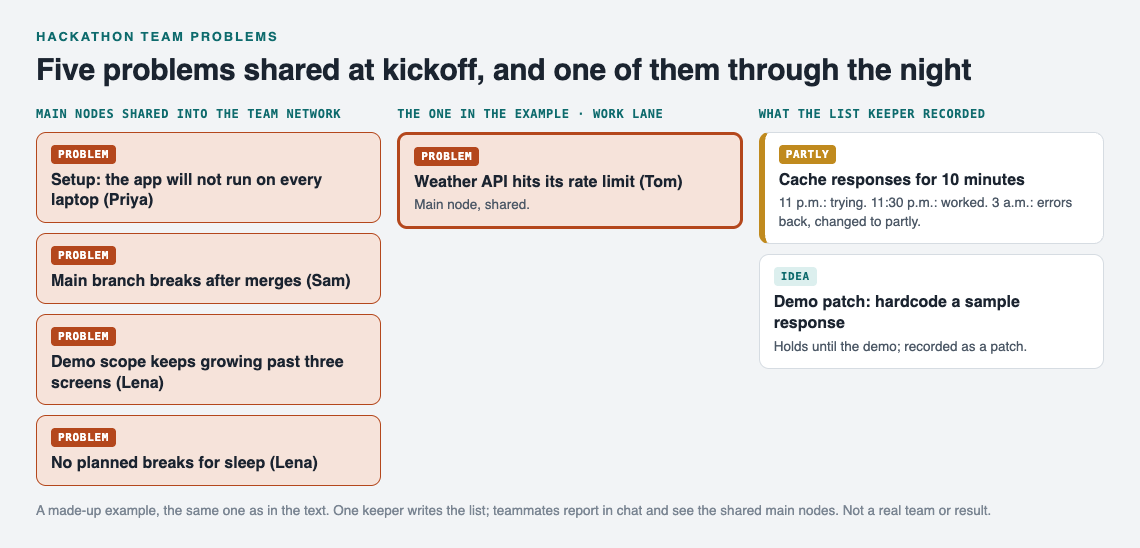
The worked example on the graph. A made-up team, not a real event or result.
Under time pressure, you also need to decide what kind of fix each problem gets. A quick fix holds until the demo. A deep fix solves the cause. Before a demo, a quick fix often makes sense. Hardcoding a sample response so the demo never calls the live API is a fine fix for Sunday at 2 p.m. Record it as a solution anyway, with a note that it is a demo patch. For a longer look at the tradeoff, read quick fix or deep fix: when each one is enough.
Link problems that belong together. If the merge conflict problem keeps showing up next to the scope creep problem, link them. That pattern may mean too many people are touching the same new feature. As the home page says, "Patterns show up on the map that never show up in a list."
If you are stuck, you can ask for suggestions. The AI proposes new solutions grounded in what worked for others on problems like yours. Treat these as ideas to try, not answers. Each one still has to earn its worked mark.
Using the list after the hackathon: retro notes and a stop doing list for next time
When the demo is over, the list is already a retro. Open it and walk through each problem in 15 minutes:
- Which fixes worked? Those go into next event's setup checklist.
- Which fixes failed more than once? Those go on a stop doing list, so nobody tries them again at 3 a.m.
- Which problems got only partly fixed? Those are the ones to plan for before the next kickoff.
Your graph is saved to your account and follows you to any phone or computer you log in on, so next year's team starts with this year's lessons. If one fix would help other teams, you can make that main node public. Others can then link their own problems to it and borrow the solutions that worked. A borrowed solution keeps a link back to where it came from.
Frequently asked questions
Where should a hackathon team keep its problem list?
Keep it somewhere every teammate can open on a phone or laptop in a few seconds, separate from the noisy team chat. In Problem Graph, that means a private network where the shared main nodes are visible only to people with the invite code.
Who should own the fix list on a small team?
Pick one person to keep the list, ideally whoever is doing the most coordination and the least deep coding. Each problem still gets its own owner, written in the problem line, so the keeper records and the owners fix.
How do we decide which problem to fix first under time pressure?
Fix whatever blocks the demo first, then whatever blocks the most teammates. Use quick fixes before the deadline and save deep fixes for problems that will come back during judging.
Is a shared doc enough, or do we need a tracker like Problem Graph?
A shared doc works if you are strict about recording outcomes. Problem Graph adds a worked, partly or failed mark on every fix, links between related problems, and a map that keeps failed attempts visible so nobody repeats them.
Get started
Before your next event, open the app and press "Load example network" to see how shared problems and solutions look. Then write the five usual problems as one line each, mark the ones your team needs as main nodes, and share them into a private network at kickoff.
Try Problem Graph: it is free, and you can look around the public network without an account. Write one problem down in a line and attach the first thing you will try.
Comments
No comments yet.
Sign in or make an account to comment.