Handover notes: pass on open problems and what was tried
Good handover notes pass on open problems and what was tried, not only a list of tasks. If you are leaving a project, going on leave or moving teams, the person who picks up your work needs three things: what is still broken, what you already attempted, and what you would do next. This post shows you how to write handover notes that cover all three, with a template you can copy and a worked example.
Why most handover notes fail the person who reads them
Most handover notes are written in the last hour before you leave. They read like a status update: "Working on the billing export. Talked to finance. Should be close." That makes sense to you, because you hold the rest of the story in your head. To the reader, it says almost nothing.
The common gaps are easy to spot once you look for them:
- No clear problem statement. "Billing export" is a topic, not a problem. What exactly is wrong?
- No record of attempts. The reader cannot tell what you tried, so they try the same things again.
- Dead ends are missing. Failed fixes feel embarrassing to write down, so they get left out. They are often the most useful part.
- No next step. The reader has to rebuild your plan from scratch.
The result is a week of rework. Your replacement repeats the experiments you ran, hits the same walls, and asks you questions you are no longer around to answer.
What good handover notes include: open problems, attempts and next steps
A useful handover note is organised around problems, not tasks. For each open problem, write down:
- The problem in one line. Specific enough that someone new can tell when it is fixed. "Invoices over 800 lines fail to export to CSV" beats "export issues".
- Why it matters. Who is affected and how urgent it is.
- What was tried, with the outcome. Each attempt, marked as worked, partly worked, or failed.
- What it depends on. Access, people, approvals, or other problems that have to be solved first.
- The next step you would take. One concrete action, not a vague direction.
- Related problems. Other open issues that share a cause or a fix.
Notice what is not on the list: a diary of your week. The reader does not need to know which meeting you had on Tuesday. They need the current state of each problem.
How to record what was tried, including the dead ends
The single most valuable habit in a handover is recording failed attempts honestly. A fix that did not work saves the next person hours, but only if they know about it.
Keep each attempt short and use a fixed outcome label. Three labels are enough:
- Worked: it solved the problem, or the part of it you aimed at.
- Partly: it helped but did not finish the job. Say what is left.
- Failed: it did not help. Add one line on why, if you know.
A good attempt line looks like this: "Raised the export timeout to 120 seconds. Partly: files up to 800 lines now export, larger ones still fail." That one sentence tells the reader what changed, what improved, and where the problem still lives.
Resist the urge to tidy up. If you tried the same idea twice and it failed both times, say so. Problem Graph puts this well on its home page: "The graph is honest. A solution that failed three times stays on the map as a failed solution, and that is exactly what the next person needs to know." That is the attitude a handover needs.
Factories have long treated this as part of the job. The Lean Enterprise Institute lists the benefits of standardized work as including documentation of the current process for all shifts and easier training of new operators, and its page on hansei describes reflection at the end of a project to communicate what was learned so mistakes are not repeated. A handover is that same moment for one person's work.
A simple handover note template you can copy
Copy this structure into your notes app or document. Repeat the problem block for each open problem, most urgent first.
- Handover from: your name. To: their name. Date: today.
- Where things live: links to the main documents, folders and contacts.
- Problem: one line, specific and testable.
- Impact: who is affected, how urgent.
- Tried: attempt, then outcome (worked, partly, failed), then one line of detail. One line per attempt.
- Needs: access, people or decisions this depends on.
- Next step: the one thing you would do on Monday.
- Linked to: other problems in this note that share a cause.
- Closed recently: problems you solved in the last few weeks, with the fix, in case they come back.
Keep each problem block to a short paragraph's worth of lines. If a block grows past that, it is probably two problems.
Example: turning a messy status update into a clear handover
Here is a made-up status update, the kind that ends up in a chat channel before someone goes on leave:
Billing export still flaky, bumped timeout which helped a bit. Finance wants it by month end. Also the vendor list sync is weird again, might be related? Didn't get to the permissions thing. Asked Sam about the server but no reply yet.
Now the same information as a handover:
- Problem 1: Invoices over 800 lines fail to export to CSV.
- Impact: Finance needs the full export for month end close.
- Tried: Raised timeout from 30 to 120 seconds. Partly: fixed files up to 800 lines. Split export into batches by date. Failed: batches still time out on the largest customer.
- Needs: Reply from Sam about more server memory.
- Next step: Profile the export on the largest customer to see where it stalls.
- Linked to: Problem 2.
- Problem 2: Vendor list sync drops records overnight.
- Impact: Purchasing sees missing vendors each morning.
- Tried: Nothing yet this round. Last month a restart worked for a week.
- Next step: Check whether it runs on the same server at the same time as the export.
- Linked to: Problem 1, possibly the same server load.
- Problem 3: New staff cannot open the shared reports folder.
- Tried: Not started.
- Next step: Ask IT which group owns the folder.
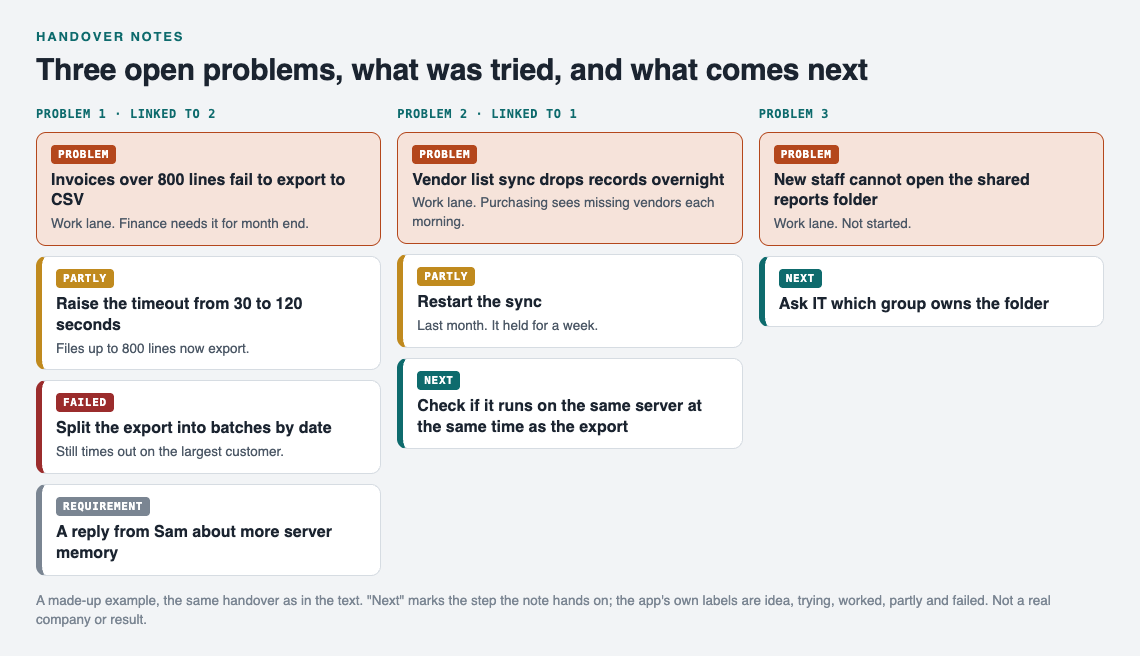
The made-up handover above, as a map.
The facts are the same. The difference is that the reader can now act without calling you. The link between problems 1 and 2 is the kind of pattern that hides inside a paragraph and becomes obvious once each problem stands on its own line.
Keeping handover notes alive with a shared problem log
The best handover is one you barely have to write, because the problems and attempts are already recorded. If your team keeps a running problem log, a handover becomes a matter of pointing someone at it. We cover the team side of this in a small team knowledge base for problems and fixes, and the solo side in how to track work problems without a ticket system.
Problem Graph is built around the same structure as the template above. Here is how a handover maps onto it:
- Write each open problem as one line in the work lane. It lands on the graph as soon as you press Enter.
- Attach each attempt as a solution and mark its outcome: worked, partly or failed. Failed ones stay visible.
- Add requirements for what a solution depends on, such as server access or a decision from someone.
- Link related problems, like the export and the vendor sync, so the connection shows on the map.
To hand the work over, mark each problem you are handing over as a main node. Only a main node can be shared, and when you share it, its solutions, their outcomes and the requirements they need go along with it. Problems you only link to it stay private. Then create a private network, give your replacement the invite code, and share the main node into it. Members of that network see it and nobody else does. Keep in mind the app says anyone with the invite code can join, so only give it to the people you mean to include.

The three ways to share, from Problem Graph's home page.
Everything starts private by default, so you can keep your rough working notes to yourself and share only the problems you are handing over. The app also has a List view beside the map, which reads much like the written handover above.
Frequently asked questions
How long should a handover note be?
As short as it can be while covering every open problem. A few lines per problem is usually enough: the problem, what was tried with outcomes, what it needs, and the next step.
Should I include failed attempts in a handover?
Yes. Failed attempts stop the next person from repeating your work, and a one line note on why something failed is often worth more than a list of what worked.
How do I hand over work without a ticket system?
Organise your notes by problem rather than by task, and record each attempt with an outcome. A shared document, a running problem log, or a problem journal you can share all work without a ticket system.
When should I start writing handover notes?
Start the day you begin the work, not the day you leave. If you log problems and attempts as you go, the final handover takes minutes instead of an afternoon.
Get started
Before your next handover, write down your three most urgent open problems, one line each, and attach every attempt you have made with its outcome. You will see the gaps in your own notes right away.
Try Problem Graph: it is free, and you can look around the public network without an account. Write one problem down in a line and attach the first thing you will try.
Comments
No comments yet.
Sign in or make an account to comment.