Heartbeat sound effects for a horror short: pick, layer, mix
Heartbeat sound effects for a horror short do a lot of work for very little screen time. A single thump under a quiet shot tells the audience that someone is afraid, even before the actor moves. This guide shows you how to pick the right heartbeat, set its tempo to the scene, layer it with low end and room sound, and mix it so it never fights your dialogue. At the end you will see what the license covers if you use a Wavecrate sound.
Wavecrate licenses royalty-free sound effects, including heartbeats, sub hits and room tone for horror scenes, and every download comes with a license certificate and a code anyone can check on its verify page.

Why heartbeat sound effects work in a horror short
It also works as a clock. A steady beat tells the viewer time is passing. A beat that speeds up says something is coming. A beat that stops cold is one of the oldest jump setups there is. In a short film you have no time for slow buildup, so a sound that sets the mood in two seconds is worth a lot.
Types of heartbeat sounds: slow, racing, muffled, and distorted
Before you browse, decide which of these four you need. Each one tells a different story.
- Slow and clear. A calm, close heartbeat. Use it for dread: the character is still, listening, waiting. The space between beats is where the fear sits.
- Racing. Fast beats close together. Use it for a chase, a hiding scene, or the second after the character sees the thing.
- Muffled. The beat sounds like it comes from inside a body, with the highs rolled off. This puts the viewer inside the character's head. It works well under a point of view shot.
- Distorted. Pitched down, stretched, or saturated. This tells the viewer something is wrong, maybe supernatural, maybe the character is losing grip.
You rarely need four different files. You can make most of these from one clean sample. Start with a dry, clear heartbeat and shape it in your editor. A slowed copy with a low pass filter gives you muffled. A pitched down copy with some saturation gives you distorted.
On Wavecrate, the Foley sound effects category lists Heartbeat Pulse, a 3 second sound by Wavecrate Foley Lab. Its page describes it as "a clean, ready-to-drop sound effect for heart and suspense moments." It is marked Premium, so it has no Free license. On 11 October 2026 its page listed Standard at $3 and Extended at $9.
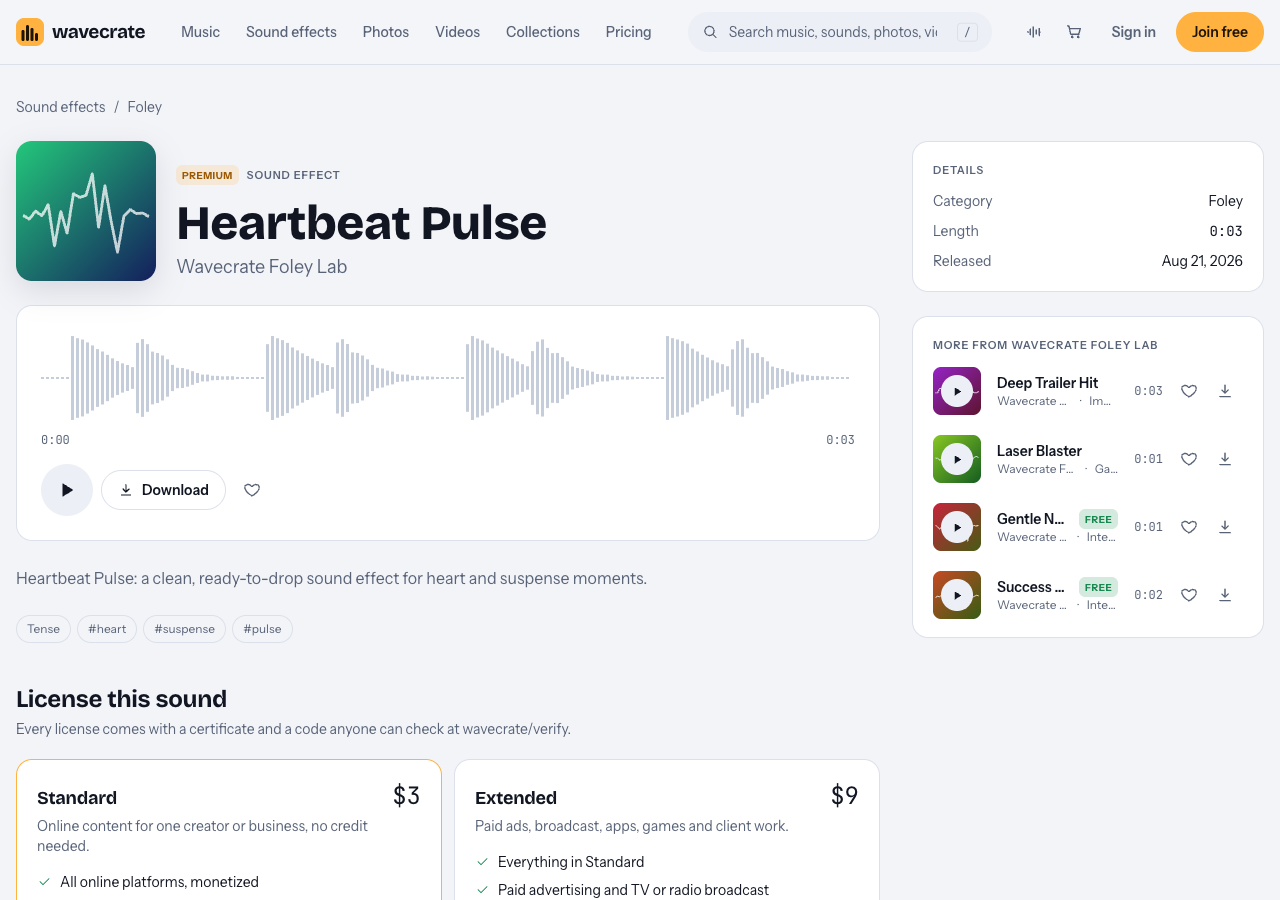
Heartbeat Pulse, read on 11 October 2026.
Matching heartbeat tempo to the tension curve of your scene
Think of your scene as a line that rises and falls. The heartbeat tempo should follow that line. Here is a simple way to plan it.
- Mark the beats of the scene on paper. For example: character enters dark hallway, hears a noise, sees a shadow, door slams.
- Give each moment a tempo. For the hallway scene you might plan 65 beats per minute at the entrance, 85 at the noise, 120 at the shadow, then silence at the door slam. Slow reads as waiting; fast reads as panic.
- Build the track by hand. Place single heartbeat hits on your timeline instead of looping one long file. This lets you shrink the gap between hits as the scene builds.
- Use silence on purpose. The most frightening moment is often the beat that does not come. Drop the heartbeat one or two frames before your scare, and let the quiet pull the audience forward.
A quick way to place hits at a tempo: at 60 BPM a beat lands every second. At 120 BPM it lands every half second. Set your editor's grid to match, and snap each hit to it. Then nudge a few hits slightly off grid. Real hearts are not perfect, and a tiny wobble sounds more human.
Heartbeat Pulse is a 3 second file, so open it first and listen. Note where each "lub dub" pair sits. If it holds more than one beat, cut it into single hits so you can space them yourself.
Layering heartbeats with sub bass and room tone
A heartbeat alone can sound thin on laptop speakers and small in a big room. Layering fixes that. Here are two layers that work well together.
Sub bass for weight
Place a low hit under each heartbeat, or just under the loudest ones. This gives the beat a physical push you feel more than hear. The impact sound effects category lists several sub hits, such as Sub Hit, Long, Deep. Trim the tail so the sub does not ring over the next heartbeat. At fast tempos, use the sub on every second or fourth beat only, or it turns to mud.
For the big scare, swap the sub for something larger. Deep Trailer Hit is described on its page as "a clean, ready-to-drop sound effect for boom and trailer moments." Its page listed Standard at $3 and Extended at $9.
Room tone for space
A heartbeat on pure digital silence sounds fake. A bed of quiet room sound under it tells the ear the character is somewhere real. The ambience sound effects category is useful here. Server Room, 20 Second, Warm is marked Free and can stand in for a basement hum. Rain on Window, also marked Free, gives you a storm outside the house. Free items need a credit line in your description, and a free account gets 3 free downloads a month.
If you want a starting set in one place, the Trailer and tension collection groups Heartbeat Pulse with Tension Riser, Deep Trailer Hit and three cinematic and rock tracks. Its page sums it up as "Big hits, rising tension and epic builds."
Mixing tips: EQ, compression, and leaving space for dialogue
Once your layers are in place, mix them so the heartbeat feels present but never loud. Here is a simple workflow you can follow in any editor.
- Group the layers. Put heartbeat and sub on their own tracks, then send them to one bus. Now you can raise or lower the whole effect with one fader.
- Cut the highs for a muffled feel. A low pass filter on the heartbeat, starting around a few hundred hertz, makes it sound internal. Open the filter slowly as the scene builds for a sense of the fear rising to the surface.
- Carve room for dialogue. Voices live mostly in the middle range. Dip the heartbeat bus a few decibels in that range, or use side chain ducking so the bus drops slightly whenever someone speaks.
- Check on small speakers. Sub bass vanishes on phones. If the heartbeat disappears on a phone, add a bit more of the original thump in the low mids so it still reads.
Licensing heartbeat sound effects for a horror short
Before you publish, check what your license covers. On Wavecrate, the pricing page lays out three license types for music and sound effects.
- Free, only on items marked Free: covers YouTube, TikTok, Instagram, Twitch, podcasts and monetized channels, with credit text in your description.
- Standard: the same platforms, no credit line needed, plus your own business and brand content.
- Extended: adds paid advertising, TV, radio and cinema, apps, games and software, and client work.
That last line matters for a horror short. Heartbeat Pulse has no Free card, so take it through three uses: your film on your own YouTube channel needs Standard (listed at $3 on its page); a screening in a cinema falls under "TV, radio and cinema", which is Extended (listed at $9 on its page); and a film a production company pays you to make is client work, Extended too. The license pages do not name festivals, so treat a festival screening in a cinema as cinema. The pricing page says that, once purchases open, Standard can be upgraded to Extended for the difference.
Pro covers Standard licenses on the whole catalog. The pricing page lists it at $99 a year, or $12 month to month. It does not include Extended. Pro and the paid licenses are not on sale yet (Wavecrate says purchases open soon), so the prices in this guide are the listed prices for when sales open, while sounds marked Free, like Rain on Window, can already be downloaded with a free account.
Every download comes with a license certificate and a code. Paste the code in your video description. Anyone can enter it on the verify page and see the licensee, the item and the license type. If a platform reviewer asks, the pricing page says you can send them your code or certificate link so they can check it without contacting Wavecrate. Note that you get a license to use the sound. Wavecrate keeps the copyright.
Frequently asked questions
What BPM should a heartbeat be for a scary scene?
Start slow, around 60 to 80 BPM, for quiet dread. Push past 100 as the threat appears, and drop to silence right before the scare.
Should the heartbeat be diegetic or non-diegetic?
Most often it is non-diegetic: the audience hears it, the character in the story does not. Make it diegetic only if your plot needs it, for example a character hearing a heartbeat through a wall.
How do I stop a heartbeat loop from sounding repetitive?
Place single hits by hand instead of looping, and nudge a few slightly off grid. Vary the volume of each hit a little, and drop beats now and then so the pattern never settles.
Get started
Open the Foley category, play Heartbeat Pulse, and cut it into single hits. Add a sub hit from Impacts and a bed of room tone from Ambience. Map your scene's tension, place the beats, and mix them under your dialogue. Then check the license type that fits where your film will be shown.
Browse Wavecrate: you can join free and download items marked Free now, paid licenses are not on sale yet (purchases open soon), and every download comes with a license certificate and a code anyone can check on its verify page.


Comments
No comments yet.
Sign in or make an account to comment.