Hex mesh loops for a cybersecurity product video: licenses
A honeycomb grid reads as "structure" and "tech" before anyone says a word, which is why security teams like it as a backdrop. This guide covers how to choose and use hex mesh loops for a cybersecurity product video, using one real Wavecrate loop as the example. It also walks through the part most people skip: which license your video actually needs. The short answer surprises people, because a product video for your own company counts as your own marketing, and that is not what the Free license covers.
Why choose hex mesh loops for a cybersecurity product video
Security products are hard to film. There is rarely a physical object to show, and screen recordings alone can feel flat. A background has to carry the mood while the narration and the interface shots carry the facts.
A hex mesh does this job quietly. Hexagons tile into a surface with no gaps, so the eye reads the grid as one connected whole. Light moving across the cells gives the frame some life without pulling attention away from your text or your product shots. That is what you want from a background: it supports the message and stays out of the way.
The other reason is practical. A loop can run under a title, behind a speaker, or under a list of points for as long as you need, because it repeats cleanly. You do not need to hunt for a clip that happens to be the exact length of your voiceover. On Wavecrate, you can preview motion backgrounds and read each loop's licenses before you build around it.

What the Hex mesh Loop in Blue gives you
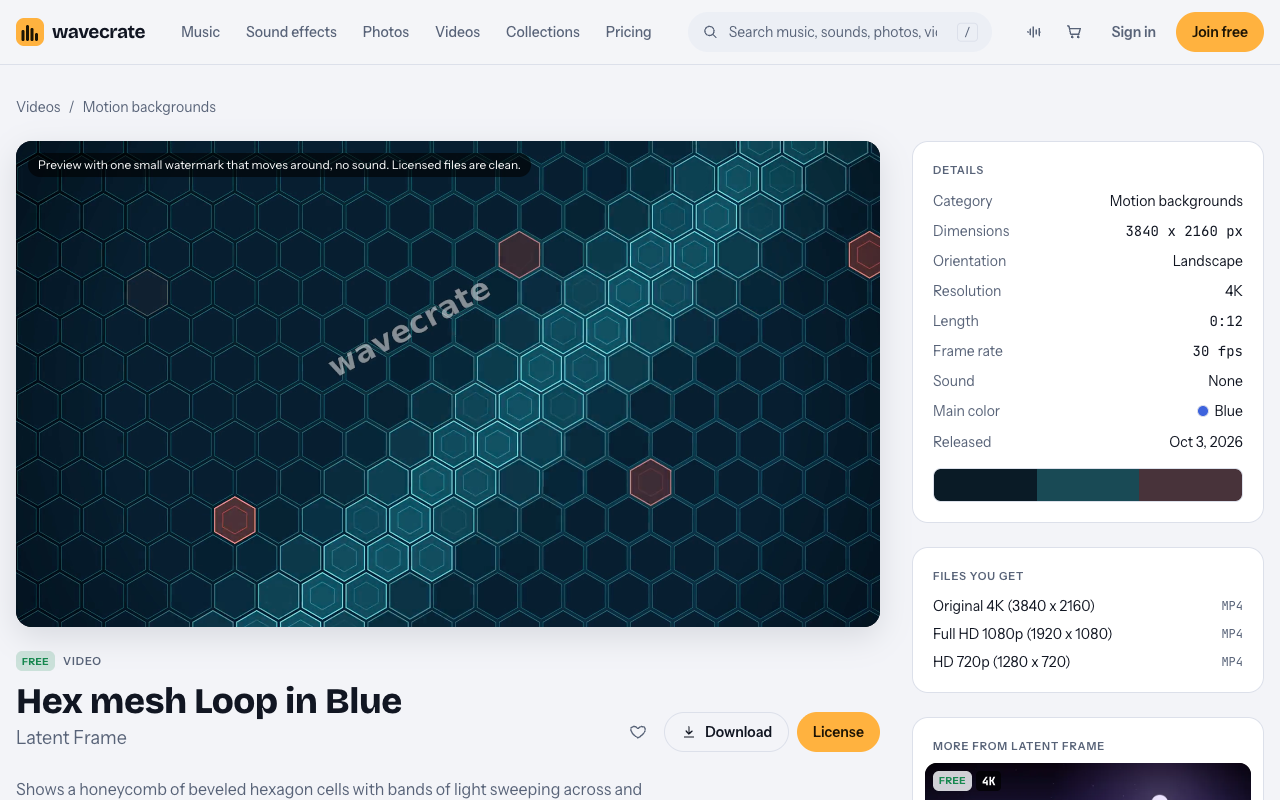
The example in this guide is Hex mesh Loop in Blue, listed in Motion backgrounds and made by Latent Frame. Its page describes it this way: it "shows a honeycomb of beveled hexagon cells with bands of light sweeping across and single cells flaring up."
Here is what the page lists on the day of writing:
- Length: a seamless 12-second loop.
- Size: 3840 x 2160 (4K) at 30 fps.
- Files: 4K, 1080p and 720p mp4.
- Sound: none, so it will not clash with your voiceover or music.
- Main color: blue.
- Tags: confident, mysterious, hexagon, honeycomb, grid, pattern, cyber security, background, texture, tech.
Those tags are a good hint about tone. "Confident" and "mysterious" sit well with a security message: calm, serious, a little dark. If your brand voice is bright and playful, a hex mesh may feel heavier than you want, and that is worth knowing before you build around it.
Picking blue or teal for your brand
The blue loop has a sibling. A teal version, Hex Mesh Loop in Teal, also sits in Motion backgrounds. Choosing between them is mostly a brand question.
- Match your palette. If your logo and interface lean blue, the blue loop will feel like part of the product. If your brand uses green or cyan accents, try teal.
- Check text contrast. Put your real title text over a still frame and read it at phone size. If it struggles, darken the loop or add a soft overlay behind the words.
- Keep one color per video. Switching between blue and teal mid video tends to look like a mistake rather than a choice.
Read each item page before you decide. The license and details for the teal version should be checked on its own page, not assumed from the blue one.
Building the video around a 12-second loop
A short loop is easy to work with once you plan for it. A few habits help:
- Write the script first. Decide what the viewer must understand, then decide where the background shows and where your product takes the full frame.
- Use the loop for framing moments. Opening title, section titles, the key promise and the closing call to action are natural places for it. Product shots and screen recordings usually work better on their own.
- Repeat it rather than stretch it. Because the loop is seamless, you can place copies end to end under a longer section. Slowing it down can make the light sweeps look sluggish.
- Edit at the right size. Use the 4K file if you plan to crop or zoom, and the 1080p or 720p files for lighter drafts or quick social cuts.
- Leave room for audio. The loop has no sound, so your music and narration are fully your choice.
Be careful with what the visuals imply. A glowing grid suggests protection, but it does not prove anything about your product. Let the narration and the interface shots make the real claims, and keep them accurate.
Which license your product video needs
This is the part that matters most, and the item being marked Free does not settle it. This loop's page shows three licenses, and what you need depends on how the video will be used.
- Free: online and social posts with credit, including websites, blogs, social media posts and monetized channels. Credit text is required next to the item or in the description, and you get 3 free downloads a month.
- Standard (listed at $29): your own websites, social, presentations and marketing, with no credit needed. It covers your own marketing and brand content, print up to 500,000 copies, and it is included with Pro.
- Extended (listed at $99): paid ads, broadcast, products for resale and client work.
A cybersecurity company's product video is that company's own marketing. The pricing page says the same thing in its table: "Apps, presentations and your own marketing" starts at Standard. So even this Free loop needs Standard or Pro once it sits inside your company's product video.
Paid licenses are not on sale yet: Wavecrate says purchases open soon, so these are the listed prices for when sales open. Items marked Free can already be downloaded with a free account.
Pro is listed at $99 a year, or $12 month to month ($8.25 a month when billed yearly), and is not on sale yet. It gives Standard on everything, never Extended, and content you publish while subscribed stays covered. If you make several marketing videos a year, Pro's listed price may come to less than Standard item by item.
Worked example: one loop, three uses
Take Hex mesh Loop in Blue, marked Free on the day of writing. Prices and labels can change, so re-read the item page on the day you download. Here is how the same loop lands in three situations.
- A personal post. You share a short clip on your own social account showing an edit you are proud of. The Free license covers this, as long as you add the credit text next to it or in the description.
- Your company's product video. You place the loop behind the titles of a launch video for your company's security product, posted on the company site and channels. That is your own marketing, so it needs Standard (listed at $29) for this item, or Pro.
- A client video or a paid ad. You are an agency making the same video for a security client, or you put it into a paid ad campaign. Client work and paid ads need Extended (listed at $99). Pro does not cover this, because Pro never includes Extended.
Keep your license record with the project files. Certificates and codes can be checked at wavecrate.vlvd.net/verify, which helps if a client or teammate asks later.
Frequently asked questions
The loop is marked Free, so when would I need a paid license?
Free covers online and social posts with credit. A product video for your own company counts as your own marketing, which starts at Standard. So that use needs Standard (listed at $29, for when sales open) or Pro.
Does Pro cover a video I make for a client?
No. Pro gives Standard on everything and never Extended. Client work, paid ads and broadcast need Extended (listed at $99).
Can I use the teal version instead?
Yes, Hex Mesh Loop in Teal is also in Motion backgrounds. Check its own page for the license and details before you download, rather than assuming they match the blue one.
What happens if I cancel Pro later?
According to the pricing page, content you publish while subscribed stays covered.
Get started
Browse Wavecrate: you can join free and download items marked Free now, paid licenses are not on sale yet (purchases open soon), and every download comes with a license certificate and a code anyone can check on its verify page.
Open the loop page, read the three licenses, and match them to how your video will be used: personal post, your own marketing, or client and paid work. When you are ready, create a Wavecrate account to download items marked Free in the file size that fits your edit.


Comments
No comments yet.
Sign in or make an account to comment.