House music for a fashion lookbook video: pick, cut, license
A lookbook video shows one look after another, and the music decides how fast that feels. This guide shows you how to pick house music for a fashion lookbook video by tempo and energy, cut each look on the beat, and choose the license that fits a brand's own video, which is not the one most people expect.
Wavecrate licenses royalty-free music, sound effects, photos and videos, and every download comes with a license certificate and a code anyone can check on its verify page.

Why house music for a fashion lookbook video works
House music is built on a steady kick drum on every beat. That steady pulse is what makes it useful for a lookbook. It gives you a clear grid to cut on, so a run of outfits feels planned instead of random.
It also stays out of the way. Most house tracks repeat a short pattern and build slowly, so they carry a video without pulling attention from the clothes. And they loop well, which helps when your edit is longer or shorter than the track.
What the House category on Wavecrate holds
On 11 October 2026 the House music page listed 10 tracks, all between 118 and 128 BPM (beats per minute). A few examples:
- Sunset Terrace by Juno Vale: marked Free, 120 BPM, happy and uplifting.
- City Lights Run by Juno Vale: 124 BPM, energetic and confident.
- Afterhours Loop by Juno Vale: 126 BPM, energetic and dark.
- Endless Current and Digital Model by Neural Groove: both marked Free that day.
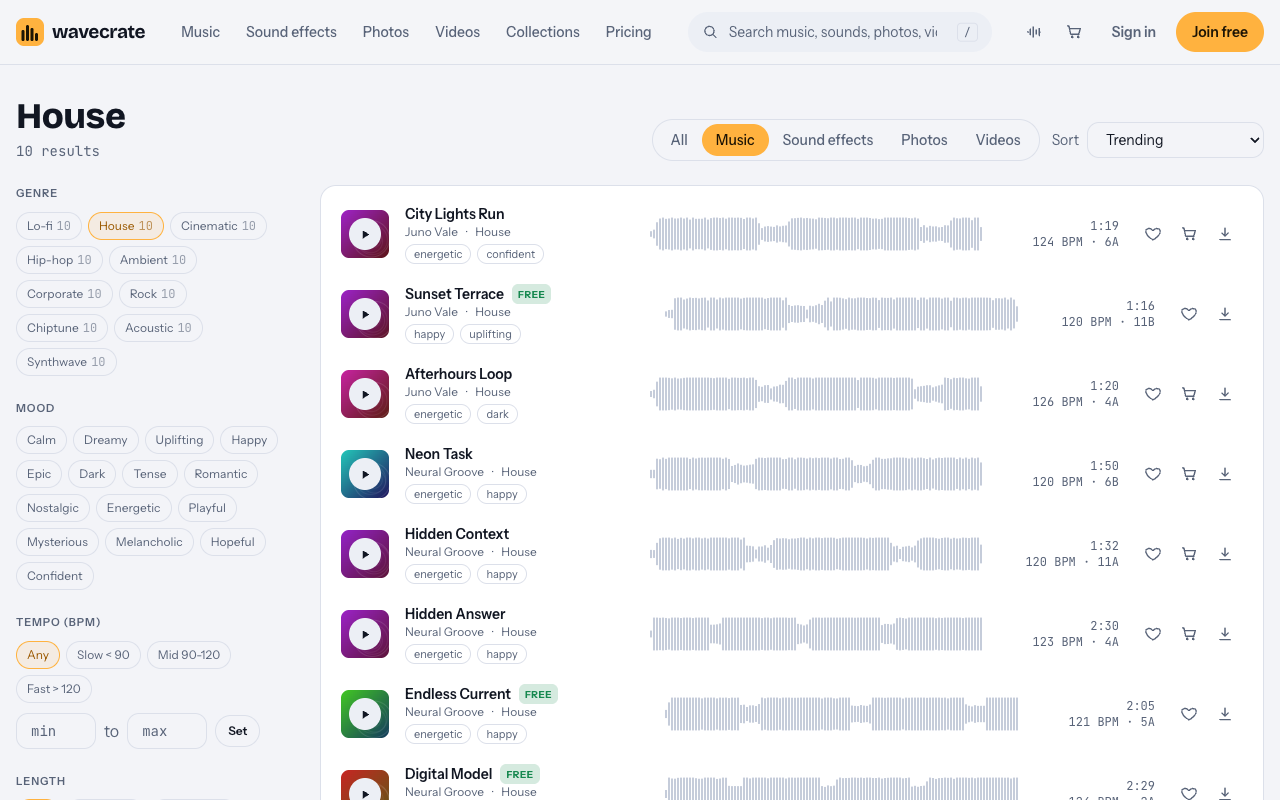
The page has filters for tempo (Slow under 90, Mid 90 to 120, Fast over 120), energy, key, vocals, length and access (Free or Premium). House sits right at the line between Mid and Fast, so the mood tags matter more than the tempo band when you choose.
Match the mood to the collection
The tempo range in this category is narrow, so pick by mood first.
- Summer, resort and casual wear: a happy, uplifting track such as Sunset Terrace.
- Streetwear and city looks: an energetic, confident track such as City Lights Run.
- Evening wear and darker palettes: an energetic, dark track such as Afterhours Loop.
Use the vocals filter too. An instrumental track leaves room for a voiceover or on-screen text with prices and product names. A vocal line can fight both.
Cut each look on the beat
You do not need to read music to cut on the beat. You need one number: 60 divided by the BPM gives the length of one beat in seconds.
At 120 BPM, as on Sunset Terrace:
- One beat is 0.5 seconds.
- One bar (four beats) is 2 seconds.
- Eight bars are 16 seconds, which matches the track's 0:16 loop.
Now plan the edit:
- Give each look one bar. Two seconds is long enough to see an outfit and short enough to keep moving.
- Give hero looks two bars. Four seconds for the pieces you most want to sell.
- Cut on beat one. A cut on the first beat of a bar feels deliberate.
- Use half bars for details. One second shots of a collar, a buckle or a stitch, cut every two beats, add rhythm.
- Save a change for the build. If the track lifts, switch from detail shots to full looks at that moment.
Sunset Terrace comes as a full track (1:16), a 30 second edit (0:30) and an 8 bar loop (0:16). Use the 30 second edit for a short social cut, and repeat the loop when the full lookbook runs longer than the track.
Mix the track with text and voice
A lookbook often carries product names, prices or a short voiceover. The music should support them, not bury them.
- Turn the music down under speech. Lower it while someone talks, then bring it back up between lines.
- Time text to the bar. Bring a product name in on beat one and take it off at the end of the bar, so text and cuts move together.
- Keep sound from the shoot low. Footsteps or fabric sounds can add texture, but keep them under the music so the beat stays clear.
- End on the bar. Fade out over the last bar, or end on a downbeat, rather than cutting the track mid-phrase.
- Check on a phone. Many people will watch on a phone speaker, so listen there before you publish.
Which license a brand lookbook needs
This is the part most people get wrong. A lookbook that shows a brand's clothes is that brand's own business and brand content. On the pricing page, that row starts at Standard. The Free license covers online videos with credit, including monetized channels, but it does not tick "Your own business and brand content".
So a track marked Free is only covered by its Free license on a personal channel. A brand's own lookbook needs Standard or Pro, and a lookbook made for someone else's brand needs Extended. Paid licenses are not on sale yet (Wavecrate says purchases open soon), so the prices below are the listed prices for when sales open; items marked Free can already be downloaded with a free account.
Worked example: Sunset Terrace through three uses
Sunset Terrace was marked Free on the day of writing. Items can change between Free and Premium, so read the track page again on the day you download.
- Your personal style channel, with credit: Free. You post a "my summer looks" video on your own YouTube or Instagram. The Free license covers online videos on YouTube, TikTok, Instagram, Twitch and podcasts, including monetized channels. Credit text is required in the description. A free account gets 3 free downloads a month.
- Your own label's lookbook: Standard ($15) or Pro. You run a small clothing label and post the lookbook on your shop's channels. That is your own business and brand content, so it needs Standard, listed at $15 on this track, even though it is marked Free. Standard needs no credit and prints your registered channels on the certificate. Pro would cover it too: it is listed at $99 a year or $12 month to month, gives Standard on everything, and is not on sale yet.
- A lookbook for a client, or one you pay to promote: Extended ($49). You are a videographer cutting the lookbook for a label, or the label pays to run it as an ad. Client work and paid advertising are Extended only, listed at $49 on this track. Pro never includes Extended.
Every license comes with a certificate and a code anyone can check on the verify page. Keep each code with the project, and note which video uses which license. With Pro, content you publish while subscribed stays covered after it ends.
Frequently asked questions
What tempo suits a lookbook?
The House tracks on Wavecrate ran from 118 to 128 BPM on the day of writing. At 120 BPM one bar is 2 seconds, a comfortable length for one look.
Can my brand use a track marked Free?
Not on the Free license. A brand's own lookbook is business and brand content, which starts at Standard.
Does Pro cover a lookbook ad?
No. A lookbook you pay to promote is a paid ad, and paid ads are Extended only.
Do I need to credit the track?
Only on the Free license, which requires credit text in the description. Standard and Pro need no credit.
Get started
Browse Wavecrate: you can join free and download items marked Free now, paid licenses are not on sale yet (purchases open soon), and every download comes with a license certificate and a code anyone can check on its verify page.
Open the House page, pick a track by mood, give each look one bar, and note the license for where the lookbook will run. Join Wavecrate free to audition tracks and keep every certificate in one place.


Comments
No comments yet.
Sign in or make an account to comment.