How Does a Game Loop Work? Input, Update, Render Explained
If you have ever wondered how does a game loop work?, the answer is simple. A game runs the same small routine over and over, many times a second. It reads what you pressed, moves everything a little, and draws the result. This post explains each step, shows why time matters more than speed, and walks through one real frame of a browser tank game, straight from its code.
How does a game loop work? The short answer
A game loop is a cycle that keeps going while the game runs. Each pass through it is one frame. In each frame the game does three jobs in order:
- Read input: check the keys or touch buttons you are holding.
- Update: move tanks, count down timers, check hits.
- Draw: put the new picture on the screen.
Then it starts again. A normal program waits for you to click something. A game does not wait. It keeps the world moving whether you touch the controls or not.
Frame rate is how many of these pictures appear each second. It is usually written as frames per second, or FPS. A faster device can finish more frames each second than a slow one. That one fact shapes almost every choice inside the loop.
The three steps: read input, update, draw
Read input
The loop first asks what you are doing right now. It reads which keys are held and which buttons are down. It does this once, at the start of the frame. The rest of the frame works from that one reading, so every part of the game agrees on the same input.
Update
The game state is everything the game knows: where each tank is, how many lives you have, how long each timer has left. The update step changes that state by a small amount. Your tank moves a few pixels. A shot moves further. A timer gets a little closer to zero.
Draw
Drawing turns the state into a picture. The game draws the board, then each object at its current place. In 2D games those objects are usually sprites. If that word is new, read what a sprite is in video games. The draw step should only show what the update decided. It should not change anything.
Delta time: keeping speed the same on any device
Here is the problem. Say you move a tank 2 pixels every frame. At 120 frames per second, it travels 240 pixels a second. At 30 frames per second, it travels only 60. Same game, four times slower on the slow device.
The fix is delta time. Delta time is the number of seconds since the last frame. Instead of "move 2 pixels per frame," you write "move so many pixels per second, times delta time." A fast device takes many small steps. A slow device takes fewer, bigger steps. After one second, both have moved the same distance.
Timers work the same way. A rule like "freeze every enemy for eight seconds" is stored as a number. Each frame, the game takes delta time away from it. When it reaches zero, the effect ends. That is why a timed effect lasts the same on any device.
Why you cap delta time
Delta time has one trap. If a single frame takes a long time, delta time gets large. Then everything jumps a long way in one step. A fast shot can skip right past a thin wall without ever touching it. Collision checks only look at where things are, frame by frame, so a big jump can miss a hit. For more on how games test for hits, read what collision detection is in video games.
The simple fix is a cap. You let delta time grow up to a limit and no further. If a frame runs long, the game moves as if only the limit had passed. The game slows down for a moment instead of jumping. For a small 2D game, that is often all you need.
Worked example: one frame of Tank City Reboot
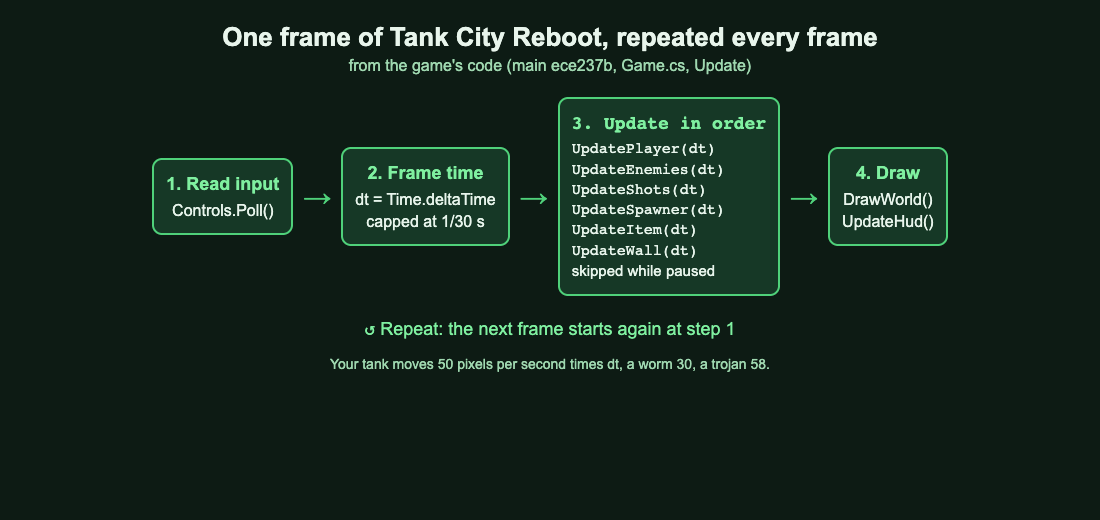
Tank City Reboot is a free site with two tank games that play in your browser. Your antivirus tank guards a CPU core while malware tanks come at it. Both games are built in Unity and run in the browser with WebGL 2. Their scripts have an Update() method that Unity calls once every frame. Here is what that method does in the first game, step by step, from the code.
Step 1: read input and take the frame time
The frame starts by reading the controls. Then it takes the frame's time and caps it with one line:
float dt = Mathf.Min(Time.deltaTime, 1f / 30f);
So dt is the real time since the last frame, but never more than 1/30 of a second. A slow frame never moves things further than a 30 frames per second frame would.
Step 2: update each part in order
During play, the game updates six parts, always in this order:
UpdatePlayer(dt): your tank.UpdateEnemies(dt): the malware tanks.UpdateShots(dt): every shot on the board.UpdateSpawner(dt): when the next enemy enters.UpdateItem(dt): the power up on the board.UpdateWall(dt): the Firewall rebuild timer, which turns the wall around the CPU core to silicon and back.
If you pause, the game returns before any of these run. Nothing in the world moves until you unpause.
Step 3: do the sums
Movement is speed times dt. In the code, your tank has a speed of 50 pixels per second, a worm 30 and a trojan 58. Let us run the numbers for two frames.
- At 60 frames per second,
dtis about 0.0167 seconds. Your tank moves 50 times 0.0167, about 0.83 pixels. A trojan moves about 0.97 pixels. - Now a frame stalls for a full tenth of a second. Without the cap, your tank would jump 5 pixels at once. With the cap,
dtis 1/30, about 0.033 seconds, so your tank moves about 1.67 pixels.
Timers count down by the same dt. After you lose a tank, the respawn wait is 1.2 seconds. On stage 1, a new enemy enters every 2.6 seconds. Pick up Breakpoint and the enemies freeze for 8 seconds. Each is just a number that shrinks by dt each frame.
Step 4: draw, then repeat
Once the update is done, the same Update() method draws the world and the side panel. Then the frame ends. Unity calls Update() again, and the loop goes round once more.
How Tank City Zero Day adds a hit stop to the loop
The second game, Tank City Zero Day, uses the same capped dt. It adds one twist: a hit stop. A hit stop is a tiny freeze when a hit lands, so the hit feels heavier. When you destroy a normal enemy, the game sets a hit stop of 0.035 seconds.
While the hit stop is above zero, the play update is skipped. Nothing moves. The hit stop itself counts down in real time, using Unity's unscaled time, which ignores any slow motion. When it reaches zero, the play update runs again. That is a good lesson: you can bend how the loop feels with a single timer, without touching the steps themselves.
Common game loop mistakes
- Moving by a fixed amount per frame. Your game runs at different speeds on different devices. Multiply by delta time.
- No cap on delta time. One long frame sends objects through walls. Cap it, the way Tank City Reboot caps it at 1/30 of a second.
- Changing things while drawing. Keep the draw step for showing only.
- Reading input in the middle of the update. Read it once at the start of the frame.
- Counting time in frames. "Shield for 600 frames" is 10 seconds at 60 frames per second and 5 at 120. Count seconds instead.
Frequently asked questions
What is a frame in a game loop?
A frame is one pass through the loop: read input, update, draw. Frame rate is how many frames appear each second.
What is delta time?
Delta time is the number of seconds since the last frame. You multiply speeds by it and take it away from timers, so the game runs at the same pace on fast and slow devices.
Why cap delta time?
A long frame makes delta time large, and objects jump too far in one step. Tank City Reboot caps it at 1/30 of a second, so a slow frame never moves things further than a 30 frames per second frame would.
What happens to the loop when you pause?
In Tank City Reboot, the play update returns early while paused. The tanks, shots and timers stay where they are until you unpause.
Get started
The best way to feel a game loop is to play one with this post in mind. Watch a frozen enemy stay still for eight seconds, or the short pause when a hit lands in Zero Day. Each of those is a timer in an update step, run every frame.
Play Tank City Reboot: it is free, plays in your browser on a computer or a phone, and needs no account.
Comments
No comments yet.
Sign in or make an account to comment.