How does antivirus software actually work? A plain guide
How does antivirus software actually work? NIST's glossary describes antivirus software as "a program that monitors a computer or network to identify all major types of malware and prevent or contain malware incidents." It does that with several methods at once: matching files against known malware, judging code by rules of thumb, watching what programs do, and asking an online service about new threats. This guide explains each one, shows you where to see what your own antivirus has caught, and covers where it falls short.
How does antivirus software actually work? The short answer
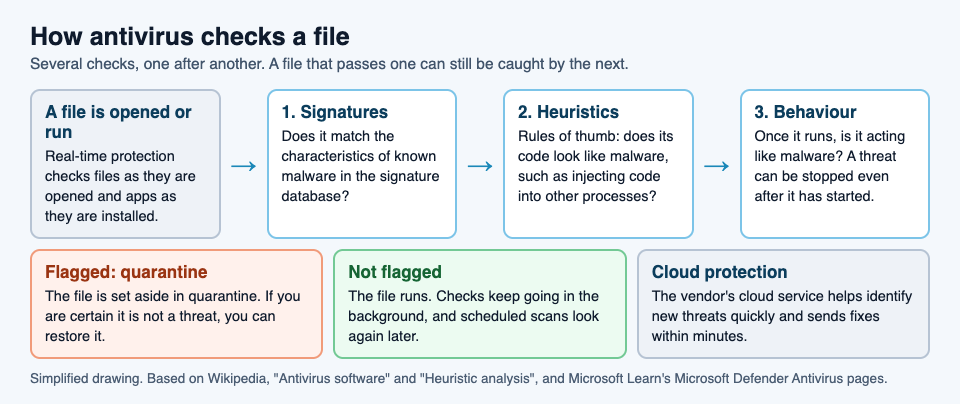
Antivirus is a set of checks that run at different moments: when a file is opened, on a schedule, and in the background while software runs.
No single check catches everything. Back in 1987, the researcher Fred Cohen wrote that no algorithm can perfectly detect all possible computer viruses, so antivirus tools stack several layers of defense instead of relying on one. A file that passes one check can still be stopped by the next.
The main layers:
- Signature detection: does this file match something already known to be bad?
- Heuristics and machine learning: does this file look like malware, even if nobody has seen this exact file before?
- Behavior monitoring and sandboxing: is this program doing things malware does?
- Real-time protection, scans, cloud protection and quarantine: how all of the above runs in practice, and what happens to a file that fails.
Signature detection: matching known malware
Traditional antivirus software relies heavily on signatures. NIST defines a signature as "a set of characteristics of known malware instances that can be used to identify known malware and some new variants of known malware."
When a malware sample reaches an antivirus company, researchers or automated analysis systems study it. Once it is confirmed as malware, a signature is taken from it and added to the antivirus software's signature database. Your antivirus then checks files against that database. A match means the file is a known threat.
The weakness is that signatures only catch what someone has already studied. Malware authors know this. They write polymorphic and metamorphic viruses, which encrypt parts of themselves or change themselves in other ways so they no longer match the signatures. That is why the next layers exist.
Heuristics and machine learning: spotting what looks suspicious
Heuristics are rules of thumb. Instead of asking "is this exactly the bad file?", the scanner asks "does this file behave like bad files?" Heuristic analysis is designed to catch previously unknown viruses and new variants of known ones.
There are two common ways to do it:
- Static analysis. The antivirus takes the program apart and looks for instructions typical of malware, such as altering the Windows registry or injecting code into other processes. Enough suspicious patterns, and the file is flagged.
- Running it in a safe copy of a computer. The antivirus runs the program inside a virtual machine, kept apart from the real system, and watches for virus-like actions: copying itself, overwriting files, or trying to hide.
Machine learning does something similar at a larger scale: models trained on large sets of files sort software into malicious or harmless.
The tradeoff: these methods can catch new variants, but they also cause more false alarms, where a harmless file is marked as malware. Heuristics also learn from known malware, so a virus that works in a truly new way can still slip past.
Behavior monitoring and sandboxing: watching what programs do
Some threats only show themselves once they run. Microsoft says Microsoft Defender Antivirus can stop threats based on their behaviors and process trees, even after the threat has started running. A common example is fileless malware.
A sandbox takes this further. In one sentence: a sandbox runs untrusted code where it cannot touch the rest of the system. Sandbox detection runs the program in a virtual environment and logs what it does, such as its memory use and network access. If the program turns out to be harmless, it then runs on the real system. Because this is heavy and slow, it is rarely used in antivirus for home computers. Read more in what a sandbox is in cybersecurity.
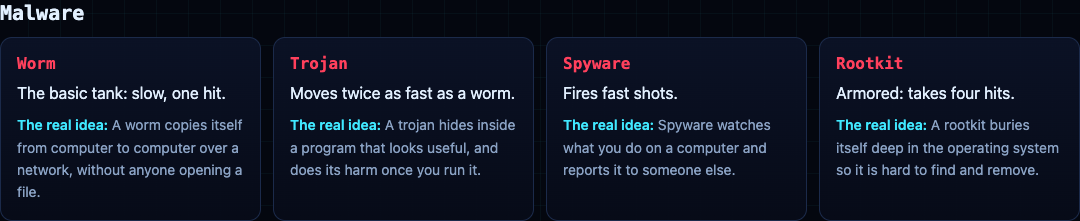
Here are four kinds of malware these layers are up against, in the one-line definitions from the glossary cards in Tank City Reboot:
- Worm: "A worm copies itself from computer to computer over a network, without anyone opening a file."
- Trojan: "A trojan hides inside a program that looks useful, and does its harm once you run it."
- Spyware: "Spyware watches what you do on a computer and reports it to someone else."
- Rootkit: "A rootkit buries itself deep in the operating system so it is hard to find and remove." A rootkit can tamper with the antivirus itself, and some can only be removed by reinstalling the operating system.
The guide to the types of malware goes through each one in more depth.
Real-time protection, scans, cloud protection and quarantine
Real-time protection
Also called on-access scanning. It checks files when they are opened and scans apps as they are installed. Microsoft's version reviews files when they are opened and closed, and whenever you open a folder.
Scheduled and on-demand scans
Scheduled scans come on top of always-on protection and the scans you start yourself. Microsoft Defender's quick scan looks at the places where malware can register to start with the system, such as startup folders.
Cloud protection
Cloud antivirus keeps a small program on your computer and does most of the analysis on the provider's servers. Microsoft says its cloud protection can identify new threats sometimes before a single computer is infected, and deliver fixes within minutes instead of waiting for the next update.
Quarantine
When a file is flagged, antivirus can delete it or quarantine it, which sets it aside. Quarantine matters because of false alarms: if a file you need is caught by mistake, you can restore it.
Worked example: see what your antivirus has caught
On Windows, Microsoft Defender Antivirus is built in. Microsoft's steps to see its record:
- Open the Windows Security app.
- Select Virus & threat protection.
- Under Current threats, select Protection history.
- If the list is long, filter it to Quarantined Items to see the files that were set aside.
- Only if you are certain a quarantined file is not a threat, select it and choose Restore. If unsure, leave it.
Where antivirus falls short and what else protects you
- New threats. Antivirus is not always effective against new viruses, even with methods beyond signatures, because some malware authors test their new viruses against the major antivirus products before releasing them. A zero-day is a flaw nobody has patched yet, because the makers do not know it exists. See what a zero-day is and how it gets fixed.
- A false sense of security. Some people come to believe their computer cannot be harmed because antivirus is installed, and then make risky choices.
Other layers help fill these gaps:
- Patches. A patch is a software update that closes a security hole.
- Firewalls. A firewall checks network traffic against rules and blocks what breaks them.
- Two-factor login. Two-factor login asks for a second proof, like a code sent to your phone.
- Backups. A backup is a copy of your data kept somewhere else, so you can restore it after a loss.
Frequently asked questions
Does Windows come with antivirus?
Yes. Microsoft Defender Antivirus is built into Windows 10 and Windows 11, and it uses real-time protection, behavior monitoring, heuristics and cloud protection.
Can antivirus catch brand new malware?
Sometimes. Signatures cannot catch what nobody has studied yet, but heuristics, machine learning and behavior monitoring can flag new malware by how it looks or what it does, though not every time.
What is a false positive in antivirus?
A false positive, or false alarm, is when antivirus marks a harmless file as malware. Quarantine lets you restore a file caught by mistake.
Does antivirus slow down my computer?
It can affect performance. You can set scheduled scans to run when you are not using the device.
Get started: learn the names with Tank City Reboot
Tank City Reboot is a free site with two original tank games that run in your browser. In the first game, your antivirus tank guards the CPU core at the bottom of a circuit board. Malware tanks come at it, and each one is named for a real idea, with a one-sentence explanation on the page. The worm is the basic tank. The trojan moves twice as fast. Spyware fires fast shots. The rootkit is armored and takes four hits.
The second game, Tank City Zero Day, adds ransomware, botnet drones, a cryptominer turret, and a zero-day boss that breaks through the walls every fifth wave. After each wave you pick one of three upgrades, such as Sandbox, a shield that stops one hit and recharges, or Two-factor, one extra life.
One honest note: the game teaches the idea behind each name in one sentence. It is not a security course, and playing it does not protect your computer. Your real antivirus, your updates and your backups do that work.
Play Tank City Reboot: it is free, plays in your browser on a computer or a phone, and needs no account.
Comments
No comments yet.
Sign in or make an account to comment.