How many hours of screen recording a month you need
You want a number before you pick a plan, so here is a way to get one. The honest answer to how many hours of screen recording a month you need is: it depends on how much you press record, and how many takes you throw away. You can work it out in five minutes with plain arithmetic.
Cheap Recorder gives each plan a monthly amount of recording time, so your own number is the thing to know first.
Count recorded time, not finished video
Your monthly need is the length of everything you record, not the length of what you publish. A 10 minute tutorial that took three tries used 30 minutes.
These are the amounts on the plans, read from the pricing grid on the home page:
- Free: 12 hours of recording a month, 1 device, no card needed.
- Creator: 80 hours a month.
- Business: 250 hours a month, 5 devices at once.
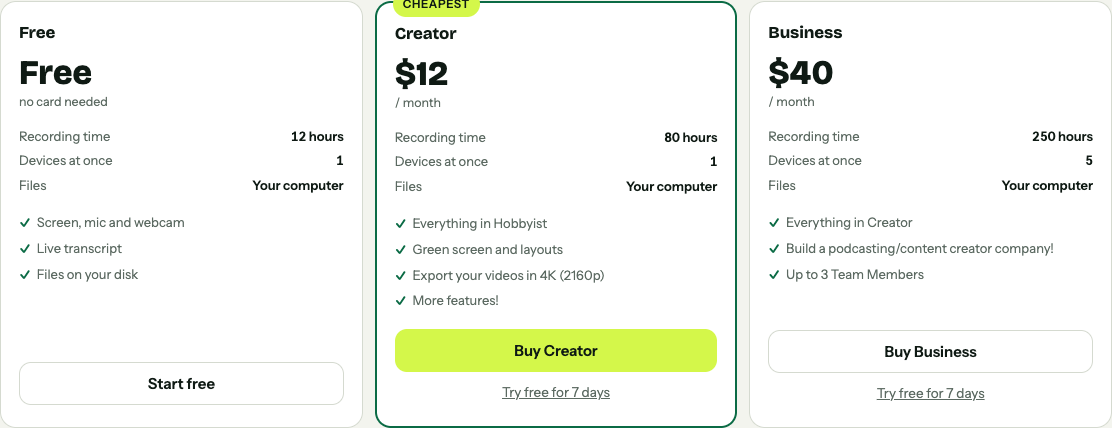
The recording time line on each plan card, from the live home page.
Twelve hours is 720 minutes. If your estimate lands well under that, you may not need to pay for time at all.
The formula: a worked example
Use this:
recordings a month × minutes per take × takes per recording + test clips = minutes a month
Say you record 8 product walkthroughs a month. Each runs about 6 minutes when it is good, you usually need 2 takes, and you record a 30 second test before each one.
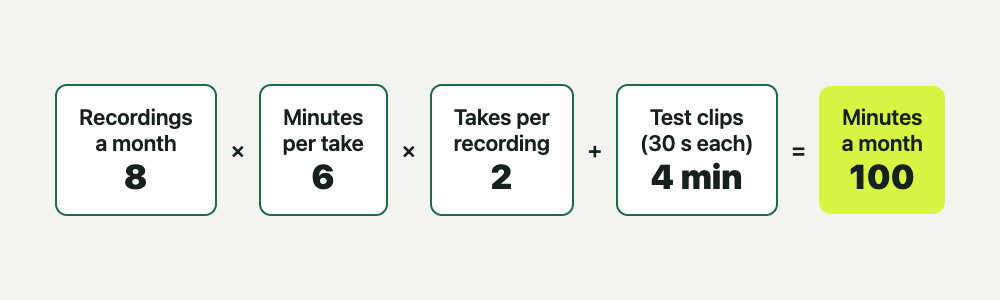
- 8 recordings × 6 minutes × 2 takes = 96 minutes
- 8 test clips of 30 seconds = 4 minutes
- Total: 100 minutes, a little under 2 hours
Now pad it. Add a third for the weeks that go wrong and you get about 2.2 hours. That sits far below the 12 hours on the Free plan.
Run it with last month's real numbers: your calendar, your finished videos, your shared drive. With no history, record for one normal week and count.
Hours of screen recording a month for different jobs
These are examples built with the formula. They are not averages, and your numbers will differ.
Teachers and course makers
Twenty lessons a month at 15 minutes with 1.5 takes each is 450 minutes, or 7.5 hours. Recording live classes in full is heavier: four 60 minute classes a week for four weeks is 16 hours before any retakes. That passes the Free plan.
Support teams
Ten clips a day at 3 minutes each over 20 working days is 600 minutes, or 10 hours for one person. Five people doing the same is 50 hours, which fits inside Creator's 80. Recorded minutes go to your account after each recording, so recordings made on every device signed in to the account come out of the same plan hours.
Developers
Bug reports and pull request demos run 1 to 5 minutes. Fifteen a month is well under 2 hours. A recorded call or a long architecture walkthrough is what pushes it up.
Podcasters
A weekly 40 minute episode recorded live is 160 minutes a month for one show. Add a 30 minute rehearsal each week and it is 280 minutes. Two shows already make 9 hours, and a third passes 12.
Why recording time is more than finished video
Four things inflate the total, and they are easy to forget.
- Retakes. Every false start counts.
- Tests. The guides suggest a 30 second test at the start of a session to catch a wrong microphone or a muted tab. It costs 30 seconds and can save a whole take.
- Dead air. A recording that runs while you hunt for the right tab is still recorded time.
- Calls. Record a call in full and its full length is counted, even if you only keep ten minutes.
Cutting does not give the time back. In a normal one-file recording, cutting words changes the transcript and captions, not the MP4, and the time was counted when you recorded it.
Quality and disk space
Resolution does not change how many minutes you use. A minute recorded is a minute used. What changes is the plan and your disk.
- Export quality: 4K (2160p) export comes with Creator.
- Disk space: recordings are written every second to a folder you pick on your own computer, so storage is your own drive.
- Separate files: tick Also save every source separately and each voice and the far end of a call get their own files next to the mix, which takes more room.
The guide on where recordings are saved explains the folder setup.
When the monthly cap becomes a problem
A cap hurts in two cases. You regularly pass it, or you hit it in the middle of something important. If the month's minutes run out mid-recording, the recording stops. That is the outcome you cannot afford during a live class or a client call.
Open your name in the top right of the recorder to see how many minutes are left. Check it before a long session.
A simple rule, after you have added the padding:
- Under about 8 hours: stay on Free and watch the counter.
- Between 8 and 12 hours: there is little room for a bad week, so look at Creator.
- Over 12 hours: Creator's 80 hours is a big step up. Business at 250 hours suits a team recording a lot.
Creator is $12 a month billed monthly, or $4.99 a month billed yearly, with a 7-day free trial. Business is $40 a month, or $19.99 a month billed yearly, also with a 7-day free trial. Creator also adds green screen, layouts and 4K export, so hours are not the only reason to choose it. If you cancel, your files are already on your disk, so you keep everything and the plan stops renewing.
Ways to use fewer hours
- Test for 30 seconds. Play it back. A dead microphone found after 20 minutes costs 20 minutes.
- Record in sections. Use Name this recording, for example Lesson 03, and redo only the part that went wrong.
- Share one window or tab. It keeps other tabs and private things out, so a stray notification does not force a restart.
- Press M to mark moments. With Also save every source separately ticked, the markers are written to a list and a chapters file. In a single MP4 the notes show while recording but are not saved, so write the times down.
- Close what you do not need. Quit extra tabs and silence notifications before you press Start recording.
Frequently asked questions
How many hours of recording does the Free plan give me?
12 hours a month, with the live transcript and captions, on 1 device and with no card needed.
Do retakes count against my monthly hours?
Yes. Every recording counts by the minutes you recorded, so tests and mistakes count too.
What happens if I run out of minutes during a recording?
The recording stops. Check the minutes left under your name in the top right before a long session.
Does cutting filler words give me minutes back?
No. Minutes are counted from what you record, and in a normal one-file recording cuts change the transcript and captions, not the MP4.
Do two computers share one allowance?
Yes. Recorded minutes are reported to your account, so every signed-in device uses the same plan hours.
Get started
Work out your number with the formula, add a third for bad weeks and compare it with 12, 80 and 250 hours. Start free in Chrome, no card needed, and your recordings stay on your own disk.
Comments
No comments yet.
Sign in or make an account to comment.