How many squares are on a 2048 board? 16 flat, 54 on a cube
How many squares are on a 2048 board? The flat board has 16 squares in a 4 by 4 grid. Evolved 2048 puts the same puzzle on a cube with six faces of nine squares, so you play with 54 squares. This post explains where that number comes from and what it changes when you play.
How many squares are on a 2048 board? 16 flat, 54 on a cube
Here is the whole answer in two lines.
- A flat board of 4 rows and 4 columns has 4 × 4 = 16 squares.
- The cube in Evolved 2048 has 6 faces, each 3 by 3, so 6 × 9 = 54 squares.
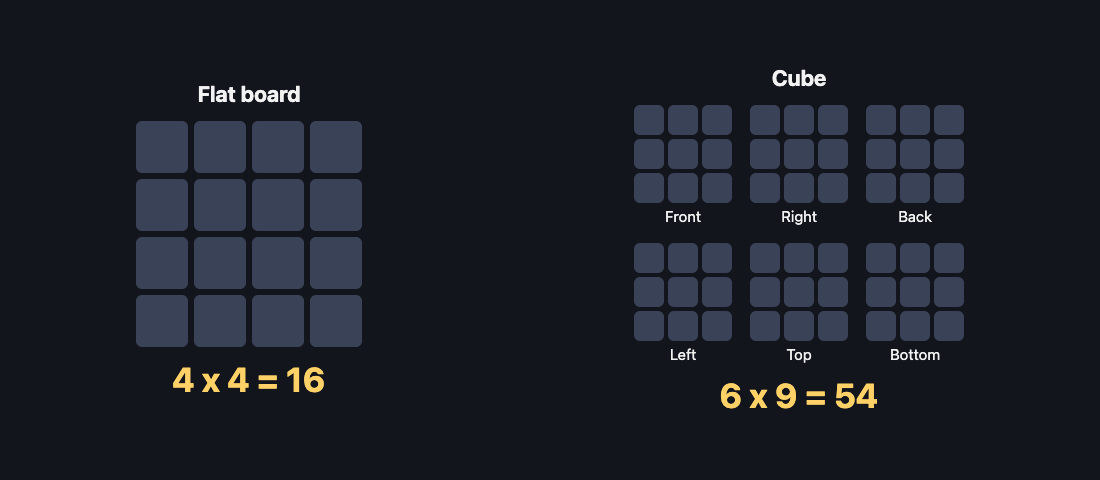
The cube has more than three times as many squares as the flat board. But you do not slide on all of them at once, and that is where the game gets interesting.
Why the flat 2048 board has 16 squares
The flat puzzle is a square grid with four squares along each side. Multiply the sides and you get 16. The original game by Gabriele Cirulli starts its board with a size of 4, as you can read in its public code on GitHub. The point here is only the arithmetic, because it is the baseline for the cube.
Each face of the cube is smaller than that grid. It is 3 by 3, which is 9 squares. Evolved 2048 is not the classic 4 by 4 board with a new coat of paint. A face is a small board, and there are six of them.
How the 54 squares on a cube are counted
The game names the six faces Front, Right, Back, Left, Top and Bottom. Each has nine squares. The game saves them in a fixed order, which makes the count easy to follow:
- Front: squares 0 to 8
- Right: squares 9 to 17
- Back: squares 18 to 26
- Left: squares 27 to 35
- Top: squares 36 to 44
- Bottom: squares 45 to 53
That is 54 numbered squares, counting from 0. The game ends only when all 54 are full and no equal tiles sit side by side. In Evolved mode that means no face has two equal tiles side by side. In Edge mode it also covers equal tiles across an edge.
Six faces of nine: how the layout works
You do not play all 54 squares equally. The game starts with two tiles on the front face. In Evolved and Edge mode, every slide happens on the front. Fun mode is the exception, and it is covered below. Here is how a move works:
- Slide. Swipe the front face, or press the arrow keys or W A S D. Tiles slide as in 2048, and two equal tiles merge into their sum.
- Twist. Drag a row on the right face sideways, or a column on the top face. That layer turns a quarter and carries its tiles to the next face. On a keyboard, 1 2 3 twist the top, middle and bottom row right, and 4 5 6 twist the left, middle and right column up. Hold Shift to twist the other way.
- Turn. Drag the space around the cube, or press Shift and an arrow key. The whole cube turns, so a different face comes to the front.
New tiles go on the front face when it has room. Each is a 2 most of the time and a 4 now and then: the game picks a 2 when a random number is under 0.9, and a 4 otherwise. If the front is full, a new tile can land on any empty square.
How more squares change your 2048 strategy
More squares do not make the puzzle easier by themselves. Here is a test game from 9 October 2026, played with slides only (before the modes existed, so it is the Evolved rule). The front face was full at move 46 and could not slide. The score was 332 and the other five faces were empty, so 45 of the 54 squares sat unused, because nothing carried tiles away from the front.
Twists are what open up the rest of the cube. A second test game used a twist whenever the front was stuck. It reached 64 at move 36 with every tile still on the front. It made 128 at move 118 with tiles on four faces. All 54 squares were full at move 165, with a score of 1160 after 39 twists. At that point the game was not over, because the front had no slide but other faces still had equal tiles side by side.
Those are single games, not averages, so treat them as examples. They do show the main idea. A full front face is not a lost game. A full cube with no matching neighbours is.
A few habits follow from the rules:
- Keep room on one face. The game's own advice when you run out of moves is to keep room on one face so a twist can still bring tiles round to their match.
- A twist needs one empty square. It adds a new tile, so if the cube is full the game tells you: "The cube is full. Merge two tiles on a face to make room before you twist."
- Bring the tile to the match. The how to play text puts it simply: bring a tile from the side next to its match on the front.
- Remember there is no undo. A twist can be twisted back with Shift and its key, but that counts as a second move and adds a second new tile.
For a plain walkthrough of each part of the instructions, see the how to play box, part by part.
What happens when a slide runs round the cube
Evolved 2048 has three modes, and you pick one before each game. In Evolved mode, slides work on the front face only. Edge mode adds one thing: a slide towards an edge also merges the tile at that edge with an equal tile just over it, on the next face.
Fun mode changes what a slide is. A slide runs each row or column all the way round the cube. Up or down runs over front, top, back and bottom. Left or right runs over front, the sides and back. Equal tiles along that path merge, and the tiles pile up on the front.
Count the squares on one of those paths: four faces with three squares each gives a ring of 12. So in Fun mode a single slide works on a line of 12 squares instead of 3. That is a different feel from a 3 by 3 face. If you want to try it, these Fun mode tips cover what to watch for.
Each mode keeps its own best score, so a good Fun game does not replace your Evolved best.
Turning the whole cube to reach every face
Turning is how you get at the squares that are not on the front. Press Shift and an arrow key, or drag the space around the cube. Two facts matter here:
- Turning is free. In a test game, two slides gave Moves 2. A Shift and Left turn then showed a face with no tiles, and Moves still read 2 with no new tile added.
- Turns add no points and no tiles. Only slides and twists count as moves and add a tile.
The direction is predictable. Shift and Left brings the right face to the front, and Shift and Right does the opposite. Shift and Up brings the bottom face to the front, and Shift and Down does the opposite. Four Shift and Left turns bring the cube back to where it started. If a face has become cluttered, a free turn lets you look at the others before you commit to a move. There is more on this in the guide to turning the whole cube.
Frequently asked questions
How many squares are on a 2048 board?
A flat 2048 board has 16 squares, a 4 by 4 grid. The cube in Evolved 2048 has 54, which is six faces of nine squares.
Is each face of the cube a 4 by 4 board?
No. Each face is 3 by 3, so it has nine squares. Six faces make 54 in all.
Do I slide on all 54 squares at once?
Not in Evolved or Edge mode. Slides work on the front face, and you use twists and whole-cube turns to bring tiles from the other faces. In Fun mode a slide runs a row or column all the way round the cube.
When does the game end on a cube?
It ends when all 54 squares are full and no equal tiles sit side by side. In Evolved mode that is checked within each face, and in Edge mode across edges too.
Does turning the cube cost a move?
No. Turning is free and adds no points or new tiles. Slides and twists each count as one move.
Get started with Evolved 2048
The quickest way to feel the difference between 16 squares and 54 is to play a few games. Pick a mode, slide the front, and try your first twist when the front gets tight. The game shows three short tips on your first game, and you can skip them.
Play Evolved 2048: it is free and plays in your browser on a computer or a phone.
Comments
No comments yet.
Sign in or make an account to comment.