How to Build in Public: A Guide for AI Product Founders
To build in public is to share your work on a product while you make it: what you tried, what broke, what you learned and what you plan next. If you want to know how to build in public without an audience, the short answer is to post small, honest updates on a regular schedule in one or two places, and to ask the people who respond to try the product. It is one step in a larger launch plan, which our guide to launching an AI product when you have no audience sets out from first users to first customers. This post goes deeper on that one step.
Age of AI Entrepreneur gives you short, hands-on lessons on finding a problem, building your first AI projects and launching, so you have real work to share while you build in public.
What building in public means (and what it does not)
It means making your process visible. You share a decision, a screenshot of a rough version, a number, or a mistake. You do it as you go, not only after a launch.
It does not mean sharing everything. You do not need to post your code, your customer names or your bank balance. You choose what to show, so people can follow along and react.
It also does not mean performing. A post that says "huge news coming" with nothing in it teaches nobody anything. A post that says "I tried three prompts for my summary tool, and the shortest one worked best" does.
Why building in public works when you have no audience
It feels backwards. You have no followers, so who will read it? Three things make it worth doing anyway.
- It forces you to ship small. If you promised yourself a post every week, you need something to show every week. That pushes you toward small, finished steps instead of one long silent build.
- It creates a record. Each post is a dated note of what you believed at the time. Later you can see which guesses were wrong.
- It finds the few people who care. You do not need a crowd. You need a handful of people who have the problem you are solving. A specific post about a specific problem is how they find you.
It also pairs well with a learning loop. If you build, measure and learn in short cycles, each cycle gives you a post. There is a plain walkthrough in the build-measure-learn loop for an AI product, with an example.
What to share at each stage of an AI product
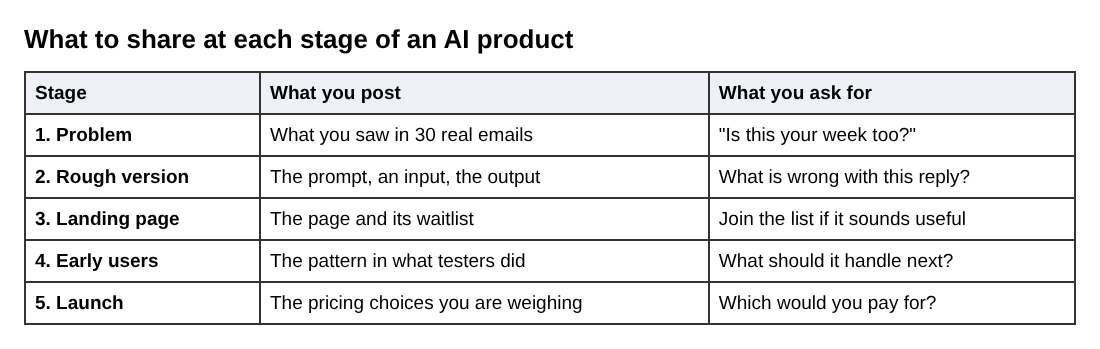
Match the post to where you are. Here is a worked example. Say you are building a micro tool that turns a messy customer email into a short, polite reply draft.
Stage 1: the problem
Before you build, share the problem. For example: "I read 30 support emails from small shops. Most spend time on the same five questions. Is this your week too?" This is a question, not an announcement. Replies tell you whether the problem is real.
Stage 2: the first rough version
Share the ugly first version. A prompt, an input and an output are enough. For an AI product, the prompt itself is worth showing. You might post the instruction you gave the model, the email you tested it on and the reply it wrote, with one line on what was wrong.
Stage 3: the landing page and waitlist
Put up a simple page that says what the tool does and lets people join a list. Share the page and say plainly what you want: "If you answer customer email for a living, tell me if this sounds useful." The course lesson Project 1: A Landing Page and a Waitlist in Your First Builds: Simple Projects covers this step. You sign in to open the course.
Stage 4: early users
Share what real people did with it. What did they paste in? Where did the output fall short? Do not share private content. Describe the pattern instead: "Three testers all wanted a shorter reply than I expected."
Stage 5: launch and pricing
Share the decisions you are weighing: what to charge, what to include, what you cut. The lessons in Launch, Price and Get Paid cover the MVP, pricing AI products and getting your first ten customers.
Where to post: choosing one or two channels
Pick one or two places and stay there for a few months. Spreading thin across six channels means six empty feeds.
Choose by where your future users already spend time. Ask yourself one question: where would a person with this problem go to complain about it? A good pairing is one place for short updates and one place for longer notes, such as a blog or a changelog page on your own site.
How to build in public: a simple weekly routine you can keep up
You will keep this up only if it is small. Here is a routine that takes about an hour a week on top of building.
- Keep a running note while you work. When something surprises you, write one line. A failed prompt, a user quote you can paraphrase, a decision you reversed.
- Pick one item on the same day each week. Choose the one that another founder would learn something from.
- Write it in four parts. What I tried, what happened, what I think it means, what I will do next.
- End with a question. Ask for a reaction you can use: "Would you want this to also handle follow-ups?"
- Reply to every comment. Early on, each reply is a mini customer interview.

Here is that format on an example:
This week I tried making my reply tool shorter. I tried: cutting the prompt from 12 lines to 4. What happened: replies got shorter, but two of ten dropped the customer's order number. I think the short prompt loses details. Next: I will add one line that says to always keep order numbers. If you handle support email, what must a reply never leave out?
That post has a result, a mistake and a question, and it invites a useful answer.
How to turn followers into early users and customers
Followers are not customers. Attention only turns into users when you ask for something specific.
- Ask people to try it, not to like it. "Reply if you want to test the tool" beats "please share."
- Talk to anyone who replies. Message them, ask how they handle the problem today and listen. Do not pitch in the first message.
- Offer a small, concrete start. Invite five people, not five hundred. Watch what they do with it.
- Follow up on what you changed. When you ship something a user asked for, tell them.
- Keep your waitlist link in every post. Someone who reads your fifth update may be ready to sign up even if the first four did nothing.
Mistakes that make building in public backfire
- Posting only wins. It reads as hollow. Share the failed prompt and the wrong guess too.
- Posting instead of building. If you spend more time writing about the product than improving it, cut the posts down.
- Sharing private data. Never post a customer's content or name without clear permission. Describe patterns, not people.
- Vague updates. "Working hard on something big" gives nobody a reason to reply. Name the specific thing.
- Claiming results you do not have. Do not invent numbers or imply customers you do not have.
- Revealing a thin idea with no edge. If copying you takes a weekend, think about what makes your product hard to copy. The lesson Thin Wrapper or Real Product? in Finding AI Opportunities is a good place to test that.
Frequently asked questions
Do I need followers before I start building in public?
No. You start with zero and the first posts are written for a few people, not a crowd. Aim your posts at the specific problem and the people who have it.
How often should I post about my AI product?
Once a week is enough if you keep it up. A steady weekly post with something real in it beats a daily burst that you drop after a month.
Should I share revenue and metrics?
Only if you want to. Sharing numbers such as waitlist sign-ups or tests run can make updates concrete, but you are never required to. Share what helps readers learn, and keep private what could hurt you or your customers.
Can building in public hurt my startup?
It can if you leak customer data, spend more time posting than building, or make claims you cannot back up. Keep your posts honest and your private details private, and the risk stays small.
Get started
This week, write down one thing you tried on your product and what happened. Post it in one place with a question at the end, and reply to everyone who answers. Next week, do it again.
If you want the lessons behind each step, Age of AI Entrepreneur has short, hands-on courses on finding ideas, first builds, launch and pricing. You sign in with your email and an emailed code. Every lesson is free to anyone with an account, as the terms page explains. For the full launch plan that this post fits into, read how to launch an AI product when you have no audience.
Building a business in the age of AI, from a first project to a company.
Visit aientrepreneur.vlvd.net↗
Comments
No comments yet.
Sign in or make an account to comment.