How to Change the 2048 Mode: The Pick a Mode Box
If you want to know how to change the 2048 mode: the Pick a mode box is where it happens in Evolved 2048. The game is the 2048 puzzle on a cube you turn like a Rubik's cube, and it has three modes. This post shows where the box opens, what each choice does, and what a pick does to the game you are playing.
Where the Pick a mode box opens
You meet the box in two places.
The first is your first visit. Before you play, the game opens a box titled Pick a mode with three choices: Evolved, Edge and Fun. On that first visit the box has no Keep playing button, and in my test the Escape key did not close it. You pick a mode to start.
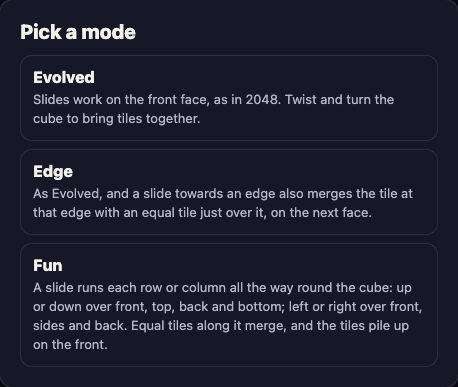
The second is the New game button in the top bar. Press it and the same box opens again. That is how you change mode later. The Settings box (the gear button) no longer has a switch for edge merging, so do not look for the mode there. Settings holds volume, Reduced motion and sign-in.
After you pick, the bottom left of the screen names your mode, for example "Evolved mode". Glance there if you forget which one you are in.
How to change the 2048 mode: the Pick a mode box, step by step
- Open evolved2048.vlvd.net in your browser, on a computer or a phone.
- Press New game in the top bar.
- If a full-screen ad for another vlvd.net site shows first, close it with the cross at its top right. In my tests it showed on some presses and not on others, and it sat in front of the box. It is not part of the game itself.
- Read the line at the top of the box. It says "This game ends and its score of 4 is kept only if it is your best." The number will be your own score.
- Look at the three choices. The mode you are playing now carries a gold this game tag.
- Tap or click the mode you want. A new game starts at once in that mode, with Score 0, Moves 0 and two tiles on the front face.
- Check the bottom left for the mode name.
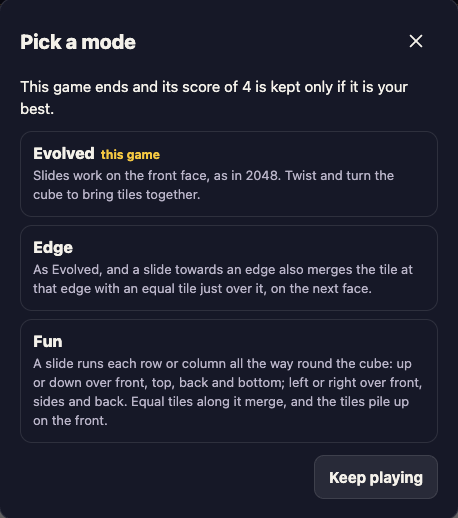
If you change your mind, press Keep playing or Escape. In my test each of them closed the box and the game kept its score, moves and mode.
What each mode in the box does
All three modes use the same cube: six faces of nine squares, 54 squares in all. All three let you slide the front face, twist a row or column to carry tiles round from other faces, and turn the whole cube. The difference is in how a slide merges tiles.
Evolved
The box says slides work on the front face, as in 2048, and that you twist and turn the cube to bring tiles together. A slide only touches the front. Tiles on other faces wait until a twist or a turn brings them round.
Say a 16 sits on the front and its match sits on the right face. A slide will not join them. You drag a row on the right face sideways to carry the tile onto the front, next to its match, then slide. In one test, a twist carried a 16 to the front's top left, and a slide down then merged it with the 16 below into a 32.
Edge
Edge works as Evolved does, with one addition. A slide towards an edge of the front face also merges the tile at that edge with an equal tile just over the edge, on the next face. The new tile stays on the front.
The pairing is strict. In a test, an 8 on the front's top middle and an 8 on the top face's bottom-row middle made a 16 on a slide up. An 8 in a neighbouring column did not merge. For more on when to aim at an edge, read 2048 Edge mode tips: when to slide towards an edge.
Fun
In Fun, a slide runs each row or column all the way round the cube. Up or down goes over the front, top, back and bottom. Left or right goes over the front, the sides and the back. Equal tiles along that path merge, and the tiles pile up on the front. 2048 Fun mode tips: when a slide runs round the cube goes through how it plays, and 2048 game modes: what Evolved, Edge and Fun change sets all three side by side.
What a pick does to your running game
A pick always starts a new game. The game saves its mode with the rest of its state, so you cannot swap modes halfway through a board. That holds even when you pick the mode you are already in: in my test, choosing Evolved while playing Evolved gave Score 0, Moves 0 and two fresh tiles.
That is why the box warns you first. The running game ends, and its score is kept only if it is your best. When you have made no moves yet, the box skips that line, but it still offers Keep playing.
There is no undo in the game. I tried Control+Z, Command+Z, Backspace and a few other keys on a test board, and nothing came back. Treat the pick as final.
Your mode survives a reload. In my test, a Fun game with a score of 8 and 4 moves came back after a page reload still in Fun, with the same score, best and moves.
How best scores work across modes
The How to play box says each mode has its own best score. I tested that. After three slides in Edge mode the saved best read 4 for Edge and 0 for Evolved and Fun. After slides in Fun it read 8 for Fun and 0 for the other two. Switching mode does not wipe a record. A mode you have not played starts at 0.
One note if you sign in. The game's script says a game started before you sign in is not ranked, and that you should start a new game to have it ranked. I did not play signed in, so I cannot say more. If ranking matters to you, sign in first, then press New game and pick your mode.
Which mode to pick first
Start with Evolved. It is the baseline. Slides behave as in 2048, and the cube's extra moves are the twist and the turn. Once you know how a twist carries tiles to the next face, you have the main idea of the whole game.
Then try Edge, which asks for one extra habit: look across the edge before you slide. Fun is the odd one out, because a slide no longer stays on the front. Pick it when you want to see how far one slide can reach.
I will not tell you which is easiest. The game gives no numbers on difficulty, and I have none.
When the box seems stuck
- An ad is covering the screen. Close it with the cross at its top right. The box was behind it in my test.
- You want to leave the box. Use Keep playing or Escape. Your game stays. On a first visit there is no way out, so pick a mode.
- You are not sure which mode you are in. Look at the bottom left. It names the mode.
- After 2048. Making 2048 opens a box titled 2048! with New game and Keep going. New game there opens the same Pick a mode box.
Frequently asked questions
How do I change the mode in Evolved 2048?
Press New game in the top bar, close any ad that appears, then pick Evolved, Edge or Fun in the Pick a mode box. A new game starts in that mode.
Can I change the mode without losing my game?
No. Picking a mode starts a new game, and the current one ends. Its score is kept only if it is your best. Press Keep playing if you want to stay in your game.
Is my best score shared between modes?
No. The best score is kept for each mode. In a test, a best of 4 in Edge left Evolved and Fun at 0.
Is there still an Edge merges switch in Settings?
No. Edge merging is now the Edge mode, which you choose in the Pick a mode box.
Get started
Open the game, pick Evolved for your first cube, and come back to the box when you want to try Edge or Fun.
Play Evolved 2048: it is free and plays in your browser on a computer or a phone.
Comments
No comments yet.
Sign in or make an account to comment.